Kodesk – Coworking and Office Space WordPress Theme
Kodesk: Technical Overview & Architecture
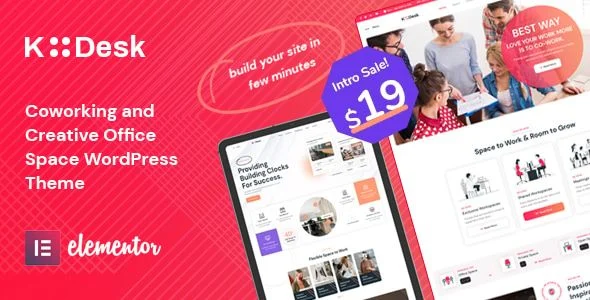
Kodesk – Coworking and Office Space WordPress Theme is an Elementor-based WordPress theme built for shared workspace operators, office rental managers, and business center administrators. The template ships with pre-optimized section templates and a flattened DOM structure, keeping wrapper nesting shallow so that space-listing grids, pricing tables, and amenity galleries render without the markup bloat typical of multi-builder themes. Booking submissions and availability queries run through AJAX endpoints that exchange JSON payloads with the server, updating calendar states and reservation confirmations in the browser without triggering a full page reload.
Every page section is assembled as a native Elementor widget block, so layout composition, column ordering, and responsive breakpoints are managed inside the Elementor editor while theme-level hooks and filters keep custom code out of the template files. The centralized options panel exposes more than a dozen configurable parameters, including header layout variants, color palette tokens, Google Fonts pairing, map API coordinates, booking notification recipients, and per-page footer assignments. Admin-side changes propagate immediately through the WordPress Customizer live preview, so typography and palette adjustments render in real time before publishing.
Key Functional Features of Kodesk for Modern Deployments
- Multiple Homepage Layouts: Distinct, separately importable homepage designs cover hot-desk hubs, enterprise office parks, and hybrid business centers; each layout uses its own widget set and can be assigned to separate URLs for A/B testing entry pages.
- Integrated Booking System: A purpose-built reservation module captures desk, meeting-room, and private-office requests through server-side validated forms, stores bookings as custom post types, and sends transactional email confirmations to both member and administrator.
- Event Management Engine: Calendar and scheduling widgets publish workshops, networking sessions, and community meetups with date-range queries, category filtering, and detail pages that render venue metadata pulled from the location post type.
- Multi-Location Google Maps: A map widget aggregates pinned office locations into a single interactive canvas, with clustered markers and info windows that load coordinates from a structured location archive rather than hardcoded values.
- Pricing Table Builder: Membership plan tables are constructed from repeatable Elementor fields supporting monthly, daily, and tiered pricing models, each linking directly to the corresponding booking flow or contact form.
- Translation-Ready Framework: All string output passes through standard WordPress i18n functions, so .po/.mo translation files can localize the entire coworking WordPress theme without modifying template source files.
Real-World Deployment Scenarios
- Single-Location Coworking Hub: A neighborhood workspace operator deploys the booking module to manage hot desks and meeting rooms, publishing real-time availability and processing membership inquiries through the built-in form endpoints.
- Multi-Site Office Network: A business center group runs separate location pages under one WordPress install, using the map widget and location archives to route prospective tenants to the correct facility and floor-plan detail pages.
- Community-Driven Innovation Hub: An accelerator uses the event system to run a public calendar of workshops and demo days, driving recurring visitor traffic that converts into dedicated-desk signups through the pricing tables.
Technical Architecture & Compatibility Standards
The theme is developed and tested against WordPress 6.x with PHP 8.0 and above, relying on the standard template hierarchy, native custom post types, and the Elementor plugin as its page-building engine. No third-party builder dependency exists beyond Elementor, and all bundled widgets register through documented WordPress actions, which keeps the codebase auditable and conflicts with popular plugins—forms, SEO suites, caching layers—to a minimum.
Front-end assets are minified and conditionally enqueued per page, so booking scripts and map libraries only load where their widgets appear, keeping Core Web Vitals budgets within Google’s thresholds for LCP and CLS on standard hosting. The responsive grid is mobile-first, with breakpoints at 1024px, 768px, and 480px verified across current Chrome, Safari, Firefox, and Edge builds, and the office space theme degrades gracefully on older Android WebView versions.
Frequently Asked Questions
Does Kodesk include a built-in booking system for desks and meeting rooms?
Yes, the theme bundles a reservation module that handles desk, room, and private-office bookings with server-side validation and email notifications, so no external booking plugin is required for basic operations.
Can I build and edit every page visually without writing code?
Yes, full Elementor compatibility means layouts, colors, fonts, and section ordering are managed entirely through the drag-and-drop editor and the theme options panel.
Does the theme support running multiple office locations on one website?
Yes, dedicated location post types and the Google Maps widget let you publish unlimited office pages with individual amenities, photos, and contact details under a single WordPress install.
Is the event calendar limited to a fixed number of events per month?
No, the event system queries the database dynamically with date-range filtering, so there is no cap on scheduled events and archives paginate automatically.
Can the theme be translated into a non-English language?
Yes, every front-end string is wrapped in WordPress translation functions, and the theme is compatible with WPML and Polylang for multilingual deployments.
-
1.6 LatestSeptember 20, 2026