KiviCare – Zoom Telemed And WooCommerce Payment Gateway (Add-on)
KiviCare Zoom Telemed And WooCommerce Payment Gateway Overview & Telehealth Monetization Layer
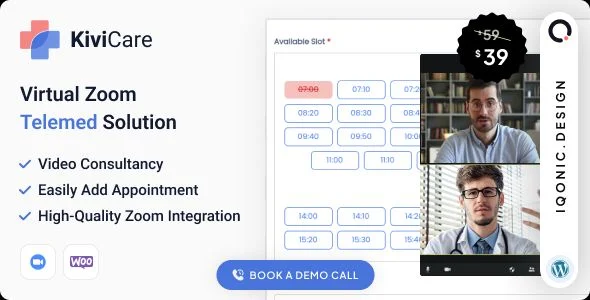
KiviCare Zoom Telemed And WooCommerce Payment Gateway is a WordPress add-on engineered for healthcare agencies and clinic operators to attach Zoom-based video consultations and paid appointment booking to the KiviCare clinic management plugin. The module resolves the operational bottleneck of coordinating multi-doctor appointment scheduling, encounter tracking, and remote consultation delivery without routing patients through disconnected external telehealth services. In production workflows, it operates as the communication and monetization layer above the KiviCare core, letting practitioners conduct face-to-face remote encounters, dispatch Zoom invitations, and collect booking payments through the WooCommerce checkout stack.
Technical Specifications & Deployment Matrix
| Engineering Metric | Deployment Specification |
|---|---|
| Base Technology / Framework | WordPress add-on extending the KiviCare clinic and patient management plugin |
| Runtime / Language Requirements | PHP server layer with JavaScript, HTML, CSS, and Sass assets; WordPress 5.0.x through 6.9.x |
| Data Exchange / Communication Protocols | Two-way Zoom video and audio sessions over secured wired or wireless internet; WooCommerce payment processing |
| Front-End / Engine Dependencies | Chrome, Firefox, Safari, Opera, and Edge; Zoom desktop or mobile application client |
| Database / Persistence Footprint | Reads and extends appointment and encounter records owned by the KiviCare core |
Zoom Consultation Pipeline & Appointment Monetization Flow
The core mechanism pairs Zoom session provisioning with WooCommerce checkout routing on top of KiviCare appointment records. Once an appointment is created inside the KiviCare core, the module attaches a video consultation channel so the encounter is no longer confined to the physical clinic. The doctor dispatches a Zoom invitation to the booked patient, and both parties join the two-way audio-video session through the Zoom application on a desktop computer or mobile device over a secured wired or wireless connection. Because the encounter runs on the Zoom meeting model, additional participants — caregivers or language translators — can be admitted into the same virtual consultation room, which matters for practices treating patients with limited mobility or non-native language needs.
On the monetization side, appointment charges route through the WooCommerce payment gateway layer, so bookings can be settled online before the encounter takes place. This keeps transaction handling inside the store’s existing gateway configuration instead of forcing a separate billing pipeline, and it lets clinic administrators reuse their configured tax, currency, and checkout rules for medical appointments.
Core Technical Capabilities of KiviCare Zoom Telemed
- Two-way Zoom video and audio encounters: face-to-face consultations run across desktop and mobile Zoom clients with synchronized high-quality audio and video, removing the physical presence requirement for routine visits.
- Third-party participant admission: caregivers and language translators join the same virtual consultation, extending the encounter model beyond a single doctor-patient pair without additional session plumbing.
- WooCommerce payment routing: appointment fees pass through the WooCommerce gateway stack so clinics reuse their configured checkout; for stores diversifying accepted tender, Reown AppKit Pay Crypto Payment Gateway adds on-chain checkout with QR flows and transaction logs alongside default gateways.
- Privacy-scoped scheduling: each doctor’s appointment data remains private from other practitioners, preserving confidentiality across multi-doctor clinics while holidays, receptionist roles, reminders, and email notifications stay governed by the KiviCare core.
Production Implementation & Operational Resilience
Deployment requires the KiviCare clinic management plugin to be active before installation, since the module reads and extends appointment and encounter records owned by that core. WooCommerce must also be present for the payment gateway portion to function. The compatibility envelope spans WordPress 5.0.x through 6.9.x, covering both legacy and current core releases, and the front-end layer renders consistently across Chrome, Firefox, Safari, Opera, and Edge. Note that the package is not Gutenberg-optimized, so page-level composition should be planned around classic WordPress admin workflows rather than block editor patterns.
Asset delivery includes JavaScript, HTML, CSS, and Sass sources alongside the PHP server layer, giving developers a pre-compilation stylesheet entry point for style overrides instead of patching rendered output. Consultation quality depends on the Zoom application and a stable internet connection; media sessions traverse Zoom’s infrastructure rather than self-hosted servers, so bandwidth and client device capability — not WordPress hosting — determine audio and video fidelity. For clinics evaluating alternative checkout aggregation paths, PaymentHUB offers multi-gateway payment handling as a separate WooCommerce-compatible option.
Frequently Asked Questions
Can caregivers or language translators join a consultation session?
Yes. The Zoom session model admits third parties into the same virtual consultation room alongside the doctor and patient, supporting remote caregiving and language translation during the live encounter.
Does the add-on itself manage appointment reminders and email notifications?
No. Those scheduling primitives — holidays, receptionist roles, reminders, and email notifications — belong to the KiviCare core plugin; the add-on layers Zoom consultations and WooCommerce payment handling on top.
Is a desktop computer required for patients to attend video consultations?
No. Zoom sessions run through the Zoom application on either a computer or a mobile device, requiring only a secured wired or wireless internet connection for real-time audio and video participation.
Are the source stylesheets editable prior to deployment?
Yes. The distribution ships Sass sources alongside the JavaScript, HTML, CSS, and PHP files, so stylesheet modifications can be performed at the pre-compilation layer instead of patching rendered CSS output.