Kingdoms Wars – HTML5 Game + Mobile Version! (Construct 3)
Kingdoms Wars Overview & Client-Side Board Game Engine
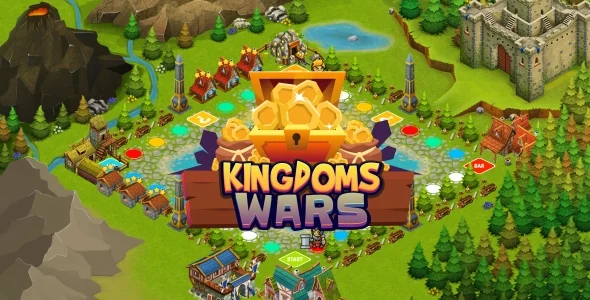
Kingdoms Wars is a Construct 3 board game source package, engineered for web studios and indie publishers to deploy a Monopoly-style property-trading game across browsers and mobile devices. The project ships as a complete, playable game in which players roll dice, acquire streets, construct hotels, draw bonus cards, pay king fees, and settle rent at opponent-owned properties. Within a production pipeline, the package functions as a self-contained HTML5 build with an editable c3p source project, allowing teams to reskin artwork, adjust gameplay logic, and wrap the output for iOS and Android distribution.
Technical Specifications & Deployment Matrix
| Engineering Metric | Deployment Specification |
|---|---|
| Base Technology / Framework | Construct 3 (editable .c3p project file included) |
| Export Format | HTML5 build (JavaScript JS, JavaScript JSON, HTML, XML, CSS) |
| Rendering Resolution | 1920×1080px high-resolution canvas output |
| Input Model | Mouse for desktop; unified touch layer for all mobile browsers |
| Browser Compatibility | Chrome, Firefox, Safari, Opera, Edge |
| Mobile Targets | Included export files for iOS and Android wrapping |
| Art Assets | Layered PNG files for direct replacement and reskinning |
| Audio Layer | Built-in sound FX events tied to gameplay actions |
Because the entire runtime executes client-side, the build drops into any static host or CMS page without server-side dependencies. Studios running parallel arcade initiatives can evaluate Pinball Master Arcade as an additional Construct 3 source package when a second genre is required for the same publishing pipeline.
Dice-Driven Turn Engine & Execution Pipeline
The engine runs turn logic entirely on the Construct 3 event sheet: a dice roll dispatches token movement across the board, and each landed tile triggers its own property, card, fee, or jail event.
Every square on the circuit maps to a discrete event block that evaluates ownership state, deducts or credits player balances, and applies penalties such as overpriced hotel stays at competitor properties. Rent collection and hotel upgrades modify the same persistent player state object, so each turn resolves against the current financial snapshot of every participant. Bonus cards inject conditional variance into the loop, while the king-fee mechanic drains treasury balances on designated tiles, keeping match pacing under pressure until a winner emerges.
Architectural & Functional Highlights
- Full game logic, one codebase: The complete board loop — acquisition, rent, upgrades, jail, cards, and fees — ships implemented, so deployment starts from a finished product rather than a prototype shell.
- Single-touch input abstraction: One-touch control routes both mouse and touch events through the same interaction layer, which is why the build behaves identically across desktop browsers and mobile screens without separate input branches.
- Layered PNG asset structure: Art files are layered, meaning a reskin reduces to replacing image files in the project rather than redrawing flattened composites.
- Facebook Share hook: A native share action is wired into the build, letting players publish results to their social graph directly from gameplay.
- Editable event-sheet source: The .c3p project opens directly in Construct 3, where gameplay rules, values, and content can be modified through visual event logic with no programming language required.
For teams assembling a multi-genre catalog on the same engine, Puzzle Block demonstrates how another Construct 3 title follows the identical embed-and-reskin workflow for WordPress-driven portals.
Production Deployment & Implementation Considerations
Deployment prerequisites are minimal: any host capable of serving the exported HTML, CSS, and JavaScript files can run the game, and the five major browser engines listed above are verified targets for the runtime. For app-store distribution, the package includes the export files needed for iOS and Android wrapping, so a WebView container — such as Apache Cordova or Capacitor — packages the same HTML5 build without rewriting game logic. Implementation boundaries are dictated by the source itself: gameplay is a full board experience but fixed at version 1.0 feature scope, and any behavioral change must be made inside the Construct 3 project rather than by patching the exported JavaScript. Customization scope covers three verified paths: replace the layered PNG files to reskin visuals, edit the event sheet to adjust rules and add content, and re-export from the .c3p file for each target platform. Developers planning a broader casual-games vertical on WordPress may also review the Puzzle Games Bundle as a consolidated catalog option for visitor engagement strategies.
Frequently Asked Questions
Does the package include the editable Construct 3 project file?
Yes, the download contains the complete .c3p source project alongside the exported HTML5 build files, so all gameplay logic, layout objects, and event sheets can be opened and modified directly inside the Construct 3 editor.
Can the game be published as a native iOS or Android app?
Yes, the package ships with the export files required for both iOS and Android, allowing the HTML5 runtime to be wrapped inside a WebView container and submitted to the Apple App Store and Google Play storefronts.
Is programming knowledge required to reskin or modify the game?
No, the project is built so visual reskins reduce to replacing the included layered PNG image files, and gameplay adjustments are handled through the Construct 3 event system rather than hand-written code, keeping the workflow accessible to non-developers.
Does the build support mobile touch input out of the box?
Yes, touch control is implemented and verified across all major browsers and mobile devices, operating alongside mouse input on desktop so a single exported build serves both input models without separate variants.