Kidscool – Children, Kids School WordPress Theme
Kidscool: Engineering Overview & Architecture
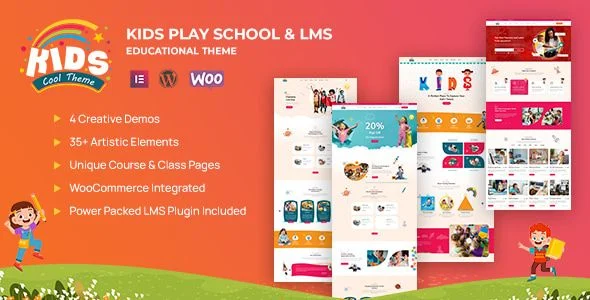
Kidscool – Children, Kids School WordPress Theme is an Elementor-driven template package engineered for kindergarten directors, preschool administrators, and primary school web teams managing enrollment-driven websites. The codebase keeps DOM depth shallow by loading section templates as discrete, reusable Elementor blocks instead of monolithic page wrappers, which reduces node count on schedule-heavy and gallery-heavy pages. Content updates such as class listings, event entries, and staff profile changes propagate through WordPress REST-driven AJAX calls that rewrite only the affected frontend regions, so administrative edits never force a full document reload.
Page assembly runs entirely inside the Elementor editor, where every homepage section — headers, class grids, teacher carousels, and admission call-to-action bands — ships as a pre-registered widget set that maps to the theme’s template partials. A centralized theme options panel exposes more than four configuration groups: global color palette assignment across primary, secondary, and accent tokens; typography control with heading and body font pairing; header layout switching between sticky, transparent, and boxed variants; and schedule display parameters governing time-slot formats, day columns, and course filtering behavior. Kidscool stores all of these settings in a single options row with sanitization callbacks, keeping database reads to one query per page load.
Key Functional Features of the Kidscool Theme
- Elementor Page Builder Integration: Every layout region renders through native Elementor widgets with live preview editing; section nesting is capped at three levels to prevent selector bloat and keep the editor canvas responsive on large schedule pages.
- Responsive and Retina-Ready Output: Media queries trigger at five breakpoints from 320px upward, and image templates ship with 2x device-pixel-ratio sources, so photo galleries of classrooms and facilities stay sharp on tablets handed to parents during tours.
- Course, Class, and Schedule Management: A custom post type architecture handles courses and classes with metadata fields for age groups, time slots, and instructors; the frontend schedule widget renders these entries as filterable grids without custom SQL.
- Teacher and Staff Profile System: Dedicated profile templates expose structured fields — photograph, qualification, subject assignment, and contact route — so each staff member page follows consistent semantic markup that search engines can parse as person entities.
- The Events Calendar Plugin Support: Declared compatibility with The Events Calendar registers template overrides for single-event and calendar views, letting schools publish open houses, holiday closures, and enrollment deadlines on a native calendar interface.
- Multiple Pre-Built Homepage Layouts: Several complete homepage variants cover kindergarten, daycare, and primary school configurations; each variant imports as a set of Elementor page data that stays editable widget by widget after activation.
Real-World Deployment Scenarios
- Kindergarten Enrollment Hub: A kindergarten deploys the admission-focused homepage variant, publishes age-grouped class pages with schedule widgets, and routes prospective parents from teacher profile pages directly to a contact form — consolidating program information and enrollment steps on one domain.
- Daycare Center Communication Site: A daycare uses The Events Calendar integration to publish closure dates and parent-visit days, while the blog module carries weekly activity updates; the responsive layout keeps schedule tables legible on the mobile devices parents check during pickup.
- Multilingual Primary School Portal: A primary school serving two language communities activates WPML compatibility, mirrors course descriptions and staff profiles across both locales, and maintains a single schedule dataset that renders identically in each translated page tree.
Technical Architecture & Compatibility Standards
The theme targets PHP 8.x environments and follows WordPress coding standards for hook and filter usage, meaning template overrides and widget registration run through documented APIs rather than core file modifications. Frontend assets load conditionally — stylesheet and script enqueues fire only on pages that call the corresponding widgets — which keeps the payload of a text-only admission page well below that of a gallery-heavy homepage and supports Core Web Vitals targets for LCP and CLS on mobile connections common among parent users.
Interoperability covers the Elementor page builder family, The Events Calendar, WPML and translation-ready string wrapping via text domains, and standard contact form plugins for admission inquiries. Because widget templates and theme options both read from cached option values and object-cache-aware queries, the school WordPress theme sustains consistent response times on shared hosting plans, where most educational sites operate without dedicated server resources.
Frequently Asked Questions
Does Kidscool require coding knowledge to modify page layouts?
No, all homepage sections, class grids, and teacher carousels are edited through the Elementor visual editor, where drag-and-drop operations and inline text changes apply immediately in the live preview canvas without touching a single template file.
Can I manage class schedules and course listings without custom post types of my own?
Yes, the theme registers dedicated course and class post types with metadata fields for time slots, age groups, and assigned instructors, and the schedule widget renders these entries as filterable frontend grids straight out of the box.
Does Kidscool support multilingual school websites?
Yes, all theme strings are wrapped in translation-ready text domains and the template declares WPML compatibility, so course pages, staff profiles, and event listings can be mirrored across multiple language trees from one install.
Can teacher profiles display qualifications and subject assignments in structured fields?
Yes, each staff profile template exposes dedicated input fields for photograph, credentials, subject areas, and contact routing, producing consistent person-entity markup that renders identically across every teacher page.
Does Kidscool function without the Elementor plugin installed?
No, the page construction layer depends on Elementor as its rendering engine, so the builder plugin must be active for the homepage variants, class widgets, and profile templates to display correctly on the frontend.
-
1.1.0 LatestSeptember 20, 2026