Karenderia | Multi-Brand Cloud Kitchen Addon
What Is Karenderia Multi-Brand Cloud Kitchen Addon? Architecture & Overview
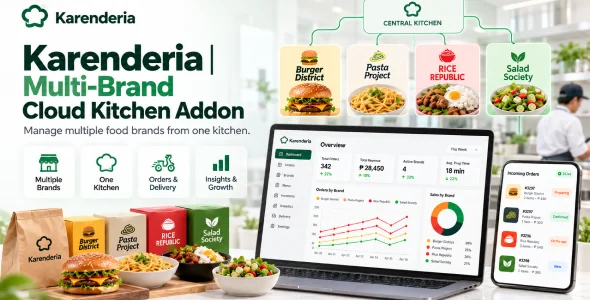
Karenderia Multi-Brand Cloud Kitchen Addon is a PHP 8.x extension for the Karenderia Multiple Restaurant System (KMRS) engineered to operate multiple virtual restaurant brands from one physical kitchen. It eliminates the operational bottleneck of switching between separate merchant backoffices by consolidating brand management, order intake, kitchen operations, POS, menus, delivery, and reporting into a single panel. In production deployments, the package targets ghost kitchen groups, delivery-first operators, and hybrid dine-in kitchens running KMRS 2.0.11 or newer.
Karenderia Multi-Brand Cloud Kitchen Addon System Requirements & Technical Compatibility
| Parameter | Verified Specification |
|---|---|
| Base platform (required, sold separately) | Karenderia Multiple Restaurant System (KMRS) v2.0.11 or newer |
| Runtime | PHP 8.x; tested and stable with PHP 8.2 |
| Software framework | Yii |
| Included files | JavaScript JS, JavaScript JSON, HTML, CSS, PHP |
| Compatible browsers | Chrome, Firefox, Safari, Opera, Edge |
| Server environment | Database and server stack compatible with KMRS 2.0.11+; working KMRS administrator and merchant panels |
KMRS 2.0.10 or older is not supported by this release, and the addon itself is not a standalone ordering system.
Multi-Brand Order Flow, KOT & Shared Kitchen Operations & Capabilities
The addon routes every brand order through one shared kitchen workspace while preserving original brand ownership.
Verified Capabilities & Core Highlights
- Centralized Order Pipeline: An all-brand order view combines delivery, pickup, takeout, dine-in, and curbside orders with brand filtering, status filtering, customer data, payment details, and per-order totals, without detaching orders from their owning brand.
- Shared Kitchen Operations / KOT: Kitchen staff process pending, preparing, and ready orders across all brands in one queue, with brand identification, preparation time, customer and kitchen instructions, and KOT printing or reprinting where supported, plus optional brand filtering.
- Cloud Kitchen POS: Point-of-sale orders follow a Select Brand, Select Order Type, Add Items, Payment flow with brand-specific menus, pricing, taxes, and promotions, including dine-in table selection where enabled.
- Menu & Availability Control: Categories, items, sizes, add-ons, suggested items, and per-brand SEO can be edited from the Cloud Kitchen panel, while item availability toggles (available, paused, sold out) let staff react immediately during service.
- Workload & Capacity Governance: Additional preparation time adjusts by workload level (low, medium, high), and kitchen-level order limits cap combined brand volume so shared capacity is not exceeded; the cloud kitchen status overrides individual brand status when paused or closed.
Additional verified domains include kitchen-level opening hours (Monday to Sunday with a Set All Days option), a shared physical fulfillment location with address, coordinates, delivery distance, and covered distance units, centralized deliveries with drivers, vehicles, zones, shifts, cash collections, and driver reviews, brand-level promotions (coupons, offers, loyalty points, spend-based free items, vouchers where supported), cross-brand customer engagement, sales, order, brand, and product reports, plus billing and invoice history. Managers planning multi-brand expansion beyond the kitchen stack can also model that growth in StartupKit SaaS, a Laravel-based strategy and planning workspace with BMC, SWOT, and Gantt tooling.
Implementation Scope, Customization & Deployment Boundaries
Deployment requires a valid, licensed KMRS 2.0.11+ installation with functional administrator and merchant panels; the addon installs as an extension to that architecture rather than replacing it. Its design reuses existing KMRS subsystems for merchant management, orders, menu management, taxes, payments, KOT, POS, customers, drivers, reports, and notifications, and merchants not assigned to a cloud kitchen continue operating normally. Kiosk configuration remains brand-level for compatibility with the Karenderia Self-Ordering Kiosk App. The package follows standard KMRS directory and runtime structures without custom server daemons. Payment gateways (Stripe, PayPal, Square, Razorpay, MercadoPago, Xendit, and others), mapping providers such as Google Maps or Mapbox, SMTP or transactional email, and SMS or WhatsApp integrations each require separate provider accounts and may carry their own fees. Operators who consolidate back-office records, contracts, and compliance files alongside order documentation often pair such stacks with the Document Management module for Perfex CRM for structured file organization and access control. Complete installation, configuration, upgrade, and troubleshooting documentation ships with the download package.
Security Audit & VirusTotal Malware Verification
PHP ScriptsPre-deployment cloud scan •
0ae1481559eb7425b7db86508da0a99b01d5a7a455ccaadabb0250ab5c4a185c
Frequently Asked Questions
Does this addon work as a standalone restaurant ordering system?
No, it is an extension that requires Karenderia Multiple Restaurant System version 2.0.11 or newer, purchased and installed separately, with working administrator and merchant panels and a compatible PHP 8.x server environment.
Can normal KMRS merchants keep operating after the addon is installed?
Yes, merchants not assigned to a cloud kitchen continue operating normally because the addon reuses existing KMRS subsystems for orders, menus, taxes, payments, drivers, and reports instead of replacing them.
Can drivers deliver orders belonging to different brands under one kitchen?
Yes, for self-delivery kitchens, delivery operations are managed at kitchen level, so drivers can fulfill orders from any attached brand while each order remains owned by its originating restaurant brand.