iOS 17 Swift QR Generator App | QR code Scanner App with Subscriptions
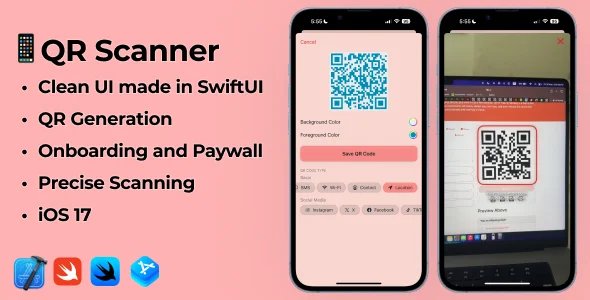
Scanly Overview & Native iOS QR Engine Architecture
Scanly is a native SwiftUI QR code scanner and generator template for iOS 17, engineered for indie developers and mobile studios to ship a fully functional App Store product without rebuilding core capture, persistence, or monetization logic. The codebase eliminates the integration burden of wiring AVFoundation camera sessions, CoreImage barcode detection, SwiftData models, and StoreKit 2 purchase flows into a single coherent runtime. Within production delivery workflows, it operates as a deploy-ready starting point that already contains iCloud synchronization, a 3-page onboarding flow, and documented App Store submission steps.
Technical Specifications & Deployment Matrix
| Engineering Metric | Deployment Specification |
|---|---|
| Base Technology / Framework | SwiftUI interface layer over AVFoundation capture, CoreImage barcode generation, MapKit location picking, and StoreKit 2 monetization |
| Runtime / Language Requirements | Swift 5, iOS 17.0 minimum deployment target, Xcode 16 or later |
| Data Exchange / Communication Protocols | CloudKit iCloud synchronization with automatic fallback to local storage; StoreKit 2 transaction handling |
| Front-End / Engine Dependencies | None — 100% native Apple frameworks, zero third-party packages |
| Database / Persistence Footprint | SwiftData (iOS 17) models covering scan history, generated codes, and free-tier usage counters |
Capture, Classification & Generation Execution Pipeline
The engine routes live camera frames through an AVFoundation metadata pipeline, classifies decoded payloads into 18 content types, and dispatches type-specific actions on the main actor. On the scan path, the device camera streams into a metadata output object whose detected QR payloads are parsed against a content-type resolver supporting Website, Text, Email, Phone, SMS, Wi-Fi, vCard contact, geographic coordinates, and ten social network formats including Instagram, X, TikTok, YouTube, Discord, GitHub, Reddit, Slack, Threads, and Facebook. Each resolved type maps to a primary one-tap action — opening Safari, dialing a number, composing mail or SMS, launching Maps coordinates, saving a vCard, or copying a Wi-Fi password — with share sheet and clipboard operations exposed as secondary handlers. Every decoded item is written to SwiftData and surfaced in a date-sorted history view.
The generation path inverts this flow: the user selects a content type from a picker grouped into Basic and Social Media categories, fills type-specific input sheets (SSID, security mode, and password for Wi-Fi; a MapKit pin picker for locations; dedicated sheets for SMS and contacts), and the engine renders a live preview through a CoreImage CIFilter as text is typed. Foreground and background colors are adjustable via ColorPicker, error correction runs at a high level for scan resilience, and exports render as crisp 400×400 pixel images saved directly to the photo gallery.
Core Technical Capabilities of Scanly
- Live capture pipeline: AVFoundation metadata output combined with CoreImage detection decodes QR payloads in real time, feeding a classifier that maps 18 distinct content types to contextual one-tap actions without manual mode switching.
- Generation engine: A CIFilter-based renderer produces high-error-correction codes with live preview, dual ColorPicker theming, and 400×400 pixel gallery export, with a creation history retaining thumbnails for share, save, and delete operations.
- Monetization layer: StoreKit 2 powers monthly and yearly premium plans with a 3-day free trial, purchase restoration, and management links; free-tier ceilings of 3 scans and 3 creations are tracked as SwiftData counters that trigger the paywall once exceeded.
- Synchronized persistence: Scan history, generated codes, and usage state sync through CloudKit to iCloud, and the persistence layer automatically degrades to local storage when iCloud is unavailable.
- Adaptive interface system: Light, Dark, and System theme selection, a custom animated floating tab bar with glow effects, toast notifications, animated deletions, and empty states are implemented natively in SwiftUI with zero external UI packages.
For studios evaluating parallel native iOS starting points in a different product vertical, WitVPN occupies a comparable position as a ready-to-build iOS template rather than a runtime component that merges into this codebase.
Production Implementation & Operational Resilience
Deployment requires a Mac running Xcode 16 or later, since the project targets iOS 17 APIs — notably SwiftData — that do not compile against older SDKs. The app runs 100% offline; no backend, login system, or demo credentials exist anywhere in the package. A bundled Scanly.storekit configuration file lets the full paywall, free trial, and purchase flow be exercised inside the simulator before any App Store Connect setup exists, which removes the most common blocker in pre-release validation of recurring purchase logic.
Error handling follows the graceful-degradation pattern: when iCloud sync is unreachable, the persistence layer silently falls back to local SwiftData storage so scan history and usage counters survive connectivity loss. The included documentation.html walks through setup, re-skinning, renaming, icon replacement, purchase configuration, and App Store submission. Buyers should treat this as a source template, not an end-user binary — building, customizing, and submitting it demands working iOS development knowledge. The package ships with the full Xcode source, the StoreKit configuration, a 1024×1024 icon PNG, and a screenshots folder. The developer disclosure notes portions of the code were produced with AI-assisted tools, then reviewed and tested as a functioning Xcode project.
Teams planning a multi-platform release schedule can treat Android deliverables as separate codebases: InStories serves as an independent Android Studio path for content-creation apps, while Nature Tile Connect provides a decoupled AdMob-monetized game project outside this Swift runtime.
Frequently Asked Questions
Can the premium paywall be tested without setting up products in App Store Connect?
Yes, the bundled Scanly.storekit configuration file activates local StoreKit testing in the simulator, covering plan selection, the 3-day free trial, and purchase restoration before any App Store Connect configuration is created.
Does the project pull in any CocoaPods or Swift Package Manager dependencies?
No, the codebase relies exclusively on native Apple frameworks — AVFoundation, CoreImage, MapKit, SwiftData, CloudKit, and StoreKit 2 — so the project builds directly in Xcode without dependency resolution steps.
Is this package a published, installable app from the App Store?
No, it is a production-ready source code template. You must compile it in Xcode 16, apply your own branding, configure your purchase products, and submit the resulting binary through your own developer account.
Does scan history survive when the device has no internet connection?
Yes, the persistence layer writes to local SwiftData storage first and syncs through CloudKit when iCloud becomes available, with an automatic local fallback guaranteeing that history and usage counters persist offline.