
 My Account
Product Description
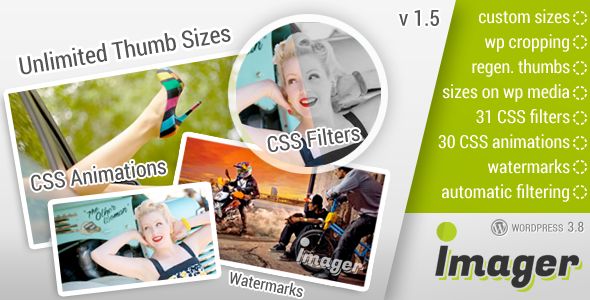
Imager is an Amazing Image Tool for WordPress designed to bring powerful, front-end image editing capabilities directly to your website. This versatile plugin is the perfect solution for sites that rely on user-generated content, such as community forums, business directories, and social platforms. It also empowers clients and content creators by allowing them to manage visuals without ever needing to access the complex backend dashboard, streamlining the entire content creation process.
Moving beyond simple uploads, this tool provides a comprehensive suite of editing options within an intuitive, user-friendly interface. When a user uploads an image, they can immediately crop, resize, and enhance it to fit your site’s specific requirements. Every edited image is saved directly to the WordPress Media Library, ensuring seamless integration with your existing workflow. The Imager – Amazing Image Tool for WordPress provides a robust framework for managing visual assets with professional-grade precision.
Key Features
- Intuitive Front-End Editor: Allow users to edit images directly on the page without backend access.
- Essential Transformation Tools: Easily crop, resize, rotate, and flip images to perfection.
- Creative Filters and Effects: Apply a range of filters like Grayscale, Sepia, and Invert for a unique look.
- Dynamic Watermarking: Protect your images by adding customizable text or image-based watermarks.
- Drawing and Layers: Add shapes, text, and other elements using a layer-based system.
- Responsive and Touch-Friendly: Delivers a smooth editing experience on desktops, tablets, and mobile devices.
- WordPress Media Library Integration: Saves all creations directly to your media library for easy management.
- Highly Customizable Interface: Adjust the tool’s appearance and available features to match your site’s design.
Use Cases
This Amazing Image Tool for WordPress is perfect for websites that demand visual consistency and user engagement. Imagine a membership site where users can upload and crop their profile pictures to fit a perfect circle, or a real estate directory where agents can resize property photos to uniform dimensions before publishing a listing. The tool gives you the power to enforce image standards without manual intervention, improving the overall quality and professionalism of your platform.
Imager also enhances your workflow as a site administrator or content creator. For a photography blog, you could quickly apply a signature watermark to an entire batch of photos before adding them to a gallery. E-commerce store owners can use it to add promotional text or stickers to product images for a sale. It eliminates the need to open external software like Photoshop for quick edits, saving valuable time and effort on daily tasks.
Benefits
The primary benefit of using Imager – Amazing Image Tool for WordPress is the significant boost in efficiency and user empowerment it provides. By shifting image editing to the front-end, you reduce administrative bottlenecks and support requests. Your users gain the autonomy to manage their own content, leading to a more dynamic and engaging community. This streamlined process ensures that all visuals on your site are polished, properly sized, and consistent with your brand identity.
Beyond workflow improvements, the plugin contributes directly to better site performance and SEO. Large, unoptimized images can drastically slow down your page load times, negatively impacting user experience and search engine rankings. By enabling users to crop and resize images upon upload, you ensure that files are optimized for the web before they are even saved to your server. This results in a faster, more responsive website that both visitors and search engines will appreciate.
Ultimately, this tool consolidates multiple functionalities into one cohesive package. It replaces the need for separate resizing, watermarking, and filtering plugins, reducing potential conflicts and simplifying your site’s technical stack. By centralizing image management within a powerful yet accessible interface, you create a more professional, efficient, and user-friendly digital environment for everyone involved.


There are no reviews yet.