HT Testimonial For Elementor
HT Testimonial For Elementor Overview & Testimonial Display Engine
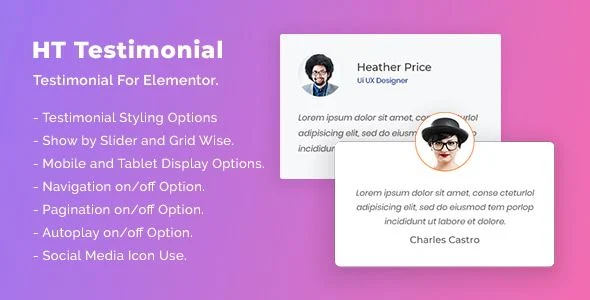
HT Testimonial For Elementor is a WordPress testimonial plugin built for agencies and freelance site builders who publish client review showcases inside Elementor-powered pages. The module eliminates the recurring bottleneck of hand-coding testimonial carousels and fighting responsive breakpoint conflicts by exposing a drag-and-drop widget with nine preset presentation styles. Within production and staging workflows, it functions as a self-contained presentation layer: teams register testimonials carrying avatar, name, company, website, and description fields, then publish them as sliders or grid layouts without editing template files.
Technical Specifications & Deployment Matrix
| Engineering Metric | Deployment Specification |
|---|---|
| Base Technology / Framework | WordPress plugin (PHP, JavaScript JS, CSS) |
| WordPress Version Range | WordPress 5.0.x through 6.2.x, including 5.5.x–6.1.x interim releases |
| Front-End / Engine Dependencies | Elementor; compatibility declared with Elementor Pro and WooCommerce 6.x.x |
| Editor Environment | Elementor drag-and-drop settings panel; Gutenberg-optimized output |
| Browser Coverage | IE11, Chrome, Firefox, Safari, Opera, Edge |
| Display Modes | Slider (carousel and single-slide) plus grid/list column layouts |
| Preset Layout Library | 9+ pre-designed testimonial styles for slider and list presentations |
Testimonial Rendering Mechanism & Execution Pipeline
The widget renders each testimonial record through a slider or grid engine configured entirely in Elementor. Content entry follows a field-based pipeline: an author image or avatar, name, designation, company, and website URL are stored as dedicated custom fields, while the review body is captured in a description field. Once records exist, layout selection, column counts, navigation behavior, and typography are all governed from the settings panel, and the engine handles carousel autoplay, touch interaction, and breakpoint-specific rendering on the visitor-facing side.
Architectural & Functional Highlights
- Slider Engine Controls: autoplay on/off, navigation on/off, and pagination on/off switches; mouse-draggable and touch-responsive behavior; carousel versus single-slide modes; and a setting that fixes how many testimonials load per slider instance.
- Grid and List Rendering: column-based layouts ship with dedicated mobile and tablet display options, allowing breakpoint-specific column counts to be defined without writing custom CSS.
- Nine Preset Styles: pre-designed layout templates covering both slider and list presentations, switchable during live editing rather than requiring template file swaps.
- Content Field Architecture: every testimonial binds author identity data (image, name, designation, company, website) to a description field, making add, edit, and delete operations structurally predictable.
- Typography and Color Controls: name color, designation color, description link color, plus font size and font family selectors for each text element, exposed directly in the Elementor sidebar alongside social media icon usage.
Where a site-wide review program outgrows a single widget context, Real Testimonials Pro exists as a standalone alternative that delivers sliders, grids, and moderation controls through its own independent plugin architecture.
Production Deployment & Implementation Considerations
Deployment requires an active WordPress 5.0.x–6.2.x environment with Elementor installed and activated; Elementor Pro and WooCommerce 6.x storefronts are also declared as supported targets, keeping the widget usable across standard agency builds. No server-side configuration beyond normal plugin activation is documented, so staging-to-production promotion follows the conventional WordPress plugin lifecycle.
Implementation boundaries are explicit: the downloadable package excludes the demo images shown in preview layouts, meaning production rollouts require replacement photography or client-supplied avatars. Testimonial management stays manual—add, edit, and delete operations run through the plugin’s own records rather than imported datasets.
Customization scope covers every documented surface: author name, designation, description, and link colors; font sizes and font families; column layouts; navigation and pagination styling; and social media icon placement. All adjustments occur in the Elementor options panel during live editing. For teams running decoupled block-editor workflows outside the Elementor page builder, GutenDraw provides an independent visual canvas path within the same WordPress runtime.
Frequently Asked Questions
Are the demo images shown in the preview layouts included in the download package?
No, the downloadable files ship without the preview photography, meaning every avatar and illustration must be replaced with licensed or client-supplied assets before a production launch, since the package contains only the plugin code itself.
Does the widget require Elementor Pro, or does it run on the free Elementor editor?
No, Elementor Pro is listed as a compatible dependency rather than a hard requirement; the widget operates within the standard Elementor editor and also remains usable on WooCommerce 6.x storefront builds across the documented WordPress version range.
Can social media icons be attached to individual testimonial entries?
Yes, the styling options include social media icon usage, allowing each testimonial card to surface linked social profiles alongside the author name, designation, and company fields without requiring any additional markup or third-party widget dependencies.
Is prior PHP or CSS knowledge required to change how testimonials are presented?
No, all documented styling—colors, font sizes, font families, column layouts, navigation, and pagination—is controlled through the drag-and-drop Elementor settings panel, so visual changes require no code edits or stylesheet overrides during the build.
-
v1.0.5 Latest