Hostlabs – Cloud Hosting Services Elementor Template Kit
Hostlabs Cloud Hosting Services Template Kit Overview & Layout Architecture
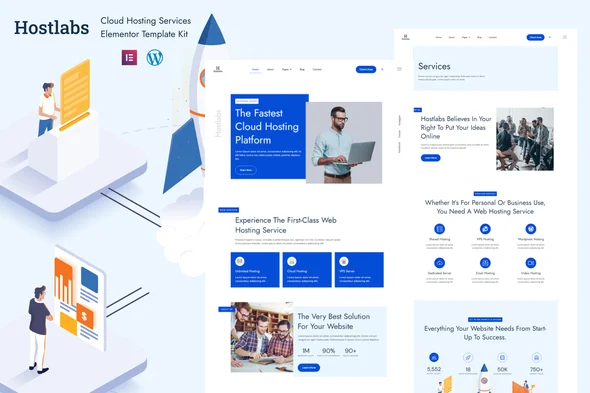
Hostlabs Cloud Hosting Services Elementor Template Kit is an Envato Template Kit engineered for hosting providers, resellers, and agency teams to launch cloud, shared, and domain hosting marketing sites on the Elementor page builder without writing code. It removes the blank-canvas bottleneck of assembling hosting funnels from scratch by supplying 21 pre-built Elementor templates that span marketing pages, editorial layouts, and reusable interface sections. In production workflows, it functions as a drag-and-drop layout system: templates import into WordPress, bind to the free Hello Elementor theme, and render as fully editable Elementor documents.
Technical Specifications & Deployment Matrix
| Engineering Metric | Deployment Specification |
|---|---|
| Base Technology / Framework | Envato Template Kit for the Elementor Page Builder on WordPress |
| Runtime Requirements | Elementor 3.4.x, 3.5.x, 3.6.x, 3.8.x, and 3.10.x; Elementor Pro (sold separately) required for some templates and features |
| Theme Layer | Optimized for the free Hello Elementor theme; compatible with most themes supporting Elementor |
| Bundled Plugins | Elementor, ElementsKit Lite, Jeg Elementor Kit |
| Data Persistence Footprint | No custom database schema; layouts persist as native Elementor documents |
| Template Inventory | 21 Elementor templates: 12 page templates plus 9 reusable sections |
Elementor JSON Layout Engine & Template Execution Pipeline
Hostlabs operates as a JSON layout package: each page and section ships as a serialized Elementor document that imports into the builder and renders through the active WordPress theme. During import, the kit workflow reads the template manifest, activates the required plugins — ElementsKit Lite and Jeg Elementor Kit — and registers each layout as an Elementor-editable document inside WordPress. Widgets resolve against the installed plugin set, global color and typography tokens propagate from the kit’s site settings into every imported template, and Hello Elementor supplies the neutral rendering shell around the builder output. Because every element remains a native Elementor node, hosting teams adjust container widths, spacing, and content bindings directly in the visual editor instead of editing stylesheet files.
Core Technical Capabilities of Hostlabs
- Full hosting funnel coverage: Twelve page templates map the complete conversion path — Home, About, Services, Team, Product, Testimonial, Pricing, Blog, Blog Single, Blog Archive, Contact, and Error 404 — so launch scope extends from acquisition pages through editorial and support surfaces.
- Modular section library: Nine reusable sections — Header, Footer, Hero, About, Contact, Team, Offcanvas, Product, and Testimonial — can be saved to the Elementor library and recombined across unlimited pages, decoupling layout decisions from any single template.
- Global design token system: Colors and typography are defined at kit level and expandable to more than 600 Google Font families, so a single token update re-skins every imported template without per-page edits.
- Offcanvas navigation architecture: A dedicated offcanvas section manages mobile menu behavior as an editable Elementor node, replacing hardcoded theme navigation with a builder-controlled interaction pattern.
For agencies running parallel client builds in other verticals, Digirox exists as a separate digital-agency Elementor Template Kit, letting one team standardize on the identical import workflow across unrelated client niches without mixing layout packages.
Production Implementation & Operational Resilience
Deploying Hostlabs into a staging environment follows a fixed sequence: install WordPress, activate Hello Elementor, install Elementor together with Elementor Pro, then execute the kit import. Full-page template imports are memory-intensive operations; verify that wp_memory_limit is set to at least 256 MB beforehand, since constrained allocations can abort mid-import and leave partially rendered documents in the library. Because the kit is a layout package rather than a theme, it introduces no backend logic of its own, and rollback reduces to deleting imported templates — a property that keeps client staging environments low-risk during iterative review cycles.
Error handling stays inside Elementor’s native model: missing widgets surface as broken-element indicators rather than fatal failures, and the bundled plugin set must remain active for ElementsKit-powered components to resolve correctly. Style overrides occur through global site settings and per-node controls, with no stylesheet editing required. Asset boundaries are explicit — demo images are drawn from Envato Elements and must be rights-cleared or replaced before production launch. For decoupled implementations outside the Elementor runtime, such as hosting operations standardized on the WHMCS billing platform, ResellPress stands as an independent HTML template path and cannot be merged into this kit’s layout structure. Header, footer, and 404 sections bind through Elementor Pro’s theme builder display conditions, which is the primary dependency to verify before go-live.
Frequently Asked Questions
Does Hostlabs function as a standalone WordPress theme?
No, Hostlabs is not a WordPress theme. It is an Envato Template Kit whose layouts are imported into the Elementor page builder and rendered through an active theme such as Hello Elementor, which the kit is optimized against.
Is Elementor Pro required to use every template?
Yes, Elementor Pro is required for some templates and features, and it is not bundled with the kit. Templates built on Pro widgets and theme builder functionality will not render correctly when only the free Elementor plugin is active.
Can the demo images be used legally on a production site?
No, the demo images originate from Envato Elements and are not distributed with the kit. You must obtain separate usage rights through an Envato Elements collection or substitute your own assets before deploying the finished site to a live production server.
Does the kit support older Elementor installations?
Yes, the kit supports Elementor versions 3.4.x, 3.5.x, 3.6.x, 3.8.x, and 3.10.x. Before importing, confirm your installed Elementor build falls within this range, since major version mismatches can alter widget behavior and break layout rendering during the import cycle.
Are blog and error pages included in the template set?
Yes, the kit ships a full editorial set covering the Blog Page, Blog Single, Blog Archive, and an Error 404 template. The 404 and header/footer layouts can be assigned through Elementor Pro theme builder conditions once the template import has finished running.