Homely – Real Estate & Property Listing Elementor Template Kit
Homely Overview & Real Estate Layout Architecture
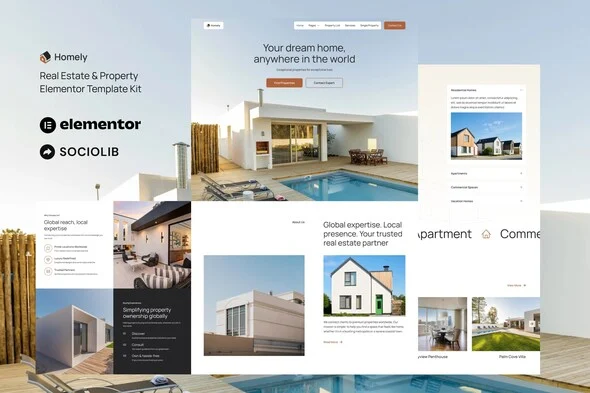
Homely is an Envato Template Kit engineered for real estate agencies, property managers, and independent agents to assemble listing-driven websites through drag-and-drop visual composition instead of theme-level development. The package decouples design data from theme logic by shipping twelve-plus prebuilt layouts — from a Single Property detail page to an Add Listing funnel — as importable Elementor records, removing the bottleneck of hand-building property grids, agent service pages, and inquiry forms from a blank canvas. Within agency delivery pipelines, the kit operates as a composition layer that runs on the free Hello Elementor theme and most Elementor-capable themes, letting production teams swap demo imagery, retune global style tokens, and push client sites live without writing code.
Technical Specifications & Deployment Matrix
| Engineering Metric | Deployment Specification |
|---|---|
| Base Technology / Framework | Elementor 3.10.x page builder, Envato Template Kit distribution format |
| Runtime / Language Requirements | WordPress installation running the Elementor plugin; Hello Elementor theme recommended |
| Data Exchange / Import Protocol | JSON design payloads installed via the Envato Elements plugin or imported directly through Elementor |
| Front-End / Engine Dependencies | ElementsKit Lite, Qi-Addons, and MetForm, installed alongside the kit |
| Persistence Footprint | None at package level — layout data becomes standard Elementor-managed page content once imported |
Property Listing Composition & Template Execution Pipeline
The execution pipeline is import-driven: JSON layout payloads are pulled through the Envato Elements plugin and instantiated as editable Elementor documents inside the site library. Once a template lands on the canvas, every widget, section, and responsive breakpoint becomes directly manipulable through the visual builder, so a Single Property page or a Property List archive can be restructured without leaving the editor. Global typography and color tokens govern the entire layout set from one control surface, and any token adjustment propagates across all imported pages, while individual elements can still be fine-tuned in isolation when a specific listing module needs a divergent treatment.
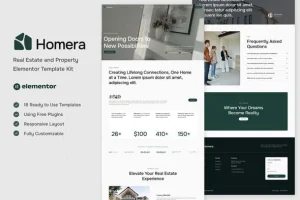
The page inventory maps the complete visitor journey: Home, Property List, Single Property, Services, About, Pricing, Add Listing, and Contact are complemented by structural assets — Header, Footer, a Submit Form, and a Contact Form — that anchor the site shell. Teams benchmarking this vertical before committing to a composition can also evaluate Homera, a parallel real estate and property Elementor kit occupying the same agent-and-listing workflow without any cross-runtime migration overhead.
Architectural & Functional Highlights
- Twelve-plus prebuilt templates: the full inventory — Home, Property List, Single Property, Services, About, Pricing, Add Listing, Contact, Header, Footer, Submit Form, and Contact Form — covers acquisition, browsing, submission, and conversion stages out of the box.
- Centralized design tokens: fonts and colors are editable in one place through global kit settings, or per element, enabling a single-pass rebrand across every imported page.
- MetForm-driven form capture: the Submit Form and Contact Form templates are built on MetForm, giving property submission and inquiry intake a structured, widget-native data path once the plugin activates during installation.
- ElementsKit Lite header and footer templating: global site chrome is assembled through the ElementsKit Lite Header Footer builder, removing any hard dependency on paid builder tiers for sitewide layout control.
- Responsive, fast-loading composition: the clean, minimal layout set is built to render across mobile viewports and keep asset weight low on listing-heavy pages.
Production Implementation & Operational Resilience
For agency staging environments, the practical sequence is to install the Envato Elements plugin, import the kit, and only then attach the Hello Elementor theme, so layout instantiation happens against the intended rendering baseline. Large JSON payload imports benefit from adequate PHP memory headroom — confirming that wp_memory_limit is comfortably above default values before bulk-importing all twelve templates prevents truncated imports on constrained shared hosting.
Header and footer wiring follows a deterministic path in ElementsKit Lite: import both templates, navigate to ElementsKit Lite, create a new Header record, set it to display on the entire site, then load the imported template through the My Templates panel via the gray folder icon inside the Elementor editor. The same procedure repeats for the footer. Teams whose project scope demands a full theme-level real estate runtime rather than a kit layered over an existing theme can examine HomeID as a decoupled, standalone WordPress theme occupying a parallel solution path outside the kit architecture.
Two operational boundaries deserve attention before client handover. First, the demo imagery ships from Envato Elements, so production deployment requires either licensing those assets or substituting owned photography across every listing layout. Second, header and footer customization routes differ by builder tier: Elementor Pro unlocks Theme Builder control, while the free path runs entirely through ElementsKit Lite.
For architecture studios whose deliverable is a portfolio showcase without listing or submission mechanics, Interiokit exists as a separate interior design and architecture Elementor kit — an adjacent composition choice, not a mergeable module for this package.
Frequently Asked Questions
Is Elementor Pro required to run this template kit?
No — the kit runs on the free Elementor plugin with the Hello Elementor theme, and global headers and footers are handled through the bundled ElementsKit Lite builder. Elementor Pro remains optional and only adds Theme Builder-level control over the site chrome.
Can the bundled demo images be published on a live client site without further licensing?
No — all demo imagery is sourced from the Envato Elements library, so each asset must be licensed separately through that platform or replaced with owned photography before the imported templates go into production use.
Does the package include a ready-made property submission form?
Yes — a dedicated Submit Form template built on MetForm ships inside the kit alongside a Contact Form, covering listing intake and general inquiries once MetForm is activated during the standard installation flow.