Happy Mail 2 – Christmas Email Templates Set + Online Access
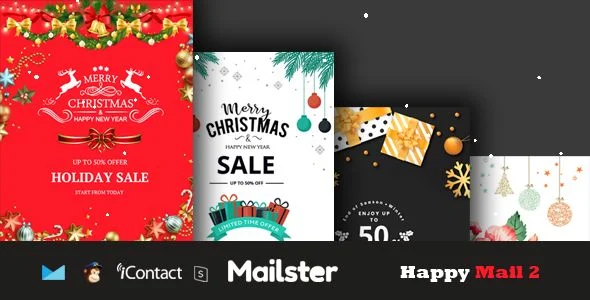
Happy Mail 2 Overview & Seasonal Email Campaign Foundation
Happy Mail 2 is a fixed-layout HTML email template package engineered for marketing teams and e-commerce agencies that need to ship Christmas and holiday promotional campaigns across multiple sending platforms. The set resolves a recurring production bottleneck of seasonal email work: authoring table-based, client-safe markup that renders consistently in MailChimp, Campaign Monitor, Mailster, iContact, and StampReady while surviving the stripped CSS engines of Gmail, Outlook, and Yahoo Mail. Within a production workflow, it operates as a deployable asset layer — four distinct three-column template variants backed by layered PSD sources that designers rebrand and re-export before distribution.
Technical Specifications & Deployment Matrix
| Engineering Metric | Deployment Specification |
|---|---|
| Base Technology / Framework | Fixed-layout, table-based HTML email markup with layered PSD design sources |
| Template Variants | 4 distinct Christmas / Xmas campaign layouts built on a three-column structure |
| ESP Compatibility | MailChimp, Campaign Monitor, Mailster, iContact, StampReady |
| Email Client Coverage | Gmail, Yahoo Mail, Microsoft Outlook, Thunderbird, Hotmail, Apple Mail, iPhone, iPod, iPad |
| Design Assets Included | Layered PSD files, HTML files, well-documented usage instructions |
| Resolution & Layout Model | Standard-resolution assets, fixed (non-fluid) layout architecture |
Table-Based Rendering & Multi-Platform Distribution Pipeline
The package distributes through a copy, import, and edit pipeline across five ESP targets. Each template is authored as fixed, table-driven HTML rather than fluid CSS Grid or Flexbox, because webmail and desktop clients strip embedded style blocks and apply inconsistent CSS support — table nesting remains the only reliable structural mechanism for cross-client layout. On import, the markup enters the selected platform: MailChimp, Campaign Monitor, Mailster, and iContact accept the HTML directly, where merge tags and list fields replace static placeholder copy, while the StampReady route enables online builder editing referenced in the product title. The layered PSD sources sit upstream of this pipeline: designers adjust typography, color palettes, and promotional imagery in Photoshop, then export updated slices into the HTML structure before the final campaign push. For teams that must also produce the seasonal landing page that recipients land on after clicking, Compact – Corporate Multi-Purpose HTML Template exists as an independent custom-code design path for the web side of the campaign, entirely decoupled from the email runtime.
Core Technical Capabilities of Happy Mail 2
- Four distinct campaign layouts: Separate Christmas and Xmas-oriented variants let a single seasonal promotion rotate creative across multiple sends without duplicating design effort, each preserving the fixed three-column structure for predictable client rendering.
- Multi-ESP packaging: Parallel build files target MailChimp, Campaign Monitor, Mailster, iContact, and StampReady, so the same creative can be pushed through whichever platform a client already operates, without reauthoring markup per provider.
- Layered PSD design sources: The included Photoshop documents expose every visual layer — headings, product blocks, CTA buttons, decorative festive elements — allowing pixel-level restyling before HTML export rather than in-browser patching.
- Cross-client rendering coverage: The templates are validated against Gmail, Yahoo Mail, Microsoft Outlook, Thunderbird, Hotmail, Apple Mail, and iOS device clients (iPhone, iPod, iPad), covering the dominant share of subscriber inboxes.
Production Implementation & Operational Resilience
Deployment begins by matching the correct import file to the destination platform: MailChimp and Campaign Monitor campaigns ingest the HTML through their template importers, Mailster accepts it within the WordPress newsletter workflow, and StampReady provides the online builder access noted in the product name. Pre-send QA should cover every confirmed client — Gmail, Yahoo Mail, Hotmail, Thunderbird, Apple Mail, and iOS devices — because each engine applies different CSS restrictions. One documented rendering boundary is structural: Microsoft Outlook does not support background images, so any decorative background imagery in the layout must degrade to a solid fallback fill in Outlook inboxes rather than relying on the image rendering. The fixed, non-fluid layout model is itself a resilience decision — it trades adaptive width behavior for deterministic column alignment in clients with partial CSS support, and the documentation walks through the import sequence for each supported platform. Resolution is intentionally standard rather than high-DPI, keeping payload weight appropriate for inbox delivery. For agencies extending the seasonal campaign into a broader marketing site build, Idiology – Creative & Corporate Multipurpose HTML5 Template serves as a separate standalone web foundation outside the email stack, handling the landing-page and brand-site scope that email templates are not designed to cover.
Frequently Asked Questions
Are the images shown in the demo preview included in the download package?
No, the preview imagery is not included. The photographs and graphics displayed in the live demo are placeholder assets sourced from freepik.com and pngtree.com, so senders must supply their own licensed campaign imagery before deploying any template to a live subscriber list.
Does the Gmail app for Android render these templates correctly?
No, the Gmail app for Android is explicitly listed as unsupported. Android-side validation should rely on standard mobile webmail rendering instead, while Apple Mail on iPhone, iPad, and iPod is confirmed as a compatible target client.
Can the templates be edited visually without directly editing HTML code?
Yes, the set ships with online builder access through StampReady in addition to MailChimp, Campaign Monitor, Mailster, and iContact packaging, so campaign copy, imagery, and call-to-action links can be modified through visual editing before export and send.