Halloween Idle Fly – HTML5 Game – C3P
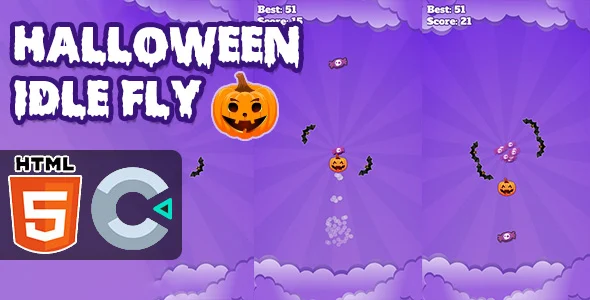
Halloween Idle Fly HTML5 Game Overview & Endless Arcade Engine
Halloween Idle Fly HTML5 Game is a Construct 3 arcade source code, engineered for web publishers and mobile studios to deploy an endless Halloween-themed tap-to-fly title across browser and native channels. The project targets a persistent portability bottleneck in casual game delivery: one HTML5 and JavaScript build that executes identically across legacy and modern browsers, from IE6 through Edge, Firefox, Safari, Opera, and Chrome, as well as mobile WebView containers. Within agency production workflows it operates as a ready-to-brand engagement asset that can be embedded on client websites, exported to Android and iOS, or fully reskinned through the included editable C3P project file.
Technical Specifications & Deployment Matrix
| Engineering Metric | Deployment Specification |
|---|---|
| Base Technology / Framework | Construct 3 game engine with native C3P project source file included |
| Runtime / Language Requirements | HTML5 and JavaScript JS executing in any standards-compliant browser runtime |
| Input / Communication Protocol | Unified tap and click event dispatch, identical on desktop mouse and mobile touch |
| Front-End / Engine Dependencies | Standalone HTML + JS bundle; no server-side runtime or external plugin required |
| Persistence / Data Footprint | Session-based high-score tracking with money collection state held in engine memory |
| Browser Compatibility Envelope | IE6 through IE11, Firefox, Safari, Opera, Chrome, and Edge |
One-Tap Impulse Loop & Endless Scoring Pipeline
The core execution mechanism is a single-tap impulse loop that translates pointer input into vertical movement physics on the pumpkin actor. Every screen interaction, whether a mouse click on desktop or a finger tap on mobile, enters the engine through the same event dispatcher, which the Construct 3 event sheet evaluates each tick to adjust the pumpkin’s vertical velocity. This unified input contract is what allows one codebase to serve both platforms without conditional branching in the logic layer.
Gameplay progresses through a procedurally continuous obstacle corridor: rotating hazards approach the pumpkin along a horizontal scroll axis, and the collision system evaluates overlap conditions every frame to determine run termination. Between obstacles, collectible money objects are spawned into the playfield, incrementing the score counter on pickup. Because the run never reaches a designed endpoint, the difficulty curve is expressed purely through obstacle rotation timing and player reaction windows, while the record system stores the best run for competitive comparison between players.
For studios assembling a seasonal game portal around Halloween, this title slots into a broader engagement strategy alongside assets like Soccer Heroes, which applies the same Construct 3 delivery pattern to penalty-shootout mechanics.
Core Technical Capabilities of Halloween Idle Fly HTML5 Game
- Unified Cross-Platform Input Dispatch: A single tap-on-screen handler serves both desktop mouse clicks and mobile touch events, eliminating per-platform input code and reducing QA surface area to one interaction contract.
- Full C3P Source Access: The package ships the complete Construct 3 project file, so every event sheet, layout, object layer, and behavior configuration remains editable for reskinning, rebalancing, or feature extension.
- Native Mobile Export Path: The engine’s export pipeline compiles the same HTML5 logic into Android and iOS packages via WebView wrapping, letting one codebase cover web embedding and app store distribution.
- Legacy Browser Execution Envelope: Runtime behavior is validated across IE6 through IE11 plus all current mainstream browsers, an unusually wide compatibility span for canvas-based casual titles.
Production Implementation & Operational Resilience
Deployment requires no server-side application layer: the HTML and JavaScript files can be dropped onto any static host, CDN, or subdirectory of an existing WordPress installation, and the game runs entirely client-side. This static footprint removes database dependencies, PHP execution requirements, and CORS complications, since all asset loading stays within the same origin as the hosted files. In agency staging environments, the title can be embedded via iframe or direct page template integration without conflicting with existing theme scripts.
Error handling is governed by the Construct 3 runtime itself, which manages the render loop, delta timing, and asset readiness before the first frame executes, preventing partially initialized states on slower connections. Asset licensing follows the author’s stated sourcing: sound effects originate from Envato Elements and selected imagery from Freepik, so teams planning commercial redistribution should verify those attribution terms against their own distribution channels. Secondary development operates entirely inside the C3P project: designers can replace sprite sheets, adjust rotation speeds of obstacles, retune the impulse strength of the pumpkin, or retheme the visual set for other seasonal campaigns without touching generated code. Teams running multi-title HTML5 catalogs can pair this game with collections such as Bundle 5 games (Construct 3) to standardize on a single engine stack across their portfolio.
Frequently Asked Questions
Does the package include the editable Construct 3 project file?
Yes, the complete C3P source ships with the purchase, containing every event sheet, layout, and object configuration, which means reskinning and mechanic adjustments happen directly inside Construct 3 rather than through compiled JavaScript edits.
Can the same build be exported to Android and iOS?
Yes, the author documents an easy export path to both mobile platforms, and because the runtime logic is pure HTML5 wrapped in a WebView container, no platform-specific code rewrite is required to reach either app store target.
Is the artwork prepared for high-resolution retina displays?
No, the item is explicitly listed as non-high-resolution, so publishers targeting retina-class mobile screens or large desktop canvases should evaluate visual sharpness in testing and plan sprite replacement if pixel density matters to their audience.
Do desktop and mobile players use different control schemes?
No, both platforms share a single tap-on-screen instruction; the engine maps mouse clicks and touch contacts to the same impulse event, which simplifies onboarding copy and keeps the tutorial messaging identical across every deployment surface.
Do I need a Construct 3 environment to customize the game?
Yes, modifying gameplay requires opening the C3P file in Construct 3, so budget for access to that editor before planning balance changes; hosting the exported build, by contrast, needs nothing beyond a standard static web server.