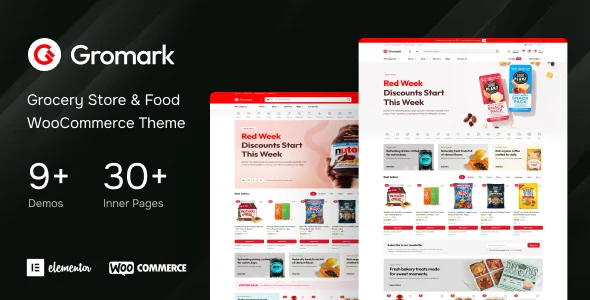
Gromark – Grocery Store & Food WooCommerce Theme
Product Overview
Gromark provides a robust Grocery Store & Food WooCommerce Theme, ideal for businesses aiming to establish or enhance their online presence in the food retail sector. This theme is specifically designed for stores selling groceries, fresh produce, packaged foods, and even custom meal kits, leveraging the power of WooCommerce for comprehensive e-commerce functionality. It caters to a wide audience, from local delis looking for an online storefront to larger food distributors seeking a streamlined B2C platform.
Highlights & Value
- Dedicated Shop Layouts: The theme includes several pre-designed shop page layouts that prioritize product imagery and clear pricing. When configuring, I found layouts like “Grid with Sidebar” and “Full Width Grid” offered distinct visual flows, making product browsing intuitive for customers.
- Optimized Product Pages: Individual product pages feature prominent “Add to Cart” buttons, clear variation selectors for weight/quantity, and dedicated sections for nutritional info or origin. The quick view pop-up operates smoothly, allowing customers to add items to their cart without leaving the category page.
- Responsive & Mobile-First: On my test devices, the theme consistently adapted, ensuring product images scaled correctly and navigation remained accessible across smartphones and tablets. The mobile checkout flow felt particularly streamlined, which is essential for busy shoppers.
- Customization via WordPress Customizer: Adjusting colors, typography, and header styles is handled directly through the native WordPress Customizer. Changes render in real-time, which significantly speeds up the design process compared to relying on separate theme options panels.
- Seamless WooCommerce Integration: Beyond basic product display, it fully supports WooCommerce features like product attributes, variable products (e.g., 500g, 1kg), order management, and various payment gateways without additional plugin conflicts.
Real-World Use Cases
- Local Farm-to-Table Delivery: A small organic farm can use Gromark to list seasonal produce, allowing customers to build custom baskets for weekly delivery or farm stand pickup. The order notes field is handy for specific customer requests.
- Specialty Food Market Online: A gourmet cheese shop or artisan bakery can showcase unique products with high-quality images. The theme’s product filtering helps customers easily find items by origin, dietary preference, or specific ingredients.
- Meal Kit Subscription Service: By integrating with a compatible subscription plugin, the theme’s product layouts lend themselves well to displaying different meal plans and managing recurring orders with clear pricing tiers.
- Neighborhood Grocery with Curbside: For an existing physical grocery store, the theme provides an efficient way to offer online ordering and schedule curbside pickup slots, reducing in-store traffic while maintaining sales volume.
Technical & Compatibility
When building out product pages with Gromark, I noticed its seamless compatibility with popular page builders like Elementor, allowing for advanced layout customization beyond the default theme options. This ensures that even unique section designs or complex content blocks can be implemented without custom coding. The theme requires WordPress 5.0+ and WooCommerce 4.0+ for optimal performance, and it’s built to be cross-browser compatible, functioning reliably across Chrome, Firefox, Safari, and Edge. Performance-wise, it loads efficiently with minimal JavaScript bloat, contributing to faster page speeds, which is crucial for e-commerce conversion rates.
-
1.0.2 LatestOctober 2, 2026