
 My Account
✅ Product Overview
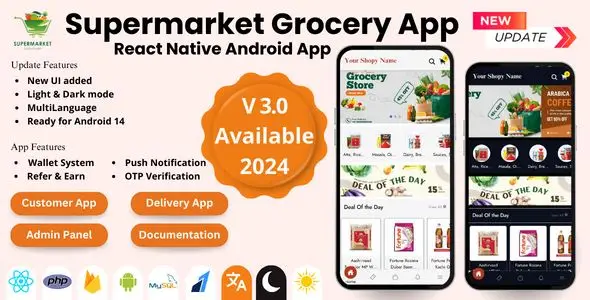
Grocery React Native Android App is a Supermarket App | Single Vendor App built for local grocery stores seeking a functional mobile presence. This codebase provides a clean mobile shopping interface, allowing customers to browse digital shelves, add groceries to their carts, and complete orders. The user interface features standard grid layouts, easy-to-read typography, and intuitive navigation tabs.
The home screen features promotional banners at the top, followed by organized categories such as fresh vegetables, fruits, dairy, and household essentials. Customers can tap on individual product cards to view unit options, description text, and final pricing before adding items to their virtual cart. This layout ensures a clear and simple user experience that mimics a traditional in-store shopping trip, presenting items clearly on standard mobile screens without clutter.
✅ Highlights & Value
Deploying a Supermarket App | Single Vendor App helps local grocery owners offer a direct mobile ordering option to their neighborhood. By having a dedicated application, businesses can establish a direct communication channel with shoppers, sending order confirmation details and delivery status updates directly to their screens. This direct model builds customer familiarity and provides an alternative to third-party delivery platforms.
- Dynamic Cart Management: Allows users to increase or decrease item quantities effortlessly from the cart screen.
- Categorized Navigation: Features a dedicated screen listing all available product categories for structured browsing.
- Clean Product Detail Screens: Displays image sliders, weight variations, pricing, and key product descriptions.
- Flexible Checkout Flow: Provides step-by-step fields for inputting delivery addresses, contact details, and selecting payment preferences.
✅ Real-World Use Cases
Grocery React Native Android App serves as a reliable starting point for physical neighborhood markets transitioning to digital home delivery. Store managers can modify the layout elements, insert their own brand logo, and connect their inventory database to show real-time stock availability to local buyers.
With the Grocery React Native Android App | Supermarket App | Single Vendor App, organic farms can organize community-supported agriculture deliveries. This direct-to-consumer setup eliminates third-party commission fees, giving small farmers better control over their pricing and distribution routes.
- Local Greengrocers: Ideal for small fruit and vegetable shops delivering fresh items within a specific postal code.
- Specialty Food Boutiques: Suitable for bakeries, butcher shops, or cheese sellers who want to offer curbside pickup options.
- Convenience Stores: Suitable for small corner stores providing late-night delivery services to nearby residential complexes.
✅ Technical & Compatibility
Choosing the Grocery React Native Android App | Supermarket App | Single Vendor App ensures a cross-platform codebase that runs efficiently on modern Android devices. Developers can maintain a clean file structure and update UI components reliably, minimizing the complexity often associated with native mobile development.
The application connects to backend servers via standard RESTful API endpoints, allowing secure data transfers for product catalogs, customer profiles, and order logs. It supports standard package managers and integrates with geolocation services to verify delivery addresses accurately during checkout. The lightweight codebase keeps memory consumption low, facilitating quick loading times on standard mobile hardware even under variable network conditions.
✅ FAQ & Tips
To maximize performance, store owners should compress product images before uploading them to the backend server to ensure fast page loads over mobile networks. Developers should verify API endpoint responses regularly to prevent latency issues when loading large inventory categories. Keeping database queries optimized ensures that customers enjoy a responsive and fast shopping experience, minimizing checkout abandonment.
How are delivery charges calculated within the application? Delivery rates can be configured on your backend administrative panel and will display during the checkout step before final payment. Is a specific server environment required? The application relies on external API feeds, meaning any standard server hosting your database and backend API will work without issues.




There are no reviews yet.