
 My Account
Product Description
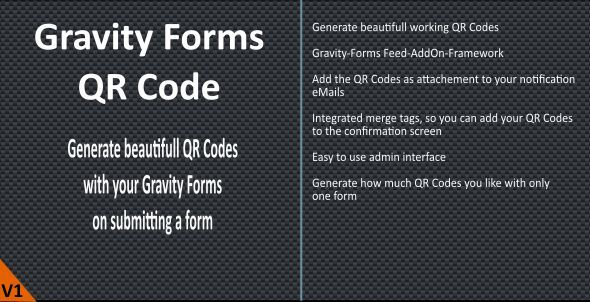
The Gravity Forms QR Code addon is an essential tool for any website using Gravity Forms to collect data that needs to be shared or used offline. This powerful extension seamlessly integrates with your existing forms to automatically generate unique QR codes based on user submissions. It is perfectly suited for businesses managing events, offering digital tickets, sharing contact information, or providing quick access to specific online resources, effectively bridging the gap between your digital forms and the physical world.
Functionally, the process is incredibly straightforward. Once a visitor completes and submits a form, the Gravity Forms QR Code plugin captures the data from your designated fields and instantly encodes it into a machine-readable QR code image. This generated code can be displayed on the confirmation page, embedded directly into email notifications, or even saved for later use, providing a smooth and automated workflow for both you and your users.
Key Features
- Dynamic Code Generation: Automatically create QR codes using data submitted in any form field.
- Multiple Data Formats: Supports various QR code types, including plain text, URLs, vCards (digital business cards), and more.
- Customizable Appearance: Easily adjust the size, color, and error correction level of your QR codes to match your branding.
- Flexible Display Options: Show the generated QR code on the form confirmation page or include it in email notifications using simple merge tags.
- Seamless Integration: Works flawlessly within the Gravity Forms ecosystem, requiring no external services or APIs.
- Lightweight and Efficient: Built with clean, optimized code to ensure it does not slow down your website.
Use Cases
One of the most popular applications is for event management. Imagine a user registering for a conference or workshop on your site. Upon submission, they instantly receive a confirmation email containing a unique QR code ticket. This code can be scanned at the event entrance for fast, paperless check-in, dramatically improving the attendee experience and simplifying your entry management process.
In a professional context, this tool excels at modernizing business networking. You can set up a simple contact form where prospects or partners enter their details. The submission automatically generates a vCard QR code, which can be scanned to instantly add the contact to a smartphone. This innovative use of the Gravity Forms QR Code addon leaves a lasting, tech-savvy impression and eliminates the need for physical business cards.
Beyond events and contacts, the addon is perfect for marketing and customer support. A form can generate a QR code that links to a unique discount coupon, a private download page for a digital product, or a specific support document. The versatility of the Gravity Forms QR Code plugin allows you to create interactive and engaging post-submission experiences that provide immediate value to your audience.
Benefits
The primary benefit is the significant boost in automation and efficiency. By using the Gravity Forms QR Code tool, you eliminate the tedious manual process of creating individual QR codes for each user or entry. The entire workflow, from data collection to code generation and delivery, is handled automatically, freeing up valuable time and resources while reducing the potential for human error.
Furthermore, this addon greatly enhances the user experience by providing instant gratification and utility. Instead of a simple “thank you” message, users receive a functional, interactive element they can immediately use. Whether it’s a ticket, a digital contact card, or a special offer, this tangible takeaway makes their interaction with your website more memorable and valuable.
Finally, the integration is completely seamless. Because it’s built specifically for Gravity Forms, it leverages the same intuitive interface and powerful merge tag system you already know. This means you can implement a sophisticated Gravity Forms QR Code solution on your site without any complex setup or a steep learning curve, empowering you to build more dynamic and powerful forms right away.


There are no reviews yet.