Furniture Shopify Theme – Furni
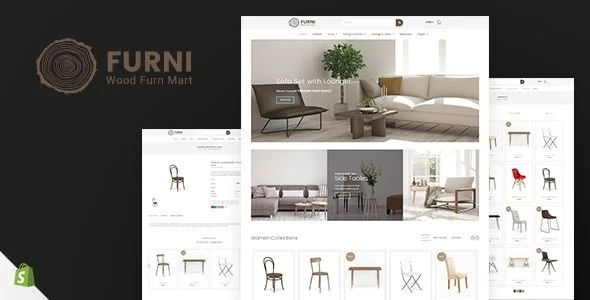
Furni Shopify Theme Overview & Storefront Architecture
Furni is a Shopify Online Store 2.0 e-commerce theme, engineered for furniture retailers and interior merchants to launch catalogs spanning sofas, dining chairs, coffee tables, wardrobes, office workstations, and home decor lines. The package targets the variant-comparison bottleneck that slows furniture storefronts: shoppers evaluating colors, materials, and categories across large inventories need swatch switching and filtered browsing that does not force full page reloads. In production workflows, it operates as a prebuilt Liquid storefront layer that merchants configure through drag-and-drop sections, multi-currency settings, and header or footer layout presets rather than direct template code edits.
Technical Specifications & Deployment Matrix
| Engineering Metric | Deployment Specification |
|---|---|
| Base Platform | Shopify Online Store 2.0 |
| Template Architecture | Liquid sections with drag-and-drop arrangement; sections-ready page composition |
| Front-End Dependencies | Sass CSS, Owl Carousel, Font Awesome icon set, animation library |
| Browser Compatibility | IE11, Firefox, Safari, Opera, Chrome |
| Layout Behavior | Responsive across desktop, laptop, tablet, and smartphone viewports; high-resolution retina rendering; 4+ column grid support |
| Distribution Contents | CSS files, JS files, installation documentation |
| Localization Scope | Multi-currency selling support |
Liquid Section Rendering & Commerce Execution Pipeline
Furni renders storefront pages through Liquid sections arranged via drag-and-drop, requiring no template code edits.
The theme treats every page as an assembly of movable blocks managed from the Shopify theme editor, which keeps catalog reorganization in the hands of store operators rather than developers. Merchants compose homepages, collection views, and product pages from prebuilt modules, while JavaScript-driven commerce functions handle cart and filtering logic asynchronously against the storefront API layer. This division keeps presentation declarative and transactional behavior event-driven.
Architectural & Functional Highlights
- Ajax Add to Cart Synchronization: Cart operations dispatch asynchronous requests that update line items and totals without reloading the page, shortening the interval between product view and checkout and reducing abandonment friction at the cart stage.
- Product Swatch Variant Switching: Color swatches trigger variant re-rendering on the product view, so a shopper selecting a different finish sees the corresponding product image update immediately—an essential behavior for furniture sold in multiple upholstery or wood tones.
- Ajax Sidebar Filtering: Filter controls for color, brand, type, and category—offered as list or dropdown widgets—narrow the catalog and return matching products without a page refresh, keeping shoppers inside the browsing flow while they refine large furniture inventories.
- Countdown Timer Module: Sale windows tick down in hours, minutes, and seconds on promotional placements, applying time pressure that accelerates order placement before a discount offer expires.
- Layout Configuration System: Three header variants, three footer variants, and five mega-menu styles define navigation density, while grid and list product display modes, a responsive slider, and Owl Carousel product carousels govern merchandising presentation.
The rendering pipeline favors feature-dense retail modules for furniture and interior verticals. For merchants weighing a lighter visual direction within the same product category, Furtop – Minimal Furniture Shopify Theme exists as an independent storefront alternative on the identical platform, trading module density for a stripped-down catalog presentation.
Production Deployment & Implementation Considerations
Deployment requires an active Shopify storefront operating on the Online Store 2.0 architecture, with the package’s CSS and JS files installed through the standard theme upload path. Once installed, configuration runs through the theme editor: sections rearrange by drag-and-drop, multi-currency settings activate cross-border selling, and a pop-up search option plus newsletter capture modal extend discovery and list-building behavior. Customization scope covers advanced typography options backed by Google Web Fonts integration, Sass-based styling for systematic design token adjustment, product sale labels, and an Instagram integration block for social merchandising.
Two implementation boundaries deserve attention before go-live. First, the photography shown throughout the demo is copyrighted and excluded from the downloadable package; merchants intending to reproduce that visual direction must source the imagery separately, and reference links for acquiring usage rights can be supplied. Second, browser coverage extends back to IE11, which constrains the JavaScript feature set the front-end relies on—an intentional compatibility decision rather than an incidental one. Agencies rotating across multiple client verticals on this platform can also baseline a separate build on Daxone – Multipurpose Shopify Theme as a decoupled, sector-agnostic starting point when furniture-specific merchandising modules are not required.
Frequently Asked Questions
Does the package include documentation for installation and configuration?
Yes, the theme ships well documented, covering setup steps, section configuration, and feature activation so that a store operator can move from upload to a configured storefront without reverse-engineering the template files.
Can shoppers save products to a wishlist without installing a separate app?
Yes, a wishlist module is built into the theme itself. Customers can flag furniture items for later purchase natively, which removes the dependency on third-party app installations and the recurring configuration work those apps introduce.
Does the theme handle customer product reviews natively?
Yes, a customer reviews feature is included among the core modules. Review output renders within the product presentation layer, letting merchants collect social proof on furniture purchases without wiring in an external review service.