Furina – Furniture Shop WooCommerce Elementor Pro Template Kit
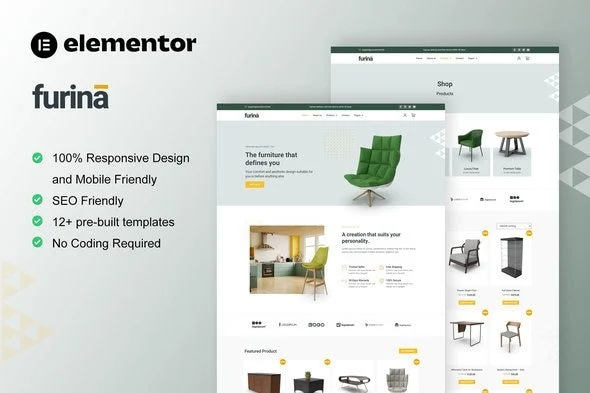
Furina Furniture Shop Elementor Template Kit Overview & WooCommerce Storefront Architecture
Furina is an Envato-format Elementor Pro Template Kit engineered for agencies and store owners launching furniture, home decor, and interior design storefronts on WordPress. The package eliminates the blank-canvas bottleneck of page-builder assembly by shipping pre-designed layout data — homepage, product archives, checkout, and account flows — as importable design structures rather than a hand-coded theme. Within agency delivery workflows it operates as a rapid-deployment layer: import the templates, bind WooCommerce product data to the pre-built commerce layouts, and publish a functioning storefront running under the Hello Elementor theme.
Technical Specifications & Deployment Matrix
| Engineering Metric | Deployment Specification |
|---|---|
| Base Technology / Framework | Envato Template Kit built on Elementor Pro page builder |
| Runtime Requirements | WordPress running Elementor 3.8.x – 3.10.x; Elementor Pro upgrade required for select templates and features |
| Data Exchange / Import Protocol | Template JSON data installed via the Envato Template Kit Import plugin or direct import through Elementor |
| Front-End Dependencies | Hello Elementor theme (optimization target), ElementsKit Lite, Skyboot Custom Icons |
| Persistence Footprint | None — the kit ships layout and design data only; it contains no theme files or database schema of its own |
JSON Layout Pipeline & Storefront Assembly Mechanics
The kit’s core mechanism is JSON layout data parsed by Elementor into editable document structures. After the zip is downloaded, an administrator installs the Envato Template Kit Import plugin — or uses Elementor’s native import route — and selects each template. The importer converts the packaged JSON into Elementor documents: nested containers, widgets, and section structures that land in the site’s page registry as fully editable layouts. Global Style functions as the design token layer; adjusting the kit-level color and typography panels propagates changes across every imported page, so a brand palette revision touches one settings surface instead of twelve separate documents.
The commerce path arrives pre-wired. Archive Product and Single Product templates bind to WooCommerce product loops and detail views, while Checkout Page, My Account, and Login Page cover the transactional endpoints of the purchase funnel. Marketing and editorial surfaces — Homepage, About Us, Contact Us, FAQ, Team, Blog Archive, Single Post, and Error 404 — round out the kit, supporting a blogging model alongside product sales. Header and Footer ship as global templates managed through ElementsKit Lite, with Skyboot Custom Icons supplying the iconography set. For merchants weighing a standalone theme rather than kit-based assembly, Woodisa exists as a separate full-theme path with equivalent furniture commerce scope.
Architectural & Functional Highlights
- Full WooCommerce funnel coverage: Archive Product, Single Product, Checkout, My Account, and Login templates ship pre-mapped to the storefront and account endpoints, removing manual page wiring for the transactional flow.
- Global Style token system: one kit-level panel governs colors and typography across all 12+ templates, enabling single-point brand overrides without touching individual page documents.
- Global header and footer architecture: site chrome installs through ElementsKit Lite as reusable global templates, decoupling navigation markup from individual page layouts.
- Responsive container layouts: pages render through Elementor container architecture and are documented as fully mobile-friendly across viewport widths, with per-breakpoint controls available in the editor.
Production Implementation & Operational Resilience
Deployment should begin on staging with Elementor Pro activated before any import runs, since several templates and features depend on the premium builder’s widget set. The server’s wp_memory_limit should sit at 128 MB or higher — the threshold documented for Elementor operations — because template payloads combined with media referencing can exhaust default allocations on shared hosting. Once global templates are imported, header and footer activation completes through ElementsKit Lite without custom code. Teams needing theme-level control over template hierarchy rather than builder-layer layouts can evaluate ErgoCraft as an independent full-theme path in the same furniture vertical.
Boundary conditions matter at go-live. The package ships design data only — it is not a WordPress theme and requires a theme with Elementor support, with Hello Elementor documented as the optimization target even though most Elementor-compatible themes will render the layouts. Builder compatibility is bracketed to Elementor 3.8.x through 3.10.x, so newer major versions should be validated on staging before production upgrades. The asset also carries no Envato kit certification, a fact worth recording in procurement documentation.
All customization occurs inside the Elementor editor: style overrides propagate through the Global Style token panel, structural edits happen at the container and widget level, and no PHP template overrides or backend changes are involved. Agencies running parallel client builds in other verticals can apply the identical import workflow with Pemogan, a kit targeted at software development and IT services sites.
Frequently Asked Questions
Does the Furina download package include the Elementor Pro plugin?
No — Elementor Pro is listed as a required premium upgrade for certain templates and features and must be obtained separately; only ElementsKit Lite and Skyboot Custom Icons install alongside the kit’s templates.
Can the templates be imported without the Envato Template Kit Import plugin?
Yes — the documentation confirms two installation routes: the Envato Template Kit Import plugin for WordPress or direct import through Elementor, giving developers flexibility depending on existing site tooling.
Are the demo images ready for production deployment?
No — demo imagery is sourced from Envato Elements and must be acquired under a separate Envato Elements plan or replaced with the buyer’s own assets before the storefront goes live.