FrontFive – Creative News & Magazine Template Kit
FrontFive Overview & Editorial Layout Delivery Architecture
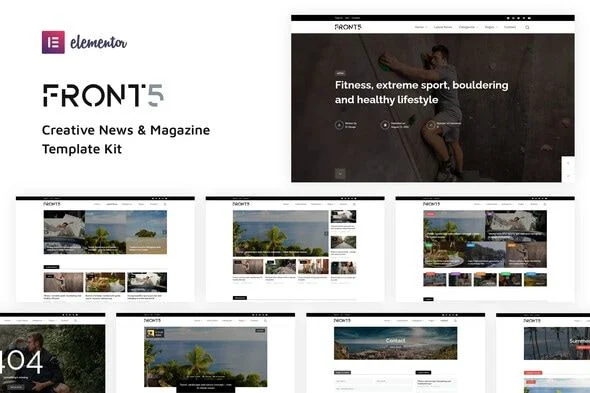
FrontFive is a creative news and magazine Elementor Template Kit that supplies publishers, bloggers, and design studios with fourteen pre-built page layouts deployable inside the Elementor editor. The package exists because assembling editorial front ends — multi-column newspaper grids, featured-post carousels, category archives, and author pages — through manual node-by-node construction consumes disproportionate delivery time on client magazine builds. In production workflows, the kit functions as a drop-in layout library: agencies import the bundled JSON templates, bind them to WordPress content, and ship a magazine-grade front end without authoring custom theme files.
Technical Specifications & Deployment Matrix
| Engineering Metric | Deployment Specification |
|---|---|
| Base Technology / Framework | Elementor page builder (compatible with 2.8.x, 2.9.x, and 3.0.x releases) |
| Runtime / Editor Requirements | WordPress with Elementor Pro (premium license required for Theme Builder templates) |
| Data Exchange Format | JSON template definitions imported through the Envato Elements plugin (zip upload under Elements > Installed Kits) |
| Front-End / Widget Dependencies | Premium Addons for Elementor and Prime Slider — both install automatically during kit import |
| Persistence Footprint | No dedicated database structures; layouts persist as Elementor documents within standard WordPress content storage |
Template Composition & Layout Execution Pipeline
The kit’s core mechanism is JSON-driven layout injection into the Elementor document model. During import, the Envato Elements plugin parses each template file, reconstructs its container tree, widget instances, and responsive settings inside the editor, and registers the result as an editable page. Layout geometry follows Elementor’s container architecture — nested flex rows and column structures govern the newspaper-style front pages, the featured-post home variant, and the news magazine home, while spacing, typography, and color values resolve from shared site-wide settings rather than per-node overrides. That token-based approach means a single adjustment to the global palette propagates across all fourteen documents, keeping visual consistency locked during iterative client reviews.
Eleven of the included templates operate on standard Elementor documents: the three home variants (News Magazine, Featured Posts, Newspaper Style), a contact page, and the Latest News blog view. The remaining set — global header, global footer, mobile menu popup, search popup, author page, single post page, 404 page, category page, and search page — depends on Elementor Pro’s Theme Builder. These Pro documents attach display conditions that intercept WordPress’s native template rendering at the front-end layer, so a single header definition covers every post and archive URL without duplicated markup. For publishers weighing an independent theme route outside the Elementor runtime, Wesper represents a separate, self-contained blog and magazine alternative with its own import pipeline and feature set.
Core Technical Capabilities of FrontFive
- Theme Builder site chrome: The global header, footer, and mobile menu popup are wired through Elementor Pro display conditions, giving site-wide chrome coverage from three documents and eliminating per-template header duplication.
- Editorial archive coverage: Category, author, search, and 404 templates extend the kit beyond home pages, mapping every standard WordPress content view to a designed layout.
- Interactive overlays: The search popup ships as a pre-built module, binding query input to WordPress search results without custom script authoring.
- Dependency automation: Premium Addons for Elementor and Prime Slider install automatically on import, so slider and addon widgets resolve their render paths without manual plugin hunting.
- Demo data parity: A downloadable demo data package lets staging environments mirror the reference build before live content substitution.
Production Implementation & Operational Resilience
Deployment begins in the WordPress admin: install and activate the Envato Elements plugin from Plugins > Add New, then upload the kit zip under Elements > Installed Kits using the Upload Template Kit button. On shared hosting, large JSON template sets can strain available PHP memory during import — raising the wp_memory_limit allocation to 256M or higher prevents partial imports that leave documents half-populated. Because the two companion plugins install automatically, verify their activated state after import; a deactivated dependency renders slider and addon widget areas as empty placeholders rather than throwing front-end errors.
Asset boundaries matter at launch. The demo imagery originates from Envato Elements, so production deployments must either license those images or swap in owned media — every image slot accepts replacement through the editor’s media controls without breaking layout geometry. Style customization should stay within Elementor’s global design tokens: adjusting site-wide fonts and colors preserves cross-template consistency, whereas per-node overrides accumulate technical debt across fourteen documents. Single post, header, and footer edits require an active Elementor Pro environment; without it, those Theme Builder documents remain inaccessible. For decoupled implementations outside the Elementor stack, The Voux offers an alternative magazine architecture built as a standalone WordPress theme. Teams pushing visual density further can also extend grid and gallery presentations independently, since the kit’s container layouts tolerate added widget modules without structural rework.
Frequently Asked Questions
Does FrontFive require Elementor Pro to function fully?
Yes. The three home pages, contact page, and blog view run on standard Elementor, but the global header, footer, single post, 404, category, search, and author templates depend on Elementor Pro’s Theme Builder and its display condition system.
Are the demo images included with the kit cleared for live site usage?
No. All preview imagery is sourced from Envato Elements and requires separate licensing before production use, or it must be replaced with media you own through the standard editor image controls.
Can the templates be imported without the Envato Elements plugin?
No. The documented import path runs exclusively through the Envato Elements plugin — activated via Plugins > Add New — with the kit zip uploaded under Elements > Installed Kits through the Upload Template Kit button.