Forsa – Custom Motorcycle Garage Elementor Template Kit
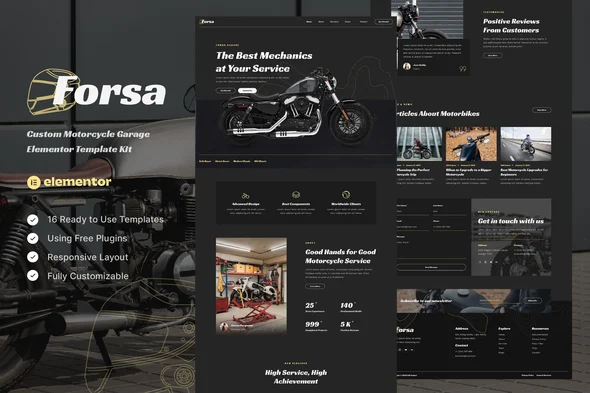
Forsa Custom Motorcycle Garage Elementor Template Kit Overview & Layout Delivery Role
Forsa Custom Motorcycle Garage Elementor Template Kit is an Elementor-based design package engineered for custom motorcycle workshops, repair garages, service centers, and motorcycle clubs to publish a production website without writing code. The package removes the layout-construction bottleneck by shipping twelve fully composed pages and sixteen reusable templates as importable design data rather than a complete WordPress theme. Within an agency delivery pipeline, it functions as a pre-built front-end layer that installs through the Template Kit Import plugin and renders entirely inside the Elementor builder environment.
Technical Specifications & Deployment Matrix
| Engineering Metric | Deployment Specification |
|---|---|
| Base Technology / Framework | Elementor 3.10.x page builder, distributed as an Envato Template Kit (design data only, not a theme) |
| Runtime / Language Requirements | WordPress with free Elementor plus ElementsKit Lite, MetForm, and Gum Elementor Addon; Elementor Pro is not required |
| Data Exchange / Communication Protocols | Kit ZIP imported via the Template Kit Import plugin; contact and newsletter submissions handled by MetForm blocks |
| Front-End / Engine Dependencies | Hello Elementor host theme, Flexbox Container feature enabled, permalinks set to Post Name; Chrome, Firefox, Safari, and Opera rendering support |
| Database / Persistence Footprint | No native persistence layer; imported layouts persist as Elementor Saved Templates reusable across pages |
Flexbox Layout Architecture & Template Import Pipeline
The kit operates as pure Elementor design data: each page ships as an importable layout structure rather than executable theme code. Installation begins by uploading the unmodified ZIP through Tools > Template Kits, where the orange requirements banner installs the dependent plugins before any layout data reaches the builder. The Global Kit Styles import executes first, pushing site-wide typography scales and color values into Elementor site settings so every subsequently imported template inherits identical design tokens without per-page overrides.
Individual templates then import sequentially in the listed order and persist under Templates > Saved Templates, where they act as reusable layout masters. Page assembly follows a repeatable pattern: a new page opens in the Elementor editor, switches to Elementor Full Width with the page title hidden, then pulls a saved template through the My Templates tab. The home route is bound under Settings > Reading by selecting a static front page. Site-wide chrome is dispatched separately — the header and footer templates load into the ElementsKit Header Footer module, scoped to Entire Site with activation toggled on, so every route renders consistent navigation without per-page assignment. For agencies running parallel client verticals on the same builder stack, Gedung- Contractor & Building Construction Elementor Template Kit supplies an equivalent layout foundation for construction-sector engagements.
Core Technical Capabilities of Forsa
- Global Design Token Layer: Global Kit Styles centralize typography and color definitions in Elementor site settings, so a single token update propagates across all twelve imported pages instead of requiring per-section edits.
- Flexbox Container Layout Engine: Templates are composed on Elementor’s Flexbox Container architecture, which must be set to Active under Elementor > Settings > Features before import for container-based structures to render correctly.
- Modular Form Architecture: Contact and newsletter capture runs through MetForm widgets; form block templates import independently, attach via the Navigator, and insert their field structures through the My Templates tab.
- Reusable Template Persistence: All sixteen templates are stored as Saved Templates, allowing the same header, footer, or section layout to be attached to unlimited pages without re-importing kit data.
Production Implementation & Operational Resilience
Pre-deployment prerequisites are strict but lightweight: the Hello Elementor theme must be activated, Elementor and the Template Kit Import plugin must sit at their latest versions, and permalink structure must be set to Post Name before import to guarantee stable route resolution. The downloaded kit archive must remain compressed — unzipping it breaks the importer’s expected payload. Safari users need the browser preference that opens safe files after downloading disabled, since automatic decompression corrupts the same payload. Because the kit carries no server-side execution layer, the operational footprint concentrates on the builder runtime; verify the host’s wp_memory_limit accommodates Elementor’s rendering of container-dense pages during multi-template import sessions.
If Elementor Pro is already connected, header and footer management moves to the Theme Builder and the MetForm installation step is skipped, since Pro’s native form blocks cover submission handling. As a static layout package, customization boundaries are confined to style overriding and asset replacement: design tokens are adjusted through the Elementor site settings panel, section spacing and typography through the visual editor, and demo imagery by direct replacement, because the bundled preview images originate from Envato Elements and require separate sourcing or substitution before client launch. For a separate IT-services client deployment on the same stack, HiTech – IT Solutions & Services Elementor Template Kit occupies the equivalent slot in an Elementor-based delivery workflow.
Frequently Asked Questions
Does Forsa require Elementor Pro to function?
No. All twelve pages render with the free Elementor builder alongside ElementsKit Lite, MetForm, and Gum Elementor Addon. Elementor Pro is optional; when present, headers and footers move to the Theme Builder and the MetForm installation step can be skipped entirely.
Is this package a WordPress theme?
No. It is an Envato Template Kit containing Elementor design data only. Layouts install through the Template Kit Import plugin or directly inside Elementor, while the Hello Elementor theme serves as the required lightweight host theme.
Must the Flexbox Container feature be enabled before importing?
Yes. The layouts depend on Elementor’s Flexbox Container experiment. Navigate to Elementor > Settings > Features and set Flexbox Container to Active, otherwise container-based layout structures will not render as designed.