Fodis – Restaurant & Cafe WordPress Theme
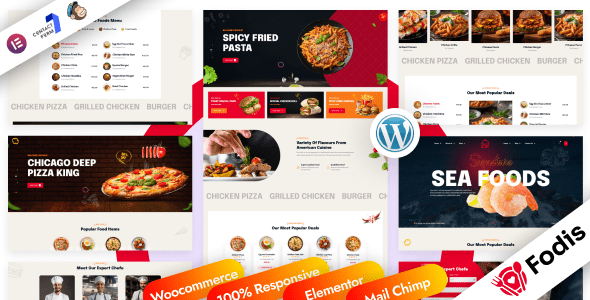
Fodis Restaurant & Cafe WordPress Theme Overview & Food-Business Presentation Layer
Fodis Restaurant & Cafe WordPress Theme is a multi-page WordPress theme built on the Underscores framework and a Bootstrap 5 grid system, engineered for restaurants, cafes, seafood venues, bakeries, bars, catering operations, and personal chef portfolios. The package resolves the bottleneck of assembling food-business sites from scratch by shipping prebuilt homepage layouts in dark and light versions, an Elementor-driven page-building pipeline, and a one-click demo import routine that replicates the reference environment inside a fresh WordPress install. Within agency delivery workflows, it operates as the presentation layer for menus, venue content, and WooCommerce 9.x storefronts, deployable across WordPress versions 5.0.x through 6.7.x.
Technical Specifications & Deployment Matrix
| Engineering Metric | Deployment Specification |
|---|---|
| Base Technology / Framework | Underscores starter framework; Bootstrap 5.x layout system on a 1170px grid |
| Runtime / Language Requirements | WordPress 5.0.x – 6.7.x; deliverables include PHP, HTML, CSS, Sass (SCSS), and JS files |
| Data Exchange / Communication Protocols | Contact Form 7 form submission handling; WooCommerce 9.x.x commerce layer |
| Front-End / Engine Dependencies | Elementor page builder; Font Awesome icon set; WOW JS and Animate CSS for viewport-triggered motion |
| Database / Persistence Footprint | Native WordPress schema; widget-ready regions registered through standard sidebar APIs; no custom tables |
Elementor Rendering Pipeline & Food-Service Layout Engine
The core mechanism routes every inbound request through the WordPress template hierarchy into Elementor’s rendering engine, which parses stored widget and section structures into a Bootstrap 5 column grid supporting four or more columns per row. Because page composition lives in Elementor data rather than hand-coded PHP templates, editors reorder menu sections, reservation blocks, and gallery areas without touching the underlying source files. The sticky header persists across scroll by anchoring the navigation node while the rest of the DOM scrolls beneath it, keeping order and booking entry points visible on long menu pages.
Styling is distributed through compiled CSS and SCSS source files, so a developer can recompile the stylesheet from token-level variables to shift the color combination across an entire multi-page site in one pass. Motion behavior is layered through CSS3 animations, with WOW JS deferring animated elements until they intersect the viewport and a text animation effect applying staged reveal timing to headline copy. Cross-browser output targets IE9 through IE11, Firefox, Safari, Opera, Chrome, and Edge, with responsive breakpoints adapting the layout for phones and tablets.
Architectural & Functional Highlights
- One-Click Demo Import Pipeline: A single import routine provisions the prebuilt homepage, inner pages, and widget assignments, collapsing a multi-day layout phase into a short staging operation that agencies can then diverge from.
- Dual Dark and Light Layout Architecture: Both visual modes ship as distinct demo variants, and the included SCSS layer lets a developer recompile palette tokens to recolor either mode sitewide instead of editing individual rules.
- Elementor-Backed Composition: Layouts are assembled through the bundled page builder engine, decoupling visual structure from PHP template files and allowing non-developer staff to modify sections under role-based editor permissions.
- Widget-Ready Regions and Icon System: Registered widget areas accept standard WordPress widgets, while Font Awesome supplies the iconography without additional font licensing overhead.
- Well-Commented Source Tree: PHP, SCSS, and JS files ship with inline commentary plus detailed documentation, reducing onboarding time when a second developer inherits the codebase mid-project.
For studios weighing a kit-only production path that bypasses PHP theme templating altogether, Wellfood exists as an independent Elementor Pro Template Kit covering fast-food layouts — a parallel design route rather than a module that can be merged into this theme’s codebase.
Production Implementation & Operational Resilience
In client staging environments, the recommended sequence is a fresh WordPress install, plugin activation, then the one-click demo import before content divergence begins, since importing over partially edited pages can produce duplicated section nodes. The import payload and Elementor rendering both benefit from adequate PHP memory headroom on shared hosting, and form handling routes through Contact Form 7’s validation layer, which rejects malformed submissions before they reach the mail transport. Where a brief drifts toward bistro or fine-dining aesthetics rather than cafe presentation, Martinoz stands as a separate standalone restaurant theme with its own layout set, selectable at the project-planning stage rather than retrofitted.
For venues migrating existing menu catalogs into the WooCommerce 9.x layer, deploying WP All Import Pro lets teams map CSV or XML product feeds into the menu-item post structure without hand-entering each dish, which matters when a client arrives with hundreds of priced SKUs. Secondary development on this package stays within conventional boundaries: style overrides should be compiled from the SCSS layer rather than patched into the minified output, and section-level changes belong in Elementor rather than in template file edits, keeping the upgrade path intact when theme updates arrive, as with the version 1.0.1 revision that adjusted the banner widget, refreshed the core plugin, and corrected a stylesheet defect.
Two operational boundaries deserve pre-deployment attention. First, the package is not Gutenberg-optimized, so block-editor-native workflows are out of scope and page assembly should remain in Elementor. Second, all demo images and video are Freepik-sourced placeholders used purely for preview and are absent from the download bundle, meaning every visual asset must be replaced with client-owned media before a production launch.
Frequently Asked Questions
Are the demo images and videos included in the downloadable package?
No, all preview imagery and footage are licensed placeholder media used only for demonstration purposes and are excluded from the download bundle; production deployments must substitute venue-owned photography and video assets before launch.
Can page layouts be built with the native WordPress block editor?
No, the theme is explicitly not Gutenberg-optimized; its page composition pipeline runs through the Elementor page builder engine, and all section assembly, reordering, and styling adjustments are expected to occur within that environment.
Does the theme support online ordering through WooCommerce?
Yes, compatibility is declared for WooCommerce 9.x.x alongside Contact Form 7, so menu items can be cataloged as products and checkout flows can operate within the theme’s Bootstrap 5 responsive layout framework.