Fill and Sign PDF Document – Easy PDF Do – PDF Editor – Sign PDF Forms – Sign Doc – PDF Sign Easy
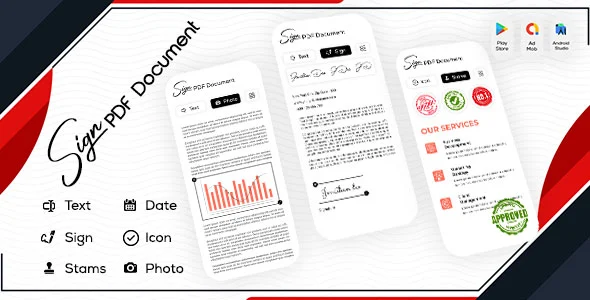
Fill and Sign PDF Document Overview & Mobile Document Workflow Engine
Fill and Sign PDF Document is a native Android application source package, engineered for mobile developers and agencies that need a deployable PDF editing and e-signature product without assembling an editor from scratch. The codebase targets the operational bottleneck of filling, signing, and submitting forms from a handheld device, replacing desktop-bound document workflows with on-device text, image, date, and stamp placement directly over PDF pages. Within a production delivery pipeline, the package operates as a rebrandable Android codebase spanning Java sources, compiled DEX bytecode, native .so libraries, SQLite persistence, and layered design assets prepared for client customization and store submission.
Technical Specifications & Deployment Matrix
| Engineering Metric | Deployment Specification |
|---|---|
| Base Technology / Framework | Native Android application, Java sources (.java) with XML layout and manifest definitions |
| Runtime / OS Requirements | Android 9.0, 10.0, 11.0, 12.0 and compatible releases |
| Data Exchange / Communication | On-device file I/O, camera and gallery image ingestion, PDF output, share dispatch via email intents |
| Front-End / Engine Dependencies | Android View layer, DEX bytecode (.dex), native shared libraries (.so), packaged data files (.dat) |
| Database / Persistence Footprint | Local SQLite database (.db) plus device storage for generated PDFs and saved signatures |
Signature Lifecycle & Document Editing Pipeline
The core mechanism is a signature lifecycle in which signatures are captured once, persisted locally, and reused across multiple documents. When a user first launches the signing module, the application renders a capture surface where a handwritten signature is drawn or an existing signature image is selected from the device gallery; the resulting asset is serialized into local storage and indexed for later retrieval. From that point onward, any imported PDF can receive the stored signature repeatedly — multiple placements per document are supported — alongside independent overlay elements that the editor composites onto the page geometry.
The inbound document path accepts existing PDFs as well as raw images pulled from the camera or gallery. Captured photos pass through a cropping stage before being converted into PDF pages, which allows field-technician workflows (photographed contracts, receipts, ID scans) to enter the same editing pipeline as native PDFs. Each overlay object — text, icon, image, date, or stamp — is positioned freely on the page and can be resized, giving the editor pixel-level placement control without requiring a desktop-class editing suite.
Core Technical Capabilities of Fill and Sign PDF Document
- Persistent Signature Store: Signatures are written to device-local storage on first creation and recalled for every subsequent document, and a single form accepts multiple signature placements drawn from the saved inventory.
- Multi-Source PDF Generation: The camera and gallery importers convert cropped images into PDF pages in-app, removing the need for a separate scanner utility in the workflow.
- Typed Annotation Engine: Users create multiple reusable text objects, manage them from a consolidated list, assign per-object colors, and place each entry anywhere on the document canvas.
- Date Formatting Library: More than fifteen date-format templates are bundled, letting each inserted date match jurisdictional or contractual formatting conventions with a single selection.
- Stamp Library: Over twenty-five predefined stamps — including Approved, Certified, PAID, Rejected, and Best Seller variants — can be applied to a page in one click and repositioned as needed.
Completed documents land in a managed registry: a file list surfaces every generated PDF with rename, share, and delete operations, so output governance stays inside the app rather than requiring an external file manager. For teams evaluating standalone Android utilities in adjacent document-media categories, the Gallery App represents a parallel native-codebase approach to on-device media editing. Developers extending this architecture will find the icon placement module follows the same positioning-and-render path as text and stamps, which keeps custom overlay types straightforward to add at the Java layer.
Production Implementation & Operational Resilience
Deployment begins with the bundled APK for direct device testing on Android 9 through 12 hardware, after which the Java and XML sources are imported into an Android build environment for recompilation. The package ships with DEX bytecode, native .so shared libraries, .dat data files, and a SQLite .db file, so a full rebuild requires the Android SDK toolchain rather than external server infrastructure — the entire pipeline executes on-device with no backend dependency. Runtime resilience rests on local persistence: because signatures and generated documents live in device storage, the editor continues functioning in offline field conditions where connectivity is unavailable, and email-based sharing is dispatched only when the user explicitly triggers an export.
Storage and camera permissions govern the import pipeline; the gallery and camera ingestion paths require standard Android runtime permission grants, and the cropping stage operates on the captured bitmap before PDF serialization. Customization boundaries are well defined: UI reskinning is handled through the included Layered PSD and Layered PNG design sources, while behavioral changes such as new date templates or additional stamp assets are compiled changes at the Java and resource layer rather than configuration toggles. The SQLite footprint remains small, storing signature records and document-list metadata rather than page bitmaps, which keeps the .db file proportional to document count. For studios sourcing additional standalone Android product lines for client catalogs, AI Live Transcribe Speak with AdMob Facebook Ads Android illustrates a comparable full-source-code delivery model in the speech domain. Pre-deployment validation should cover the minimum OS target (Android 9.0), signature placement accuracy across varied page sizes, and the share-intent handoff to installed email clients on each target device profile.
Frequently Asked Questions
Can multiple signatures be placed on a single document?
Yes. The application stores created signatures in local storage and permits adding multiple signature placements onto one PDF, so a form requiring several signatories or repeated initials can be completed without re-capturing.
Can the device camera capture pages and convert them into a PDF?
Yes. Images selected from the camera or the gallery pass through an in-app cropping step and are then converted into PDF pages, entering the same editing and signing pipeline used for imported documents.
Are layered design source files included for UI reskinning?
Yes. The deliverable contains Layered PSD and Layered PNG assets alongside the Java, XML, and compiled binaries, allowing design teams to rework the visual identity before a branded store build.
Does the package include a prebuilt APK for immediate device testing?
Yes. An APK file ships with the source bundle, so the application can be sideloaded and evaluated on Android 9 through 12 hardware before any recompilation of the Java sources is undertaken.