FileBird – WordPress Media Library Folders & File Manager – WordPress plugin Proven
Product Overview
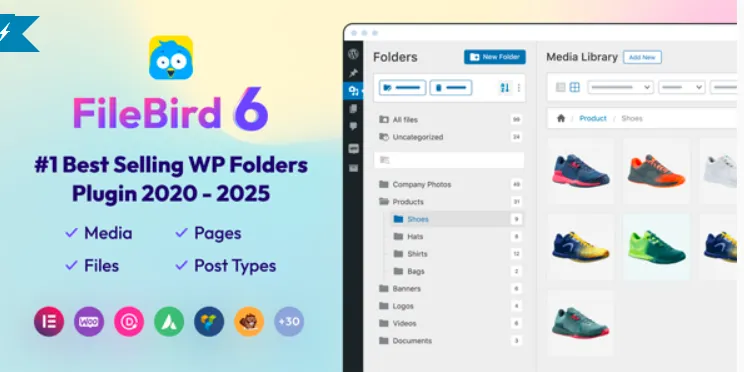
FileBird WordPress Media Library Folders is a WordPress media management plugin created for users who need a more structured way to organize images, videos, documents, and uploaded files. It is especially useful for websites with large media libraries, including blogs, online stores, agency websites, educational platforms, and content-driven projects where finding files quickly becomes difficult.
The plugin adds a folder panel to the left side of the WordPress Media Library, creating a familiar file manager experience directly inside the dashboard. Instead of scrolling through hundreds or thousands of uploads, users can create folder structures and move media items with drag-and-drop actions. FileBird – WordPress Media Library Folders introduces this organization layer without changing the actual file paths stored on the server.
Highlights & Value
- Drag-and-drop folder management inside the Media Library.
- Create unlimited folder structures for different content types.
- Bulk move files between folders.
- Search and filter media within selected folders.
- Supports images, PDFs, videos, and other uploaded files.
- Tree-style navigation panel for easier browsing.
- Works with both grid and list media views.
WordPress Media Library Folders becomes particularly useful when managing websites that publish content regularly. During testing, the folder tree remains visible while browsing files, making it easy to switch between categories such as blog images, product galleries, downloadable documents, and marketing materials. The layout feels similar to desktop file management systems, which reduces the learning curve for editors and content managers.
Large media collections can become difficult to maintain over time. The plugin allows multiple files to be selected and moved into folders at once, reducing repetitive actions. Search results can also be narrowed within a specific folder, helping users locate assets without sorting through unrelated uploads. FileBird appears naturally within the existing Media Library interface rather than introducing a completely separate management screen.
Real-World Use Cases
- Organizing WooCommerce product images by category.
- Managing downloadable PDFs for membership websites.
- Separating client assets on agency-managed projects.
- Structuring course materials on learning platforms.
- Grouping blog graphics by content category.
- Maintaining media libraries with thousands of files.
FileBird – WordPress Media Library Folders is particularly helpful for ecommerce websites where product photography accumulates rapidly. Store managers can create dedicated folders for product categories, seasonal campaigns, banners, and promotional materials. This organization becomes valuable when updating products or replacing media assets during sales events.
Content publishers may benefit as well. Editorial teams often work with featured images, downloadable resources, screenshots, and social media graphics simultaneously. WordPress Media Library Folders allows these assets to remain separated while still being available through the standard WordPress media selection window used by posts, pages, and page builders.
Technical & Compatibility
The plugin integrates directly into the native WordPress Media Library and supports both grid view and list view layouts. Folder navigation appears alongside existing media controls, ensuring that editors can continue using familiar upload and selection workflows. FileBird works without requiring changes to existing uploaded content, allowing established websites to organize files after years of accumulated media uploads.
Compatibility with common WordPress workflows is one of its practical advantages. Media folders remain accessible while editing posts, building pages, or selecting images from supported plugins. The folder structure helps reduce clutter without affecting the underlying attachment records stored by WordPress.