FForce Game Booster 4X Faster with AdMob Ads Android
FForce Game Booster Overview & Android Performance Orchestration Architecture
FForce Game Booster is a native Android application source package built in Java with XML Material Components, engineered for mobile publishers and indie studios to ship a game optimization, launcher, and monetization utility on Google Play. The codebase addresses two recurring production bottlenecks: fragmented game discovery across device home screens and unmanaged CPU, RAM, and storage allocation during gameplay. Within an agency delivery pipeline, the package operates as a rebrandable foundation — monetized through AdMob and Facebook ad networks and compilable for hardware ranging from Android 6.0 up to Android 16.
Technical Specifications & Deployment Matrix
| Engineering Metric | Deployment Specification |
|---|---|
| Base Technology / Framework | Native Android application, Java language runtime |
| UI Layer | XML layouts built on Material Components |
| SDK Floor | Minimum SDK API 23 (Android 6.0) |
| SDK Ceiling | Target SDK API 36 (Android 16) |
| Verified OS Range | Android 9.0 through Android 15.0 device families |
| Monetization Layer | AdMob and Facebook ad network integration |
| Persistence Footprint | No external database; reads runtime CPU, RAM, storage, and signal telemetry |
Resource Mode Engine & Game Launch Execution Pipeline
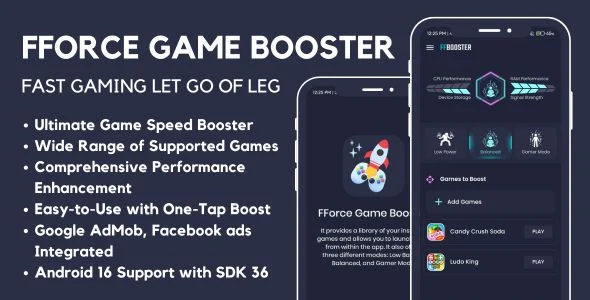
The core mechanism is a mode-dispatch engine that reconfigures device resource behavior before a game process starts. On initialization, the application queries the Android package manager to enumerate installed game titles and aggregates them into an in-app library, replacing manual home-screen navigation with a single management surface. A user selects one of three operational profiles — Low Battery, Balanced, or Gamer Mode — and taps the play control on a chosen title. The engine applies that profile’s parameter changes to system state and hands execution to the target game through a launch intent; a swipe gesture triggers the same handoff as an alternate entry path. A monitoring layer runs alongside this flow, sampling CPU usage, RAM utilization, and storage readings and rendering them as on-screen statistics so the user can verify device condition before and during play.
Core Technical Capabilities
- Three-mode optimization engine: Low Battery, Balanced, and Gamer Mode profiles map distinct resource-allocation strategies to different usage scenarios, letting one binary serve both battery-conscious and performance-focused audiences without separate builds.
- Unified game library launcher: Package-manager enumeration collects installed titles into one library, and the launch-intent path opens any game with a single tap — no per-game configuration or title whitelisting is required.
- Real-time telemetry dashboard: CPU load, RAM consumption, storage state, and signal levels surface as live statistics, giving users measurable feedback rather than opaque boost claims.
- Dual-network ad layer: AdMob and Facebook placements are wired into the interface, so revenue generation is active from the first build without writing mediation logic from scratch.
- Gesture-based launch path: The swipe launch action applies the selected mode’s changes and starts the game in one motion, compressing the optimization workflow into a single interaction.
For teams comparing parallel Android utilities that add graphics-parameter tuning on top of resource management, Pro Game Booster stands as a separate standalone alternative and cannot be merged into this package’s launch pipeline.
Production Implementation & Operational Resilience
Deployment begins by importing the Java and XML sources into Android Studio, where the Gradle configuration pins minimum SDK 23 and target SDK 36. That ceiling matters for store distribution: builds compiled against API 36 satisfy current Android 16 platform requirements, while the API 23 floor keeps the installable base open to Android 6.0 hardware. Rebranding work stays confined to the XML Material Components layer — colors, typography, and layout structure can be restyled without touching the Java dispatch logic — and ad rollout requires substituting the placeholder network identifiers with the publisher’s own AdMob and Facebook credentials.
Operational boundaries are equally concrete. The monitoring layer is read-only telemetry: it reports CPU, RAM, storage, and signal values but does not generate synthetic benchmark scores, and optimization changes are applied at launch time rather than through persistent background services. Error paths therefore remain shallow — a missing game entry simply fails to resolve a launch intent, and mode changes take effect through the documented sequence of select, tap, apply. For publishers assembling a multi-title monetized portfolio on this toolchain, Puzzle Block Jewel V6 offers a separate Android Studio game template carrying its own ad-integration pattern, usable as a sibling release rather than an extension of this codebase.
Frequently Asked Questions
Does the package include a compiled, install-ready APK in addition to the editable source files?
Yes. The deliverables contain an .apk binary for direct device installation and evaluation alongside the raw .java and .xml sources, so runtime behavior can be verified before any customization work begins.
Does the codebase depend on Flutter, React Native, or any cross-platform runtime?
No. The application is written entirely in Java with XML Material Components layouts, so builds require only Android Studio and the standard Android SDK — no Dart, JavaScript, or platform-bridging layer is involved.
Do target games need modification before they can be launched or optimized?
No. The launcher enumerates installed titles through the package manager and starts them via standard launch intents, which is why the documentation describes compatibility with a wide range of games without per-title integration work.
Does the telemetry dashboard report network signal strength as well as CPU and RAM?
Yes. The monitoring statistics cover CPU usage, RAM utilization, storage state, and signal levels, giving users a four-signal view of device health during and between gaming sessions on supported devices.