Ferme – Food Farm Ecommerce WordPress Theme
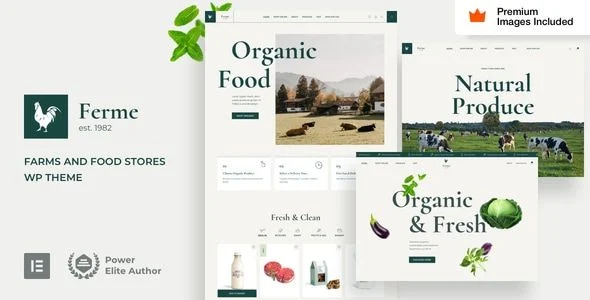
Ferme Food Farm Ecommerce WordPress Theme Overview & Architectural Role
Ferme Food Farm Ecommerce WordPress Theme is a WooCommerce storefront theme engineered for farm shops, butchers, grocers, and organic food producers who need a production ecommerce site running on WordPress 6.0.x through 7.0.x. It targets a specific architectural bottleneck: most marketplace themes claim Elementor Pro compatibility while still shipping legacy theme-options panels and shortcode-based templates, whereas this codebase is assembled natively from Elementor Pro widgets and inherits its configuration model. Within agency delivery workflows, the package functions as the presentation and commerce layer for meat, dairy, vegetable, and grocery catalogs across desktop, tablet, and mobile viewports.
Technical Specifications & Deployment Matrix
| Engineering Metric | Deployment Specification |
|---|---|
| Base Technology / Framework | WordPress 7.0.x, 6.9.x, 6.8.x, and 6.0.x; WooCommerce 9.x.x and 10.x.x |
| Runtime / Language Requirements | PHP files, CSS files, Less files, and JavaScript files; Gutenberg-optimized output |
| Page Builder Engine | Elementor and Elementor Pro (Pro is required for the demo content importer and theme setup) |
| Interoperability Layer | WPML multilingual support, Facebook integration, and RTL stylesheet handling |
| Browser / Device Matrix | Responsive high-resolution layout verified on Firefox, Safari, Chrome, and Edge |
| Persistence Footprint | Standard WordPress and WooCommerce database tables; no custom schema is documented in the package |
Elementor Pro Rendering Pipeline & Commerce Capabilities
Every page renders through the Elementor Pro engine instead of through bundled template shortcodes. Inbound requests traverse the standard WordPress template hierarchy, then defer layout decisions to stored Elementor Pro widget structures that the theme code extends with additional styles and animations. Because that extension layer never replaces native widgets, page builder updates propagate through existing layout data without triggering structural breakage — the documented trade-off being that a valid Elementor Pro installation is a hard prerequisite for the demo importer and the initial setup routine.
Configuration is consolidated into the Elementor Pro Global Styles panel, which replaces the conventional theme-options screen and controls typography, color tokens, and responsive breakpoints. Header and footer regions, mega menus, forms, and pop-ups are all constructed with Elementor Pro, so per-device layouts are adjusted through the builder’s tablet and mobile controls with customized breakpoints rather than through a parallel administrative interface. Dynamic content layouts — including product listings, blog posts, blog and product archives, 404 pages, a maintenance mode page, a coming soon mode page, and search results — are likewise generated as Elementor Pro dynamic templates, which keeps archive rendering consistent with single-page design decisions.
Commerce templates receive the same treatment: the Elementor Pro WooCommerce builder governs the design of product pages, product archives, the my-account area, cart, checkout, and the side cart. The codebase then layers three functional extensions onto WooCommerce — a wishlist, Ajax Search, and gift cards — so standard catalog operations gain engagement and merchandising behavior without the plugin clutter that typically accompanies those features. For agencies standardizing retail deliveries across verticals, this niche farm storefront sits alongside a parallel option on the same runtime, Mr.Bara – Responsive Multi-Purpose eCommerce WordPress Theme, which covers multi-purpose catalog structures where a generalized layout system is preferred over a vertical-specific one.
Architectural & Functional Highlights
- Native Elementor Pro Construction: The theme’s PHP, CSS, Less, and JS files only extend Elementor Pro widgets, producing a unified builder workflow and reducing the compatibility surface that typically degrades when major builder versions ship.
- Delegated Dynamic Layouts: Products, blog posts, archives, error pages, maintenance and coming-soon modes, and search results are rendered as Elementor Pro dynamic content layouts, keeping template logic inside the builder rather than split across theme files.
- End-to-End WooCommerce Builder Coverage: Product detail pages, archives, account, cart, checkout, and side cart are all editable in the WooCommerce builder, allowing merchandising changes without template file overrides.
- Smart Commerce Extensions: Wishlist, Ajax Search, and gift card functionality extend WooCommerce directly from the package, cutting the number of third-party plugins needed for a standard food-store launch.
- Selective Code Deactivation: The theme code can be removed on a widget-by-widget basis, letting developers strip unused extension logic and shrink the rendered asset payload where a leaner page is required.
Production Implementation & Operational Resilience
The runtime dependency set is deliberately minimal: WordPress, Elementor, Elementor Pro, and WooCommerce. That constraint reduces plugin conflict potential and simplifies client handover, since there is no proprietary options panel to learn before editing content. Version maintenance is handled through a documented update procedure paired with a public changelog, so teams can audit what changes between releases before applying them to a live storefront.
Localization and display resilience are covered at the stylesheet level: RTL support is built in, and WPML compatibility allows multilingual farm catalogs where produce, dairy, and meat listings must exist in several languages simultaneously. High-resolution assets and responsive behavior are verified across Firefox, Safari, Chrome, and Edge, which keeps layout stability predictable across the browser matrix that food-retail traffic typically spans.
Demo deployment is accelerated by the inclusion of the premium stock photography shown on the demo website; the imagery ships inside the demo content, so an imported staging environment matches the reference design immediately and project teams can defer sourcing replacement photography until after launch. Onboarding is supported by 23 HD WordPress video tutorials aimed at beginners, which shortens the knowledge transfer cycle when a client’s internal staff will manage the store post-delivery. To surface Instagram-published harvest and product photography inside widget areas without writing custom endpoint code, activating Instagram Feed Pro WordPress Plugin – Smash Balloon adds feed presets and filtering on the same WordPress runtime.
Frequently Asked Questions
Does Ferme include a separate Theme Options panel that clients must learn before editing?
No — the Elementor Pro Global Styles panel serves as the central configuration surface for typography, colors, and breakpoints, so the only required stack is WordPress, Elementor, Elementor Pro, and WooCommerce.
Can the theme’s widget extension code be disabled on individual widgets?
Yes — the package exposes a removal option on a widget-by-widget basis, allowing developers to deactivate theme-generated code where it is unnecessary and reduce the JavaScript and CSS footprint of the rendered page.
Are the photographs visible on the demo website delivered through the demo content import?
Yes — the premium stock imagery included with the package ships with the demo content, so imported pages match the reference demo and existing imagery can be carried into production projects without sourcing replacement assets first.
-
v48.0 LatestOct 24, 2026