FastClock – React Native CLI eCommerce Mobile App Template
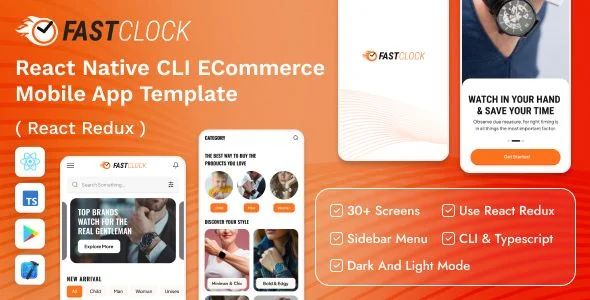
FastClock React Native eCommerce Mobile App Template Overview & Native Storefront Foundation
FastClock React Native CLI eCommerce Mobile App Template is a TypeScript-oriented React Native codebase built for mobile developers and agencies delivering watch-store applications on iOS and Android. The package removes the ground-up construction of commerce interfaces by supplying 30+ prebuilt screens and 15+ components already wired into a Redux state layer and a React Navigation 6 routing stack. Within production workflows, it functions as the front-end foundation that teams reskin, connect to a commerce API, and compile through standard Xcode and Android Studio release pipelines.
Technical Specifications & Deployment Matrix
| Engineering Metric | Deployment Specification |
|---|---|
| Base Technology / Framework | React Native CLI with TypeScript-oriented JavaScript source |
| Runtime / Platform Targets | iOS 12 through iOS 15; Android 9.0 through Android 12.0 |
| State Management | React Redux store with action/reducer dispatch pipeline |
| Navigation & Animation Engines | React Navigation 6; React Native Reanimated; Gesture Handler |
| Native Deliverables | JavaScript, JSON, XML resources, .java sources, Gradle build files, .plist configuration |
| Typography Assets | Plus Jakarta Sans, Oswald, and Roboto font families |
Redux-Driven Storefront Pipeline & Screen Execution Flow
FastClock routes commerce interactions through a central Redux store that feeds React Navigation 6 transitions. User actions fired on product cards, pricing layouts, and profile screens dispatch typed actions into reducers; the updated store slices then trigger re-renders across the component tree while the navigation stack pushes or pops routes in response. The result is a predictable, single-direction data flow in which UI state, cart context, and session data remain synchronized without prop-drilling through nested screen hierarchies. Animation work is delegated to React Native Reanimated in combination with Gesture Handler, which executes transition math on the native UI thread so that gesture-driven motion does not block JavaScript event processing. Swiper, Tab View, raw bottom sheets, collapsible sections, vector icon sets, SVG rendering, chart kit visualizations, and dedicated sound and video modules extend the presentation layer without requiring additional architecture, and the codebase ships login and register flows alongside a structured user profile layout.
Agencies producing a parallel browser-based storefront under a separate delivery track can evaluate Stroyka as an independent Next.js web alternative outside the native mobile toolchain.
Core Technical Capabilities of FastClock
- Dual-theme rendering pipeline: Light and dark mode are implemented as switchable theme contexts, allowing color tokens to propagate across all 30+ screens without duplicating layout code.
- Layout variant system: Multiple header styles, bottom navigation styles, and pricing layouts let teams select presentation patterns per screen while reusing the same underlying component logic.
- Reusable component inventory: Accordion elements, input fields, buttons, cards, and 15+ composed components are built for extraction and reuse across new screens.
- Readable, structured source: The codebase is organized for straightforward comprehension, with modular sections that shorten onboarding time before client-specific customization begins.
Production Implementation & Operational Resilience
Deployment begins with the included native project artifacts: Gradle files and .java sources drive Android Studio builds, while .plist entries and project configuration control iOS packaging inside Xcode. Engineers should align local toolchains — Node runtime, JDK, and the Android SDK — with the documented platform floor of Android 9.0 and iOS 12 before generating release binaries, since mismatched SDK targets are the most common cause of first-build failures in React Native CLI projects. Because the template is a front-end deliverable, teams retain responsibility for wiring REST endpoints and JSON serialization against their own commerce backend; no server or database ships inside the package, which keeps the payload focused on interface logic. Customization boundaries are well defined: typography swaps operate through the bundled Plus Jakarta Sans, Oswald, and Roboto assets, theming flows through the theme context, and screen composition reuses the documented component set rather than requiring structural rewrites. Media handling stays native as well, with sound and video modules managing playback through platform bridges. For back-office work decoupled from the mobile client, teams can adopt Konrix as a standalone React admin dashboard path for catalog and order oversight.
Frequently Asked Questions
Does the template ship with both light and dark mode implementations?
Yes, dual light and dark mode is a documented feature, implemented so theme contexts propagate color tokens across the full screen library without requiring duplicate layout code for each appearance mode.
Are native Android and iOS project files included in the download package?
Yes, the deliverables include .java sources and Gradle build files for Android plus .plist configuration and XML resources for iOS, enabling direct compilation through Android Studio and Xcode without scaffolding a fresh native shell.
Is the codebase written with TypeScript?
Yes, TypeScript is listed among the package’s technology tags, meaning component props, state shapes, and Redux payloads can be typed during customization to catch integration errors at compile time.
Can header and bottom navigation styles be changed without rebuilding screens?
Yes, the package documents multiple header styles and multiple bottom navigation styles as selectable variants, allowing teams to swap presentation patterns per screen while the underlying page components and routing logic remain intact.