Exhibz | Event Conference WordPress Theme (AI Powered)
Exhibz: Technical Overview & Core Architecture
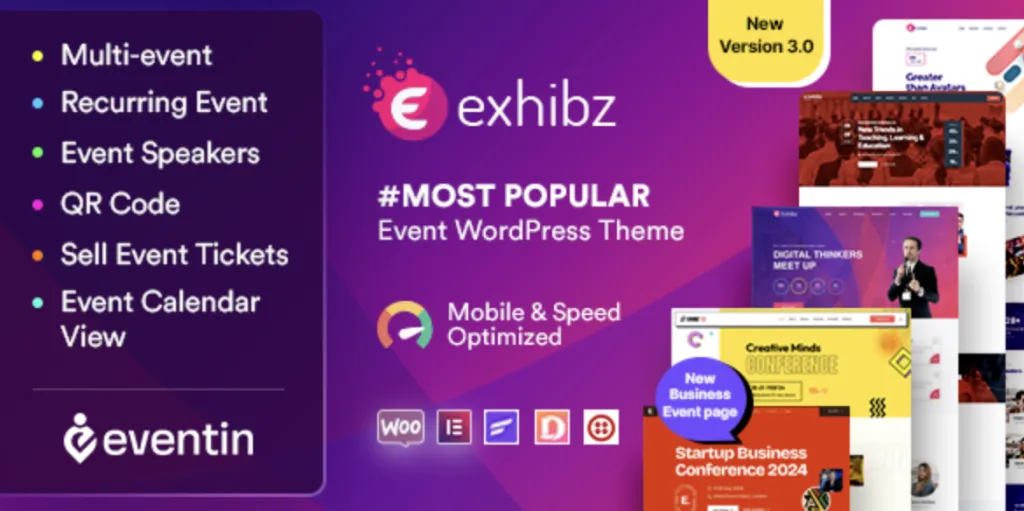
Exhibz | Event Conference WordPress Theme (AI Powered) delivers an event coordination framework engineered specifically for technical summits, industry conventions, and academic congresses. The core architecture uses modular post types to decouple conference sessions, speaker bios, and venue locations, preventing repetitive database queries during timetable rendering. Front-end schedule tabs execute via lightweight asynchronous JavaScript calls, swapping daily speaker sessions without triggering browser document refreshes.
Layout composition relies on Elementor along with custom theme widgets, giving conference organizers visual canvas editing capabilities without hardcoded template constraints. From the administrative dashboard, event managers configure multi-day session agendas, ticket tiers, and countdown clocks through organized customizer controls and dedicated metabox panels.
Key Functional Features of Exhibz for Modern Deployments
- Multi-Track Schedule Management: Exhibz integrates multi-track schedule tabs that render parallel seminar sessions, displaying speaker thumbnails, room numbers, and time intervals in accessible CSS grid tables.
- Speaker Profile and Session Binding: Custom post taxonomies bind individual keynote speakers directly to their scheduled time slots, generating bidirectional links between speaker index pages and calendar agendas automatically.
- Integrated WooCommerce Ticket Pass Funnels: Conference ticketing modules embed custom pricing tables that connect directly to WooCommerce checkout flows, handling seat quotas and pricing variations without external gateway plugins.
- Synchronized Countdown and Micro-Interaction Modules: Event landing headers deploy hardware-accelerated JavaScript timers to display real-time countdown clocks, maintaining accurate local time calculations across client browsers.
Real-World Deployment Scenarios
- Global Developer and Tech Summits: Organizing committees deploy parallel agenda tracks across multi-day conferences, providing attendees with real-time room filtering and downloadable calendar files.
- Medical and Academic Research Congresses: Institutions present complex abstract presentation schedules, where deploying a purpose-built event conference WordPress theme ensures responsive schedule browsing across attendee smartphones.
- Corporate Product Expos and Trade Fairs: Commercial event teams configure interactive exhibitor directory grids, floor plans, and tiered ticket checkout workflows to monetize conference registrations efficiently.
Technical Architecture & Compatibility Standards
Under production workloads, Exhibz isolates schedule script execution by enqueuing timetable libraries only when conference blocks exist on the active template. As a dedicated event conference WordPress theme, the codebase structures custom post types to comply with PHP 8.0, 8.1, and 8.2 execution standards, preventing deprecated function notices during high-concurrency registration spikes. Critical stylesheet compilation eliminates render-blocking assets to maintain First Contentful Paint metrics within recommended Core Web Vitals thresholds.
The responsive grid engine handles viewport scaling across breakpoints at 1200px, 992px, 768px, and 480px. Built-in template actions ensure full operational compatibility with WooCommerce, WPML for multi-language event listings, Contact Form 7, and Redis server-level object caching.
Frequently Asked Questions
Does the schedule engine support multi-track sessions taking place simultaneously?
Yes, the schedule module supports parallel session tracks organized by hall or topic. Organizers assign sessions to specific rooms and time blocks, which the front-end layout renders in multi-column grid tabs.
How does ticket purchasing connect with native payment gateways?
Ticket tiers integrate directly with WooCommerce product types. Customers select ticket quantities on the event landing page and proceed through standard WooCommerce checkout funnels with any configured payment gateway.
Can organizers display speakers without manually creating separate individual pages?
Yes, the speaker module supports both standalone profile pages and modal popup previews. Selecting a speaker card opens a lightbox overlay with biography details and assigned sessions without navigating away from the agenda.
-
3.0.14 LatestSeptember 28, 2026