Eventor – Meetup Conference WordPress Landing Page
Eventor Meetup Conference WordPress Landing Page Overview & One-Page Event Delivery Architecture
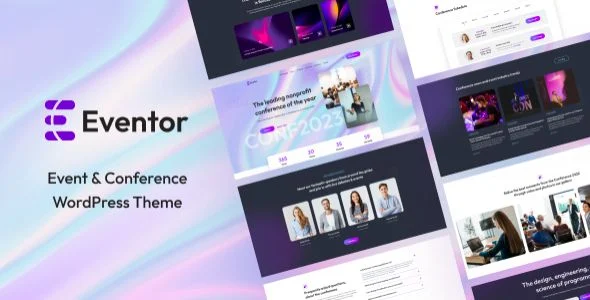
Eventor Meetup Conference WordPress Landing Page is a WordPress theme engineered for event organizers and digital agencies to publish meetup, conference, expo, festival, and concert sites without writing custom code. The package solves a recurring delivery bottleneck: assembling speaker profiles, timetables, pricing tiers, and ticket purchase flows into a single responsive one-page layout that renders consistently across ten browser targets. Within production workflows, it operates as a deployable front-end layer that installs on standard WordPress, seeds content through one-click demo import, and delegates layout control to Elementor widgets and the native Customizer.
Technical Specifications & Deployment Matrix
| Engineering Metric | Deployment Specification |
|---|---|
| Base Technology / Framework | WordPress theme built on Bootstrap 5.x with W3C-valid HTML5/CSS3 markup |
| Runtime / Language Requirements | WordPress 5.5.x through 7.0.x; PHP, CSS, and JS source files delivered in the package |
| Front-End / Engine Dependencies | Elementor page builder, WooCommerce 5.x through 10.x, WPML multilingual stack, Contact Form 7 |
| Browser Compatibility | IE10, IE11, Firefox, Safari, Opera, Chrome, and Edge |
| Layout & Resolution | Responsive layout with high-resolution assets, 4+ column grids, and widget-ready footer regions |
Elementor Widget Pipeline & Event Content Execution Flow
Eventor composes its one-page layout through a suite of Elementor custom widgets, each mapped to dedicated template partials in the theme hierarchy.
When a visitor requests the landing URL, WordPress resolves the template hierarchy and the page builder streams section-level markup for the Slider, Event Info, Event Videos, About, Speakers, Testimonials, Pricing Table, FAQs, Gallery, Contact, News, Plans, and Subscription blocks. Because the builder writes these structures rather than locking them into fixed templates, agencies can reorder, remove, or duplicate sections while the underlying PHP partials continue to supply validated markup, enqueue assets, and honor the responsive breakpoint grid defined by the Bootstrap 5.x front-end layer.
Global presentation state is synchronized through the WordPress Customizer rather than scattered builder panels. Post-level parameters such as excerpt length, read-more label, pagination text, and sticky label are set once and inherited across blog output. Header behavior — including the transparent variant, custom logo, navigation menu, and call-to-action buttons — is configured in the same panel, alongside global Google Fonts assignments for heading and body typography plus footer widget display and copyright text controls. Teams that prefer a kit-based build path instead of a PHP template hierarchy can adopt Eventapro as a standalone Elementor Pro kit for event and conference sites, since kits import as design packages without theme-level template overrides.
Architectural & Functional Highlights
- Custom Elementor widget suite: Fourteen dedicated widgets — from the Slider through the Pricing Table to the Subscription form — encapsulate each event section’s markup generation, letting non-technical editors assemble page structures entirely within the builder canvas.
- WooCommerce ticket commerce: Event ticket purchase flows run through the WooCommerce engine, inheriting its order lifecycle, checkout validation, and template system while remaining decoupled from any single payment processor.
- Dual dark and light design variants: Both visual modes ship as first-class designs rather than CSS overrides, allowing the same content payload to render under two palettes without rebuilding sections.
- RTL and multilingual handling: Right-to-left support was added in version 1.0.6, and WPML compatibility enables translated content trees, which matters for international conferences serving mixed-direction locales.
- Low plugin dependency: The theme runs on basic free plugins, reducing the update surface and plugin-conflict risk that typically accumulates in page-builder event stacks.
Production Implementation & Operational Resilience
Deployment begins with a one-click demo import that seeds speakers, schedules, and pricing structures, after which the Customizer and builder widgets take over iteration. A child theme ships with the package, so template overrides and function additions survive parent updates across the release cadence documented in the changelog. Version 1.2.1 tested the codebase against WordPress 6.6.2, refreshed outdated WooCommerce templates, updated required plugins, and resolved PHP version compatibility issues — signals that maintenance is aligned with current core releases.
Runtime resilience features include a sticky menu for long-scroll landing pages, an offcanvas drawer for mobile navigation, cross-browser rendering verified from IE10 through Edge, and a preloader disable option introduced in 1.0.9.2 to speed up perceived paint on slower connections. Contact Form 7 supplies server-side form validation and mail routing, while Google Analytics hooks are ready for traffic instrumentation. Version 1.2.1 also added TheBooking Appointment plugin, extending the package beyond single-event landing pages into scheduled session booking. For organizers who need a multi-page information architecture rather than a single-scroll layout, OpenHub exists as a separate events and conference theme covering directory-style and multi-section builds outside the one-page model.
Frequently Asked Questions
Can attendees purchase event tickets without an online payment gateway being configured?
Yes. The ticket purchase feature runs on WooCommerce and ships with bank transfer, check payment, and cash on delivery methods, so organizers can complete transactions without configuring an online card-processing gateway.
Is there a theme setting to disable the page preloader?
Yes. The 1.0.9.2 update introduced a preloader disable option, letting developers switch the loading overlay off directly from the theme settings when faster perceived page paint is required.
Does the package include an appointment booking capability out of the box?
Yes. Version 1.2.1 added TheBooking Appointment plugin to the required plugin set, giving organizers a dedicated scheduling component alongside the core timetable and event plan sections of the landing page.
-
1.0.9.2 LatestSeptember 25, 2026