Escape Box – HTML5 Game (Construct 3)
Escape Box Overview & Multi-Platform HTML5 Platformer Architecture
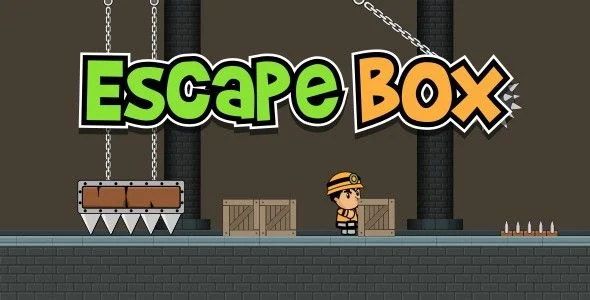
Escape Box is a Construct 3 HTML5 platformer source project, engineered for web publishers and mobile developers to deploy a box-assisted escape game across desktop browsers and wrapped mobile runtimes. The core gameplay loop resolves level-traversal puzzles by requiring players to push in-game boxes, retrieve keys, and reach the exit inside a dungeon-castle environment rendered at a fixed 1280×720 canvas resolution. Within agency and indie production workflows, the package operates as an editable, plugin-free Construct 3 project that ships with exported HTML5 builds, a debug APK artifact, and PDF documentation for immediate staging, device verification, and client handoff.
Technical Specifications & Deployment Matrix
| Engineering Metric | Deployment Specification |
|---|---|
| Base Technology / Framework | Construct 3 (event-sheet logic, no third-party plugins) |
| Runtime / Language Requirements | HTML5 runtime with exported JavaScript and HTML entry files |
| Browser Compatibility | IE11, Firefox, Safari, Opera, Chrome |
| Display Pipeline | HD 1280×720 canvas, adaptive to all phone screen sizes |
| Input Channels | On-screen touch keypad and buttons; keyboard arrows plus spacebar |
| Monetization Hooks | Video ad integration support (AdMob-tagged mobile deployment path) |
| Deliverable Formats | .c3p source, HTML5 files, debug APK, PDF documentation |
Box-Based Escape Mechanics & Execution Pipeline
Escape Box runs its entire escape logic through Construct 3’s native event-sheet system, evaluated on every engine tick before canvas rendering. When the exported HTML5 build loads, the JavaScript runtime boots the layout, preloads sprite and audio assets, and enters the standard request-driven loop in which input polling, collision resolution, and draw calls execute in sequence per frame. Player movement is dispatched through two parallel channels: on mobile, an on-screen keypad drives left/right walking while dedicated right-side buttons fire the jump action; on desktop, keyboard directional input maps to identical movement events, with the spacebar bound to jumping. This dual-dispatch design means a single event sheet serves both input paths without duplicated logic.
Level progression follows a conditional chain: box objects function as pushable surfaces that players reposition to reach elevated keys, key pickup flips a flag condition, and the exit tile validates that condition before triggering layout completion. Because the project uses no additional Construct 3 plugins, every behavior — box pushing, collision, win-state detection — is expressed through the engine’s built-in event conditions and actions, keeping the .c3p file fully portable between Construct 3 installations. For studios evaluating additional Construct 3-authored titles to populate a web game portal alongside this release, Geometry World follows the same .c3p-plus-HTML5 deliverable pattern as a separate standalone build.
Core Technical Capabilities of Escape Box
- Plugin-Free Event Architecture: All gameplay logic is implemented with native Construct 3 conditions and actions, eliminating third-party plugin version-locking and allowing the project to open and export from any current Construct 3 editor without dependency installation.
- Dual Input Dispatch: Touch keypad events and keyboard events feed the same movement and jump actions, so a single logic layer serves mobile Webview sessions and desktop browser sessions without conditional code forks.
- Fixed 1280×720 Canvas with Adaptive Scaling: The HD layout maintains its design ratio while the exported runtime scales output to accommodate all phone screen sizes, preserving readable touch hit-areas across device classes.
- Video Ad Integration Points: The project is structured to support video ad placement, giving mobile publishers an AdMob-aligned monetization path when the HTML5 build is wrapped for Android or iOS distribution.
- Asset-Level Reskin Pipeline: Because visuals are isolated in standard sprite images, teams can replace art in Photoshop and re-export without touching the event sheet, cutting reskin turnaround to an image-swap workflow.
Production Implementation & Operational Resilience
Deploying the exported HTML5 folder requires only a static file host — the build contains HTML and JavaScript with no server-side scripts, no database connections, and no backend API calls, which removes CORS configuration and server provisioning from the deployment checklist entirely. The documented browser matrix (IE11, Firefox, Safari, Opera, Chrome) indicates the exported runtime targets both legacy and current engines, so QA passes should cover at minimum one legacy engine and one Chromium-based engine before release. For portal embedding, the game runs inside an iframe or full-page host without additional runtime dependencies.
Mobile verification is accelerated by the included debug APK, which demonstrates the Android Webview wrapping path and confirms touch keypad behavior on physical hardware before a store build is produced; the ios and android tags confirm the intended native wrapping targets for the HTML5 runtime. Error-surface exposure is minimal by architecture: with no network payloads to validate and no persistence layer to corrupt, runtime failures are effectively limited to asset-loading or host-container misconfiguration. Teams planning broader HTML5 catalogs that mix hidden-object and platformer genres can treat Find Differences as a separate Construct 3 title occupying the casual puzzle slot. Secondary development stays within two safe boundaries: visual replacement through image assets, and mechanical adjustment through the unobfuscated event sheet — both documented in the included PDF.
Frequently Asked Questions
Does the package include a debug APK for testing on physical Android devices before release?
Yes, the deliverables contain a debug APK alongside the .c3p source and HTML5 files, allowing developers to verify touch controls, screen scaling, and video ad behavior on real hardware prior to producing a finalized store build.
Are third-party Construct 3 plugins required to open, edit, or export the project?
No, the project is built entirely with Construct 3’s native event system and uses no additional plugins, so any standard Construct 3 installation can open the .c3p file, modify event logic, and export new HTML5 builds without dependency installation.
Can the visual theme be changed without modifying gameplay event logic?
Yes, reskinning is performed by replacing the existing sprite images using image-editing software such as Photoshop, and because art assets are decoupled from the event sheet, the box, key, and exit mechanics continue to function unchanged after the swap.
Is written documentation supplied for setup and deployment procedures?
Yes, the package includes PDF documentation covering the project structure and deployment steps, giving developers a reference for configuring the HTML5 export and reproducing the mobile wrapping workflow demonstrated by the bundled debug APK.