EmbedPress Pro – WordPress Embed Plugin
EmbedPress Pro Overview & Functional Embedding Engine
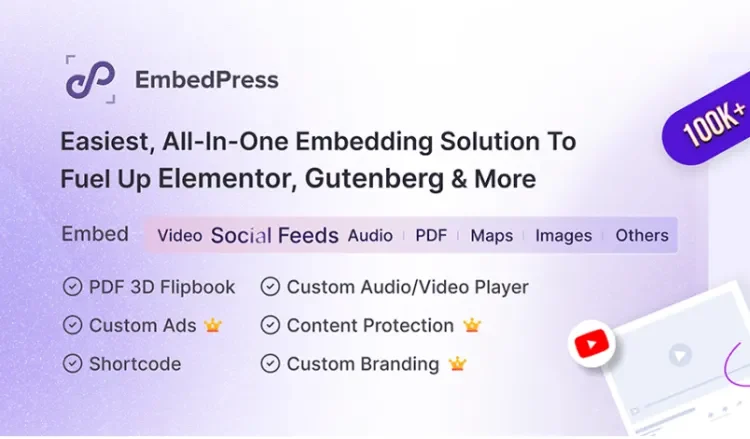
EmbedPress Pro is a WordPress embedding engine, engineered for publishers, content teams, and agencies to inject third-party media—PDFs, videos, documents, and social posts—directly into Gutenberg, Elementor, and Divi layouts. The plugin addresses a structural limitation of the WordPress core oEmbed pipeline, which renders only a narrow set of whitelisted providers and exposes almost no presentation controls over the resulting output. Within production workflows it operates as the presentation layer for external content, converting raw source URLs into styled, responsive embeds through a configuration interface that requires no custom code.
Technical Specifications & Deployment Matrix
| Engineering Metric | Deployment Specification |
|---|---|
| Base Technology / Framework | WordPress plugin (PHP) extending the native oEmbed and iframe rendering pipeline |
| Runtime / Language Requirements | Active WordPress installation running the Gutenberg block editor; no separate server-side service required |
| Data Exchange / Communication Protocols | HTTP/HTTPS oEmbed and iframe-based delivery from 250+ external content providers |
| Front-End / Engine Dependencies | Gutenberg blocks (AI-powered block library), Elementor widget framework, and Divi module support |
| Supported Content Classes | Documents (PDF, Google Docs, Sheets, Slides), video platforms (YouTube, Vimeo, Dailymotion), and social media (Facebook, Instagram, Twitter, TikTok) |
| Database / Persistence Footprint | Embeds are generated at render time from provider endpoints; no custom database schema is documented in the official specifications |
Multi-Source Embedding Pipeline & Execution Flow
The execution flow follows a URL-to-render pattern: a source link is pasted into a block, widget, or module, the engine resolves the matching provider handler, and a responsive, customizable iframe-based embed is dispatched into the page markup.
Architectural & Functional Highlights
- 250+ Provider Coverage: A provider handler registry extends beyond the core oEmbed whitelist, enabling posts, videos, reels, and streams from platforms such as Facebook, Instagram, Twitter, TikTok, Vimeo, and Dailymotion, all rendered responsively across viewport sizes.
- Branded PDF Embedding: Document embeds accept injected brand logos and call-to-action elements, and PDFs can be rendered as interactive 3D flipbooks rather than flat viewer frames, with the same pipeline functioning inside Gutenberg blocks, Elementor widgets, and Divi modules.
- YouTube Rendering Controls: The engine handles single videos, full playlists, or entire channels, and exposes configuration for progress bar colors, caption display, autoplay behavior, live chat activation, and subscription button placement—parameters that core WordPress embeds do not expose.
- Google Workspace Interoperability: Google Docs, Sheets, and Slides can be surfaced as live embeds, so documents referenced on the page remain synchronized with their cloud source rather than requiring re-uploaded static copies.
- No-Code Configuration Layer: All customization—coloring, branding elements, layout adjustments—runs through the settings interface, removing the need for template overrides or hand-written CSS in standard deployment scenarios.
For document-heavy builds where teams evaluate standalone alternatives on the same WordPress runtime, Embed Any Document Plus offers a separate file-viewer implementation for PDFs, documents, and slides as an independent plugin path.
Production Deployment & Implementation Considerations
Deployment requires an active WordPress installation with the Gutenberg editor available, since the block implementation anchors the primary authoring flow; Elementor and Divi installations gain parallel widget and module entry points. Because content is fetched from external provider endpoints, operational behavior depends on provider availability—when a source platform changes its embedding rules or rate-limits requests, the rendered output reflects those upstream conditions, a boundary that no client-side configuration can override. Implementation scope covers the three major builder ecosystems without code changes: PDF flipbooks, YouTube parameter tuning, and social embeds are all configured through the same settings surface. Customization is explicitly bounded to the documented controls—brand logos, CTAs, progress bar colors, captions, autoplay, and chat toggles—so teams planning exotic layout mutations beyond these parameters should expect to layer their own CSS. Editorial teams that need an audit trail of who modified embed configurations during content cycles can pair the plugin with WP Activity Log, which records change events across the WordPress dashboard and WooCommerce workflows. Pre-deployment testing on staging is advisable when embedding from providers with regional restrictions, since iframe delivery behavior can vary by audience geography.
Frequently Asked Questions
Can I embed an entire YouTube channel or only individual videos?
Yes, the engine supports single videos, complete playlists, and entire channels. Each embed accepts configuration for progress bar colors, captions, autoplay behavior, live chat activation, and subscription buttons, giving channel-level embeds the same control surface as individual video embeds.
Does the plugin support live Google Docs, Sheets, and Slides embeds?
Yes, Google Workspace documents can be embedded as live views inside Gutenberg, Elementor, or Divi. The rendered document reflects the current state of its cloud source, so teams avoid maintaining duplicate static copies of frequently updated files.
Can I add my own logo and call-to-action to embedded PDFs?
Yes, PDF embeds accept injected brand logos and call-to-action elements, and documents can be presented as interactive 3D flipbooks. These branding options are configured through the settings interface without writing any custom code.
Are social media embeds responsive on mobile devices?
Yes, embeds from Facebook, Instagram, Twitter, and TikTok are rendered fully responsive across viewport sizes. The same responsive behavior applies to video embeds from platforms such as Vimeo and Dailymotion.
-
v3.10.2 Latest
-
v3.10.1