Digital POSTER Hub, Festival Post Or brandspot 365 clone – Ios App
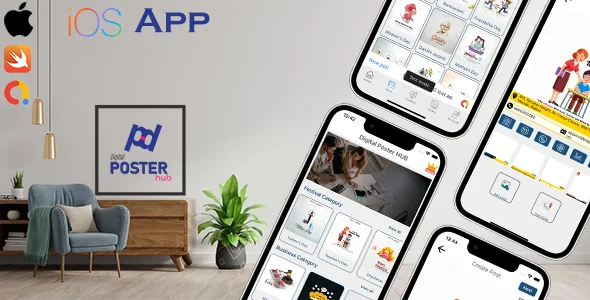
Digital Poster Hub iOS App Overview & Mobile Business Marketing Architecture
Digital Poster Hub iOS App is a Swift 5 native application source package, engineered for iOS developers and marketing agencies to deploy a festival poster and business banner generation platform in the vein of Festival Post and BrandSpot 365. The codebase removes the engineering overhead of building a template-driven creative engine from scratch by shipping a pre-wired client-server architecture in which templates, festival categories, and business data flow from a hosted admin panel into a native editing and rendering pipeline. Within an agency delivery workflow, it functions as a deployable production asset: a studio rebrands the shell, connects its own backend, configures AdMob identifiers, and submits the binary to the App Store under its own developer account.
Technical Specifications & Deployment Matrix
| Engineering Metric | Deployment Specification |
|---|---|
| Base Technology / Framework | Native iOS application built in Swift 5, compiled with Xcode 13.4 |
| Runtime / Language Requirements | iOS 14.0 or later on iPhone and iPad; software compatibility declared across iOS 12 through iOS 15 |
| Data Exchange / Communication Protocols | REST-style API communication with a PHP-based server-side admin panel over HTTP |
| Front-End / Engine Dependencies | UIKit interface layer distributed as .h, .m, and .xib/.nib files; AdMob banner and interstitial ad units |
| Database / Persistence Footprint | Local on-device database storing sticker and template assets, synchronized against remote admin-managed content |
Template Rendering Engine & Execution Pipeline
The core mechanism is a server-orchestrated template pipeline: administrators publish festival categories, banner images, and video templates through the admin panel, and the iOS client consumes that catalog as serialized JSON. At runtime, the app parses each payload into its model layer, validates category and asset references, and populates the browsing interface with the retrieved creative inventory. When a user selects a template, the editing engine overlays the stored business profile, which the operator has populated with brand name, logo, email, phone number, and physical address, directly onto the template canvas using the built-in professional editing tools. Rendered output is then dispatched through one of three terminal paths: in-app sharing, persistence to a created-works gallery that lists both images and videos, or a download engine optimized for fast asset retrieval. Monetization events run in parallel through the AdMob integration, with banner units mounted into view hierarchies and interstitial units triggered at defined points in the creation and download flow.
Core Technical Capabilities of Digital Poster Hub iOS App
- Dual-Media Creative Engine: The rendering pipeline supports both static festival banner images and full video post generation, with each output type tracked in a unified created-works list for retrieval, re-sharing, and download management.
- Server-Synchronized Content Catalog: Template categories, festival assets, and business banner libraries are administered centrally through the PHP admin panel, allowing content updates to propagate to the client without requiring an App Store binary resubmission.
- Profile Injection Layer: Business details entered once into the profile module are automatically composited onto every selected template, converting each generic festival graphic into a branded marketing asset without manual re-entry.
- Tri-Language Localization: The interface ships with English, Hindi, and Gujarati string support, structuring the presentation layer for regional market deployment across Indian business audiences.
- AdMob Monetization Wiring: Banner and interstitial ad units are pre-integrated into the view lifecycle, requiring only identifier replacement during the reskin phase to activate revenue generation on the operator’s account.
Studios evaluating a parallel poster-maker codebase built on a different runtime and delivery model can assess DailyPost as an independent standalone alternative outside this Swift package.
Production Implementation & Operational Resilience
Deployment follows a documented reskin sequence: the operator replaces the launcher logo and splash screen, renames the application, sets a unique bundle identifier, configures AdMob unit identifiers, provisions the server environment, and points the client at the admin API endpoint. The package includes full source for both the iOS application and the server-side admin code, plus written documentation and the visual design shown in the product screenshots. Because content distribution depends on the hosted backend, the production environment requires a reachable server with the PHP admin deployed before the client can resolve its template catalog; the local on-device database for stickers provides a bounded offline asset cache, but remote catalog and business-category operations remain dependent on API availability. Asset licensing constitutes a known operational boundary: the bundled images and stickers ship as freely available assets stored locally, and the operator assumes responsibility for verifying rights before commercial distribution. Interface construction follows Material design conventions adapted to iOS Human Interface Guidelines, and the codebase is structured for straightforward reskinning through asset replacement rather than logic rewrites. Agencies that also maintain a client-facing marketing site on WordPress can run Kimox as a separate web presence alongside this native deployment, since the two operate on entirely distinct runtimes. App Store publication requires the operator’s own developer account, with device coverage spanning both iPhone and iPad form factors under the iOS 14.0 minimum target.
Frequently Asked Questions
Does the deliverable include server-side admin source code in addition to the iOS client?
Yes, the package contains full source code for both the native Swift application and the PHP admin panel, together with written documentation and the design assets reflected in the screenshots, enabling complete self-hosted operation.
Are the bundled stickers and images fetched from a remote CDN at runtime?
No, the available free images and sticker sets are stored in a local on-device database, while the admin panel governs template and category distribution, so the bundled graphics do not depend on remote retrieval for rendering.
Does the app ship with localization for languages beyond English, Hindi, and Gujarati?
No, the documented localization scope covers exactly three languages: English, Hindi, and Gujarati. Additional locales would require extending the string resources within the Swift codebase as a secondary development task.
Is a personal Apple developer account required to publish this application?
Yes, App Store submission must be executed through the purchaser’s own developer account, since the design assets and the App Store developer credentials are supplied by the deploying party rather than bundled with the code.
Student Study Notepad – iOS App – Subject Notes – Topic Notes – Digital Study Notepad
Digital Business Card Maker – Creative Visiting Card Maker – Visiting Card Templates Editor
LED Scroller – Digital Painel – LED Banner – LED Text Banner – Banner Marquee – LED Sign Board