Digibuz – Digital Marketing Agency Elementor Template Kit
Digibuz Overview & Elementor Layout System for Marketing Agencies
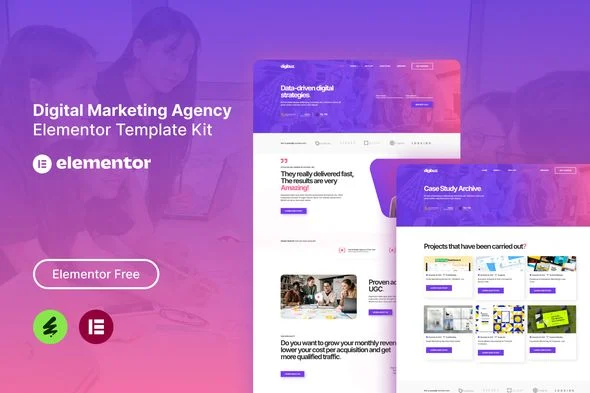
Digibuz is a digital marketing agency Elementor template kit engineered for marketing studios, SEO consultants, email marketers, and freelancers who need production-ready page layouts without writing code. The package removes the bottleneck of building an agency website from scratch by supplying structured page content — home, services, case study, team, careers, and FAQ layouts — as importable Elementor design data. Within an agency delivery workflow, it operates as a complete starting scaffold: templates are pulled in through the Envato Elements plugin or directly through Elementor, then customized visually before deployment to a live client environment.
Technical Specifications & Deployment Matrix
| Engineering Metric | Deployment Specification |
|---|---|
| Base Technology / Framework | Elementor 3.10.x page builder (Envato Template Kit format) |
| Runtime / Language Requirements | WordPress environment with the free Hello Elementor theme; Elementor Pro is not required |
| Data Exchange / Communication Protocols | Kit ZIP imported via the Envato Elements plugin or directly through Elementor; form submissions routed through MetForm |
| Front-End / Engine Dependencies | Elementor, ElementsKit Lite, MetForm, Sticky Header Effects for Elementor |
| Database / Persistence Footprint | Imported layouts persist under Elementor Saved Templates; no standalone theme file structure is shipped |
JSON Layout Import & Content Assembly Pipeline
The import sequence determines how design tokens and page structures propagate across the site. Installation begins with the Global Kit Styles file, which writes the site-wide typography and color settings that every subsequent template inherits, ensuring visual consistency before any page exists. Individual page templates are then imported one at a time in the documented order, and each imported layout is stored under Elementor Saved Templates, where it can be reused or re-inserted across multiple pages. New pages are assembled by creating a blank page, switching the builder to Elementor Full Width, hiding the native page title, and inserting the desired layout from the My Templates tab.
Core Technical Capabilities of Digibuz
- Global design token propagation: Importing the Global Kit Styles file first synchronizes typography and color tokens across all seventeen ready templates, so a single token adjustment restyles every dependent page consistently.
- ElementsKit header and footer activation: The header and footer templates attach through the ElementsKit Header Footer module, where toggling Activation to On and selecting Entire Site binds the layout globally, including the sticky header behavior driven by Sticky Header Effects for Elementor.
- MetForm-driven form architecture: Contact, request call, services, careers, and subscribe forms are pre-built as MetForm block templates; each form is bound to its page by inserting the imported form template into the Metform widget through the Navigator panel.
- Full marketing page inventory: Home, About, Why Us, Services, Team, Careers, FAQs, Contact, Case Study, and Single Case Study layouts cover the complete conversion funnel for an agency site, from service positioning to portfolio proof.
- Responsive layout container behavior: Layout structures adapt across viewport widths natively through the Elementor rendering engine, requiring no manual breakpoint configuration for mobile delivery.
For agencies comparing kits across different creative directions before committing to a visual identity, Creativa offers a parallel digital agency template kit option within the same Elementor import workflow.
Production Implementation & Operational Resilience
Before import, the permalink structure must be set to Post Name under Settings, and Hello Elementor must be activated as the active theme, which also triggers the Elementor installation prompt when absent. All required plugins should sit at their latest versions prior to upload; if the orange requirements banner appears during kit installation, clicking Install Requirements loads the dependencies automatically. Because the kit ships as a compressed archive of large JSON layout payloads, raising the wp_memory_limit on the host environment prevents import interruptions on smaller shared hosting plans. One browser-specific gotcha applies: Safari users must disable the Open safe files after downloading preference so the kit ZIP is not unpacked before upload.
Customization operates strictly at the layout and style layer. Colors and typography are overridden through site settings rather than per-widget editing, and content blocks are restructured visually in the builder. Demo imagery comes from Envato Elements, so production deployments must either license those assets or replace them with client-owned media. Teams weighing a full theme-based route outside the template kit workflow can evaluate Etta as an independent WordPress theme alternative for marketing and SEO lead-generation sites. Where Elementor Pro is already installed, headers and footers shift to the Theme Builder, and the MetForm installation step can be skipped entirely in favor of native form blocks.
Frequently Asked Questions
Is Elementor Pro required to run the full kit?
No, the kit runs entirely on free plugins — Elementor, ElementsKit Lite, MetForm, and Sticky Header Effects for Elementor. Elementor Pro is optional; if present, headers and footers move to the Theme Builder and MetForm can be bypassed.
Does this package function as a standalone WordPress theme?
No, it contains Elementor page design data only. A supporting theme such as Hello Elementor must be installed and activated, and the kit layouts are imported and rendered through the Elementor page builder rather than theme template files.
Can the bundled demo images be used directly on a live client site?
No, the demo images are sourced from Envato Elements and require a separate license for production use. Teams can either license those assets or substitute them with client-owned or independently licensed imagery.