Derby – Event Organizer Sketch Template
Product Overview
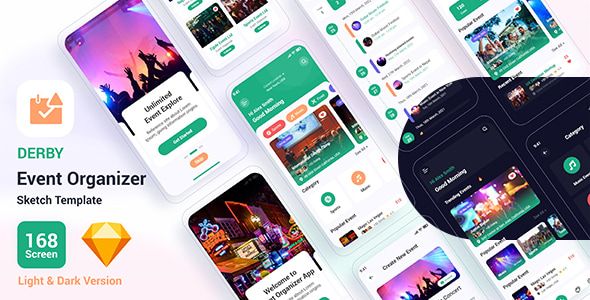
Derby is a structured Event Organizer Sketch Template designed for UI professionals and frontend developers building conference platforms. If you are prototyping a new Derby – Event Organizer Sketch Template, this file provides the exact interface elements needed for ticketing, speaker profiles, and complex schedule layouts. It serves as a direct blueprint for coding WordPress themes or custom event applications.
This UI kit focuses on the practical layout behavior of large-scale event websites. Instead of generic placeholder blocks, the artboards contain specific UI patterns like multi-track schedule timelines, speaker biography modals, and layered pricing tables. When the schedule container resizes, the internal text layers automatically pin to the left edge, keeping time slots properly aligned against the corresponding session titles.
Designers can drag and drop pre-configured Sketch symbols to build custom pages. The layer hierarchy is strictly organized by component type. Developers inspecting the file can easily extract CSS values for button hover states, grid gutters, and typography scales without having to guess the underlying layout logic. The sidebar navigation artboards also demonstrate exactly how the mobile off-canvas menu pushes the main content viewport when toggled.
Highlights & Value
The Derby – Event Organizer Sketch Template simplifies the layout handoff process by standardizing how event data appears on the screen.
- Modular Schedule Timelines: The agenda artboards use a horizontal scrolling timeline for multi-track events, allowing users to switch between different conference rooms using a fixed tabbed navigation bar.
- Speaker Grid Layouts: Speaker profiles are designed as reusable card symbols with defined padding for headshots, company logos, and social media hover states.
- Ticketing & Checkout Flow: The pricing artboards display comparative ticket tiers with sticky headers that stay visible on scroll, followed by a multi-step checkout form layout including specific input validation states.
- Sponsor Logo Carousels: Dedicated sections feature predefined grid alignments for sponsor logos, ensuring consistent spacing and vertical centering regardless of the uploaded image dimensions.
- Venue Map Integrations: The contact and location pages include overlapping UI cards for venue addresses positioned over a full-width map background component.
Real-World Use Cases
Using the Derby – Event Organizer Sketch Template, designers can rapidly assemble custom interface prototypes for various niche gatherings.
- Tech Conferences: Utilizing the multi-track schedule components and large speaker grids to manage dozens of overlapping sessions and keynote profiles.
- Music Festivals: Applying the ticket pricing tables and interactive venue map layouts to guide attendees through wristband purchases and physical stage locations.
- Corporate Summits: Using the sponsor carousel and formal agenda lists to present B2B networking events and structured panel discussions.
- Local Meetups: Scaling down the UI symbols to create single-page landing pages focused solely on RSVP registration buttons and date/time blocks.
Technical & Compatibility
Derby utilizes a standard 1170px Bootstrap grid, ensuring frontend developers can translate the Sketch artboards directly into HTML/CSS or a page builder framework. Every margin, padding, and column width adheres to this 12-column system, preventing alignment issues and spacing inconsistencies during browser resizing.
The Event Organizer Sketch Template requires Sketch App for Mac to open and edit the source files. All typography relies on free Google Fonts, which are embedded within the document’s text style registry, meaning global font changes across the entire project can be executed through a single dropdown selection.