
 My Account
✅ Product Overview
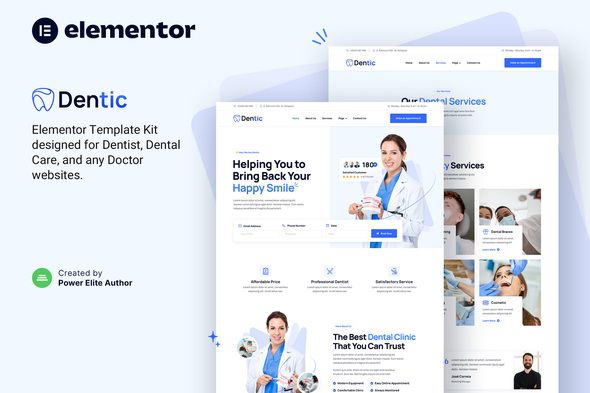
Dentic is a Dentist & Dental Clinic Elementor Template Kit built to help oral health practitioners establish a professional web presence. This layout package offers pre-designed page layouts tailored for dental clinics, orthodontists, and oral surgeons. With structured templates for homepage introductions, treatment lists, dentist profiles, and appointment inquiries, dental practices can configure their content without building complex rows and columns from scratch.
The visual framework displays a sticky header with direct links to service pages, contact details, and an appointment booking button. Below the hero image, the layout features service blocks designed as three-column cards with icon placeholders. Patients can scroll past these to see an organized pricing comparison chart with neat checkmark features, followed by a meet-the-doctors slider displaying bios, certificates, and clinic photos.
✅ Highlights & Value
Using this specialized Dentist & Dental Clinic Elementor Template Kit ensures that your patients can find treatment options and pricing information easily. The structured layout allows visitors to scan the site and learn about dental cleanings, root canals, or teeth whitening packages without struggling through messy navigation bars. Mobile responsiveness is fully integrated, which keeps columns properly proportioned on smartphones and tablet screens.
- Interactive Pricing Tables: Compares different treatment tiers, showing exactly what is included in checkups, cleanings, and deep scaling procedures.
- Doctor Profiles Section: Showcases individual biographies, specializations, and qualifications inside structured, side-by-side card containers.
- Online Appointment Forms: Integrates clean form elements with custom margins, date-picker compatibility, and simple submit button layouts.
- Clean Case Studies Grid: Provides dedicated before-and-after image containers to illustrate treatment success and build immediate patient trust.
✅ Real-World Use Cases
Dentic offers practical layouts that adapt well to various dental services, such as pediatric care or cosmetic dentistry. Local clinics can adjust the color scheme to match their physical office branding, switching background colors or main accent hues through the global site settings. Having distinct pages for restorative care, implants, and general checkups helps clinics organize complex medical directories logically.
With the Dentic – Dentist & Dental Clinic Elementor Template Kit, local clinics can showcase before-and-after treatment galleries. This real-world layout is perfect for cosmetic dental practices emphasizing smile design, teeth alignment, or veneer procedures. Patients can interactively check visual results, helping them feel more comfortable booking an initial consultation through the website.
- Pediatric Dental Offices: Great for displaying friendly, child-focused environments, special checkup packages, and calming office galleries.
- Emergency Dental Services: Useful for highlighting immediate response phone numbers and walk-in policies inside high-contrast header sections.
- Orthodontic Specialists: Designed to outline complex treatment steps for braces or clear aligners through clean step-by-step roadmap segments.
✅ Technical & Compatibility
Deploying the Dentic – Dentist & Dental Clinic Elementor Template Kit requires importing the files via your Elementor setup. This layout framework operates reliably with the free version of Elementor alongside lightweight base themes like Hello Elementor. It utilizes standard column configurations, which keeps page generation speeds optimized and minimizes database resource usage during initial rendering phases.
The code structures remain clean and follow standard WordPress accessibility practices, helping search engine crawlers index your service offerings without errors. The kit supports translation plugins such as WPML or Polylang, allowing offices in bilingual communities to serve patients in multiple languages. It also works with standard browser environments, rendering text, custom icons, and button styling consistently on both mobile and desktop formats.
✅ FAQ & Tips
To optimize website loading performance, ensure that patient education PDFs and large gallery photographs are properly compressed before uploading. Running local caching plugins will help speed up the rendering of elements like custom sliders and icon columns on slower cellular connections. Always double-check your form handler setup in the page builder settings to confirm that prospective patient booking messages are routed correctly to your staff inbox.
How do we alter the default appointment fields? You can customize the form fields, labels, and text boxes directly inside the Elementor editor workspace by clicking on the form block.
Is a commercial license required for the design components? The template kit utilizes standard free assets and relies on compatible free add-ons, making it straightforward to maintain without needing expensive subscription plans.




There are no reviews yet.