DashHub – PHP Tailwind CSS Admin Dashboard Template
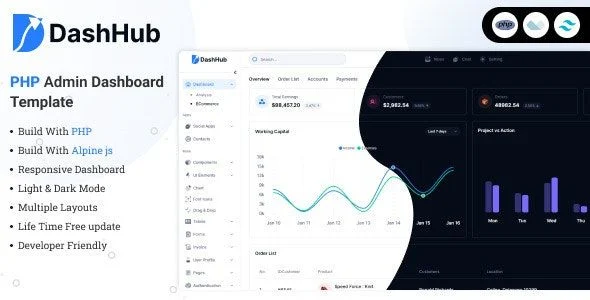
DashHub PHP Tailwind CSS Admin Dashboard Template Overview & Utility-First Back-End Foundation
DashHub is a PHP and Tailwind CSS admin dashboard template, engineered for back-end developers and software agencies to accelerate the construction of application control panels, SaaS platforms, and internal management systems. The package targets a recurring delivery bottleneck: stylesheet bloat and override chains that accumulate when component CSS lives detached from markup, slowing every layout iteration. In agency workflows, it operates as a pre-assembled presentation layer that teams adapt, rebrand, and extend into client-facing administrative interfaces without rebuilding base UI from zero.
Technical Specifications & Deployment Matrix
| Engineering Metric | Deployment Specification |
|---|---|
| Base Technology / Framework | PHP server-side page assembly with the Tailwind CSS utility framework |
| Runtime / Language Requirements | PHP-enabled hosting environment; no heavy JavaScript framework dependency declared |
| Data Exchange / Communication Protocols | Server-rendered HTML delivered over HTTP, with compiled Tailwind output and lightweight scripts as static assets |
| Front-End / Engine Dependencies | Component-level vanilla JavaScript; no Vue, React, or equivalent runtime required |
| Database / Persistence Footprint | None bundled; the package is a pure presentation layer with no shipped schema or ORM |
Server-Side Page Assembly & Tailwind Utility Execution Pipeline
Request handling follows a straightforward server-rendered pipeline: the PHP layer assembles each administrative page from logically organized partials, and the resulting markup carries Tailwind utility classes directly on the elements it styles. Because styling decisions live inside the markup itself, layout changes are made where the structure is defined rather than inside an overriding stylesheet that must out-specify previous rules. This removes the cascade-conflict layer that typically inflates dashboard CSS payloads and makes each component self-describing at the point of edit. The utility-first compilation path also keeps the delivered stylesheet bounded to the classes actually used in the template, producing a lighter payload than framework-default distributions.
Core Technical Capabilities of DashHub
- Utility-first styling engine: Tailwind classes are applied per element within the HTML, allowing developers to prototype and restyle layouts by editing markup directly, which shortens the change-deploy cycle and removes the need for large override stylesheets.
- Light and dark mode state switching: The interface ships with a toggleable dark theme, so operators can flip visual modes to match user preference while the underlying utility markup and component structure remain constant.
- Pre-built page inventory: Authentication screens, user profile views, settings panels, and error-handling pages are supplied up front, giving projects a consistent visual baseline from the first login flow onward.
- Rich UI component set: Charts, form controls, data tables, modals, and notification elements are included, covering the recurring surface area of administrative interfaces so teams assemble screens instead of authoring primitives.
- Well-commented source structure: The codebase is organized into logical, commented sections, which reduces the time needed to locate a component, trace its markup, and extend it for project-specific behavior.
Production Implementation & Operational Resilience
Deployment requires only a PHP-capable host, which makes the package workable across standard shared hosting, containerized staging servers, and agency client environments without provisioning Node build pipelines at runtime. Because the deliverable is a presentation layer with no bundled persistence engine, teams retain full authority over data modeling, authentication enforcement, and session handling on the server side; the template supplies the interface for those systems rather than dictating them. Error handling is addressed through dedicated pre-built error pages, so failed requests present a branded, controlled response instead of a raw server message.
Customization boundaries are well defined: visual changes occur at the Tailwind utility level inside the markup, structural changes occur within the PHP partial organization, and interactivity is extended through the lightweight script layer. Teams migrating toward component-driven reactive runtimes should treat that as a separate architectural decision; Modernize VueJs Admin Dashboard exists as an independent dashboard implementation on a different JavaScript stack, and Ynex – Nextjs App Router Javascript Dashboard Template serves decoupled front-ends built outside PHP hosting, neither of which merges into this codebase.
Frequently Asked Questions
Does DashHub depend on a JavaScript framework such as Vue or React at runtime?
No, the package ships with minimal dependencies and avoids heavy JavaScript frameworks, relying on lightweight component-level scripts for interactivity while PHP handles server-side page assembly across the administrative interface.
Can operators switch between light and dark interfaces without editing source files?
Yes, a toggleable dark mode is included, letting end users change the visual theme to match their preference while the underlying Tailwind utility markup and component structure stay exactly as delivered.
Are authentication and error-handling screens included in the delivered page set?
Yes, pre-built pages cover authentication flows, user profiles, settings panels, and error handling, giving developers a consistent visual language from the first login screen through routine back-end administrative operations.
Does the template ship with a database schema or data persistence layer?
No, this is a presentation-layer package containing no bundled database schema, ORM, or migration routines, so data modeling and persistence remain entirely under the implementing development team’s control.