Coloring Book Doodle – Coloring Book Game Android Studio Project with AdMob Ads + Ready to Publish
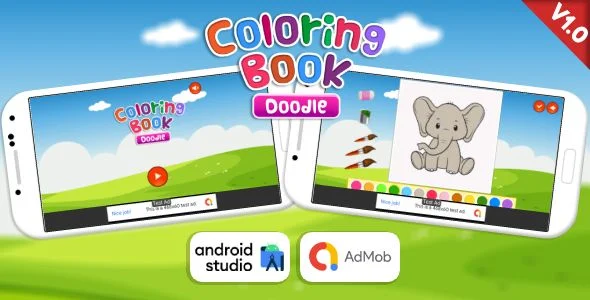
Coloring Book Doodle Overview & Native Android Game Architecture
Coloring Book Doodle is a native Android coloring book game source code built in Android Studio with Java and XML, engineered for indie developers and mobile studios to publish a monetized children’s painting game on Google Play without writing an engine from scratch. The package eliminates the two costliest bottlenecks in casual-game delivery: canvas-based drawing logic (brush strokes, flood-fill painting, erasing) and AdMob ad-unit wiring, both of which ship pre-implemented and verified against API 33. In a production workflow, the codebase functions as a deployment-ready foundation: a developer imports the project, swaps the package name, icon, and AdMob identifiers, compiles a signed release build, and submits it to the store.
Technical Specifications & Deployment Matrix
| Engineering Metric | Deployment Specification |
|---|---|
| Base Technology / Framework | Android Studio project, Java source (.java) with XML layouts |
| Runtime / Language Requirements | Android 9.0 through Android 12.0; targets API level 33 |
| Data Exchange / Communication Protocols | Google AdMob SDK (banner and interstitial request/response cycles) |
| Front-End / Engine Dependencies | Native Android view layer; no third-party game engine required |
| Database / Persistence Footprint | No external database; content ships as in-package assets (Layered PNG artwork) |
| Architecture / Binary Support | 64-bit support; universal builds for phone and tablet form factors |
Doodle Rendering Engine & Execution Pipeline
The engine dispatches touch input into three distinct painting pipelines: stroke rendering, flood-fill region coloring, and erasure. Twenty pre-loaded pictures (including mandala-style line art) are drawn onto the canvas as Layered PNG assets, so each tap or drag event is mapped against the active layer and painted through one of three selectable brushes or the fill operation.
Stroke events are captured through the standard Android touch-dispatch cycle, converted to canvas draw calls, and rendered in real time on the device’s UI thread, while the eraser reverses pixel output on the same layer without destroying the underlying outline. Because the artwork and logic are separated, the picture library behaves as a swappable content layer rather than hard-coded game data. Studios running parallel creative deployments on the same ad-monetization stack can evaluate Magic Photo Collage Maker with AdMob Ads Android as an independent codebase occupying a separate product lane, since the two apps share an AdMob integration pattern but not a runtime.
Core Technical Capabilities of Coloring Book Doodle
- Three-brush painting system: Brush selection switches the stroke-rendering parameters applied to canvas draw calls, giving players distinct line weights and textures without any engine-level branching.
- Flood-fill and eraser operations: The fill feature resolves a tapped region and colors it in a single action, while the eraser clears applied pigment while preserving the source outline layer.
- Extensible picture library: The shipped twenty images are assets, not compiled logic, so additional line art can be introduced by following the documented asset-adding procedure rather than modifying rendering code.
- AdMob banner and interstitial integration: Both ad formats are wired into the project lifecycle, so a developer replaces the placeholder ad-unit identifiers with their own publisher IDs during pre-release configuration.
- Universal layout architecture: XML layouts adapt across phone and tablet viewports, removing the need to maintain separate form-factor builds for a single store listing.
Production Implementation & Operational Resilience
Deployment begins with importing the Android Studio project and aligning the build environment with the documented Gradle configuration, which was updated in March 2025 alongside the Android API target. The included documentation file walks through the release sequence: renaming the application and package name, replacing the icon and splash assets, substituting AdMob publisher identifiers, and producing a signed 64-bit release bundle accepted by Google Play’s current submission requirements.
Operational boundaries are straightforward because the game is self-contained. There is no backend dependency, no networked state synchronization, and no database migration surface; the entire runtime footprint consists of local assets, canvas rendering, and AdMob request cycles. Failure modes therefore concentrate in two areas: ad delivery, which depends on the AdMob network and correct ad-unit configuration rather than game logic, and device fragmentation, which the API 33 target and 64-bit binary support address directly across the Android 9.0–12.0 compatibility band.
For secondary development, the codebase is structured for reskin work: sounds and music are replaceable assets, graphics live in the resource directories, and gameplay behavior requires no modification when only the visual identity changes. Teams producing store-listing artwork in-house rather than commissioning it externally can route that task through Poster Maker, a standalone graphic design pipeline that sits outside this Android project entirely, generating promo banners and store visuals as a parallel workflow. Pre-deployment testing is accelerated by the bundled demo APK, which allows verification of painting behavior, ad rendering, and layout adaptation on physical hardware before any recompilation is performed.
Frequently Asked Questions
Does the download include a demo APK for testing before compiling the project?
Yes, the file package contains a demo APK alongside the Android Studio project and documentation, so painting behavior, ad display, and device compatibility can be verified on real hardware prior to any code changes.
Can pictures beyond the pre-loaded twenty be added without changing engine code?
Yes, the picture library is an asset layer rather than hard-coded logic, and the included documentation describes the procedure for introducing additional line-art images into the selectable gallery.
Are both banner and interstitial ad formats already wired into the project?
Yes, AdMob banner and interstitial integration ships pre-implemented, so configuration consists of replacing the placeholder ad-unit identifiers with your own publisher IDs during the release-preparation stage.
Are background music and sound effects included as replaceable assets?
Yes, sounds and music ship with the project and are treated as swappable resources, allowing a full audio reskin during rebranding without touching the rendering or input-handling code.
4 App Template| Truck Delivery Booking | Truck Logistics | Delivery Management Solution | DeliTruck
Cartoon Coloring Book – Baby coloring book for kids – Happy Color – Coloring Games – Coloring World
Multi Salon, Spa, Barber Appointment Booking System | Adminpanel | Salon Owner Panel – saas