Clock Alarm Reminder Timer with AdMob Ads Android
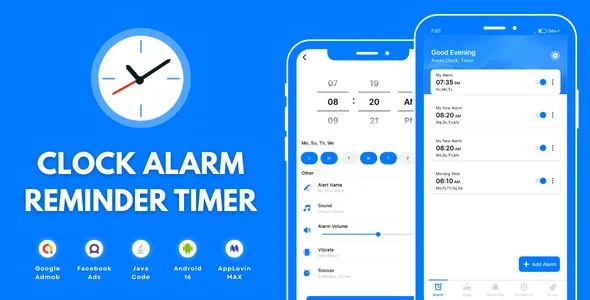
Clock Alarm Reminder Timer Overview & Native Android Time-Management Architecture
Clock Alarm Reminder Timer is a native Android application source package, engineered for mobile developers and agencies to ship a monetized time-management utility spanning alarms, daily reminders, a countdown timer, and a stopwatch. The package solves a concrete production bottleneck: assembling a multi-module scheduling app that persists alarm states, fires notifications reliably across Android 9 through Android 16, and carries a pre-wired ad layer without rebuilding the stack from an empty Gradle project. Within agency delivery pipelines, it operates as a compilable Android Studio codebase that can be rebranded, signed, and published to Google Play with the monetization path already in place.
Technical Specifications & Deployment Matrix
| Engineering Metric | Deployment Specification |
|---|---|
| Base Technology / Framework | Native Android application (Java source, XML layouts) |
| Runtime / Language Requirements | Android 9.0 through Android 15.0, plus Android 16 targeting SDK 36 |
| Data Exchange / Communication Protocols | AdMob and Facebook ad network SDK integration |
| Front-End / Engine Dependencies | Android system alarm scheduling, notification dispatch, light and dark theme resources |
| Database / Persistence Footprint | Local device storage for alarm definitions, reminder entries, and user preferences |
| Deliverable Package | .apk build, .java classes, .xml layouts and resources |
Alarm Scheduling Engine & Execution Pipeline
The engine routes every user-defined alarm through Android’s system scheduling service and dispatches notifications at the operating-system level. When a user creates an alarm, the input layer captures the trigger time, repeat pattern, and custom tone, then persists the configuration to local device storage so definitions survive process termination and device reboots. At the scheduled moment, a broadcast receiver wakes the presentation layer, which renders the alarm interface and plays the selected tone, with the motivational quote module surfacing an uplifting message during the wake-up flow to anchor the morning routine. The reminder subsystem follows the same persistence-and-dispatch pattern for daily task alerts and event notifications, while the countdown timer and stopwatch modules run as foreground-tracked timing states suitable for workouts, cooking, and focused work sessions. Bedtime alerts occupy a separate scheduling lane, nudging users toward a healthy sleep cycle independently of wake-up alarms. On the monetization side, AdMob and Facebook SDK calls are embedded at defined placements, letting publishers route banner and interstitial inventory through either network. For studios exploring a separate standalone path in the motivational-quotes vertical, Quote.ly offers an independently architected Firebase-backed quotes template rather than an extension of this codebase.
Core Technical Capabilities of Clock Alarm Reminder Timer
- Multi-Alarm Scheduling with Custom Tones: Each alarm entity stores its own tone selection and repeat options, allowing several concurrent schedules whose definitions are retained across restarts through local persistence rather than in-memory state.
- Reminder & Event Notification Pipeline: Daily task alerts reuse the alarm dispatch infrastructure, so reminder payloads are validated at creation time and handed to the notification layer without a separate scheduling framework.
- Countdown Timer & Stopwatch Modules: Both timing tools execute as self-contained state machines, supporting fitness intervals, cooking, and study focus scenarios with pausable, resumable time tracking.
- Bedtime & Sleep-Cycle Alerts: A dedicated alert lane prompts users toward consistent sleep windows, decoupled from the wake-up alarm configuration.
- Dual-Network Ad Monetization: AdMob and Facebook SDKs are integrated into the project, and the app ships with light and dark theme variants defined in the XML resource layer.
Production Implementation & Operational Resilience
Deployment begins by importing the .java and .xml sources into Android Studio, resolving the Gradle dependency graph, and compiling against SDK 36 to satisfy Android 16 target requirements while retaining backward compatibility down to Android 9. Before a Play Store release, publishers must register their own AdMob and Facebook application identifiers and ad unit IDs, since shipping with placeholder identifiers produces unfilled ad requests. Reskinning work stays contained within the resource layer: string tables, drawables, color definitions, and theme styles can be replaced without touching scheduler logic, which keeps visual rebranding decoupled from behavioral code.
Operationally, alarm-driven apps on modern Android must contend with background execution limits and battery optimization policies, so pre-release testing should verify that alarms fire while Doze restrictions are active and that notification channels are granted. The included .apk lets QA teams validate stock behavior on physical devices before any modification, establishing a known-good baseline for regression comparison. The package targets battery-conscious operation with an ad-light placement strategy, which reduces the chance of policy review friction during store submission. For teams that also manage wellness-oriented web properties and need a parallel, non-Android bedtime solution, Relaxing Sleep Sounds exists as a separate WordPress-side sleep toolchain rather than a module that merges into this native codebase.
Frequently Asked Questions
Does the delivered archive include a compiled APK alongside the raw source files?
Yes, the package ships .java classes and .xml layouts together with a ready-to-run .apk, so teams can verify baseline behavior on a physical device before performing any Gradle recompilation, dependency resolution, or visual reskinning work.
Can the ad configuration route inventory through Facebook as well as Google AdMob?
Yes, both SDKs are integrated into the project. Publishers can direct banner and interstitial placements through either network by adjusting the ad identifiers and configuration values during the build configuration phase.
Are light and dark visual themes provided without additional development work?
Yes, dual theme variants ship inside the XML resource layer, meaning builds inherit both palettes out of the box and theming changes can be handled through resource overrides rather than new layout code.
Does the bedtime alert feature depend on the wake-up alarm module?
No, bedtime alerts operate as a distinct feature aimed at sleep-cycle consistency, so a user’s sleep reminders can be configured and can trigger independently of any wake-up alarms defined in the main alarm scheduler.