Clap Phone Finder | Find my phone By clap | Android App | With Admob Ads | V5.0
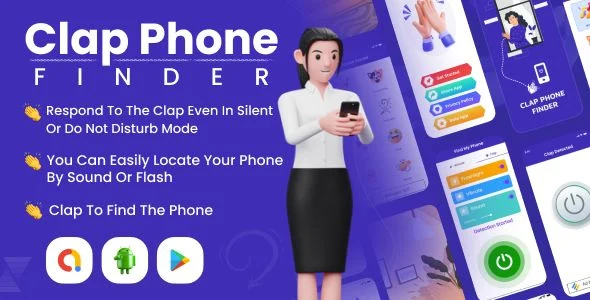
Clap Phone Finder Overview & Native Android Utility Architecture
Clap Phone Finder is a native Android application source package, engineered for solo developers and app-publishing studios to ship a sound-detection utility that locates misplaced devices. The core engineering problem it resolves is acoustic event capture in background execution contexts: the application listens for clap-like sound signatures through the device microphone and converts each detected event into an immediate, user-configurable alert output. Within production workflows, the codebase functions as a reskin-and-ship foundation for the personal-utilities category, arriving as an Android Studio project with AdMob banner and interstitial placements already wired into the interface layer.
Technical Specifications & Deployment Matrix
| Engineering Metric | Deployment Specification |
|---|---|
| Base Technology / Framework | Native Android, Java source built in Android Studio |
| Runtime / OS Compatibility | Android 9.0, 10.0, 11.0, and 12.0, with a documented migration pass targeting Android 13 |
| Source Deliverables | .apk build, .db, .java, and .xml files |
| Monetization Layer | AdMob banner and interstitial ad units pre-integrated |
| UI Framework | Material Design layout system |
| Alert Channels | Sound, vibration, and flashlight (torch) activation modes |
Clap Detection Engine & Alert Dispatch Pipeline
The detection engine converts raw microphone input into discrete clap events that trigger the configured alert chain. Operationally, the user activates the service and the application begins sampling ambient audio; when the input crosses the configured sensitivity threshold in a pattern consistent with a hand clap, the event handler fires a broadcast that the alert module consumes. Depending on the settings the user has toggled, that module dispatches one or more responses simultaneously: a loud ringtone playback at the configured volume, a vibration pattern, and a flashlight activation through the camera torch API. This multi-channel dispatch is what shortens the physical search radius, because the phone announces its position audibly, haptically, and visually even when it is buried under cushions or set to silent profile at the ringtone level.
The sensitivity tuning is exposed as a user-facing configuration rather than a hardcoded constant, which matters in acoustically noisy environments such as open offices where false positives from keyboard noise or conversation would otherwise drain the battery and desensitize the operator. The settings screen also governs ringtone selection and volume, so the alert output can be adapted to quiet bedrooms versus loud workshops without touching code.
Core Technical Capabilities of Clap Phone Finder
- Multi-Modal Alert Dispatch: A single detected clap event fans out to sound, vibration, and torch channels simultaneously, ensuring the device is locatable regardless of whether it rests face-down, in silent mode, or out of direct line of sight.
- AdMob Monetization Wiring: Banner and interstitial ad units are already placed within the activity flow, so a publisher only swaps the ad unit identifiers and rebuilds to start revenue collection.
- Material Design UI Layer: The interface is built on the Material Design system, meaning reskinning work stays within theme attributes and layout XML rather than requiring custom view engineering.
- Configuration-Driven Behavior: Alert mode, ringtone, volume, and sensitivity are all runtime settings persisted by the application, eliminating the need to recompile for different user scenarios.
- Engagement Modules Included: Rate App, More App, and Share App screens ship inside the project, providing standard retention and cross-promotion surfaces without additional development effort.
For developers assembling a broader native utility and game portfolio, this project sits alongside comparable Android Studio deliverables; as an independent publishing path outside this codebase, Android Game Booster covers the device-optimization niche with the same AdMob-based monetization pattern, letting a studio serve both the finder-utility and performance-utility audiences from parallel builds.
Production Implementation & Operational Resilience
Deployment begins by importing the Android Studio project, replacing AdMob unit identifiers with the publisher’s own, updating the application identifier and package namespace, and generating a signed release build. Because the deliverables include the full .java and .xml tree plus a .db component and a compiled .apk, a developer can first validate baseline behavior on the prebuilt binary before modifying source, which shortens the verification loop during reskinning.
Operationally, the microphone-based listener and the torch activation both depend on runtime permissions, so testing on Android 9 through 12 targets is the documented compatibility band, with the 2022 changelog entries recording the migration work and bug fixes needed for the Android 12 and 13 permission and service models. Background service lifecycle behavior under modern Android restrictions is the primary environmental boundary to validate before store submission: the detection service must stay resident while the screen is off for the utility to fulfill its purpose, and this behavior varies by OEM power management.
Secondary development is straightforward within defined limits. Customization effort concentrates on theme colors, strings, icons, ringtone assets, and sensitivity defaults, all of which live in XML resources and settings screens rather than engine logic. New alert channels or alternate detection triggers would require touching the Java listener core. Error handling is framed around user feedback: invalid or missing configurations fall back to default alert behavior rather than failing silently.
For agencies planning multi-app releases on the same publishing account, this finder utility and a native ride-share deliverable such as Car2Go represent separate Android Studio projects serving distinct verticals, and maintaining them as parallel codebases avoids the coupling that a forced merge into one solution would create.
Frequently Asked Questions
Does the package ship with both a runnable binary and editable source files?
Yes. The deliverables include a compiled .apk for immediate device testing, alongside the full editable .java, .xml, and .db components required to rebuild and modify the application inside Android Studio before store submission.
Can the alert response be restricted to a single output channel instead of all three?
Yes. Sound, vibrate, and flash alert modes are individually configurable through the application settings, and ringtone selection plus volume levels are also adjustable, so the operator can enable only the channel that suits the situation.
Was the codebase migrated to AndroidX and recent Android target versions?
Yes. The changelog records an August 2020 AndroidX migration, followed by 2022 passes that fixed bugs and migrated the project toward Android 12 and Android 13, with a further bug-fix release in October 2023.
Is this a cross-platform Flutter or React Native build?
No. The project is written in native Java within Android Studio, and the included file set (.java, .xml) reflects a standard native Android structure rather than a Dart or JavaScript cross-platform compilation pipeline.
Clap Phone Finder | Find Phone by Clap, Whistle | Android App With Admob Ads
Mouse Cursor Touchpad – Quick Cursor – One-Handed Mode – Remote Mouse – Touchpad for Big Phone Tab
Dynamic Island Notch – Dynamic Notch – Notify Island – iOS 16 Notch Pro – iPhone 14 Notch