Chat – Support Board – AI Chatbot – WP
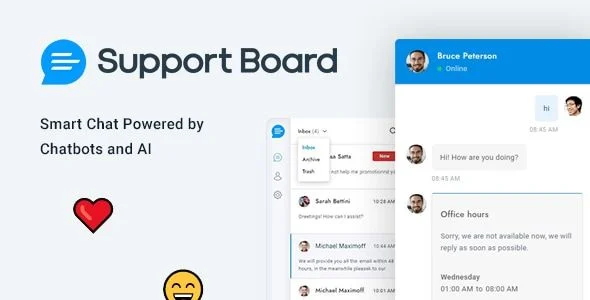
Support Board Overview & Conversational Automation Layer
Support Board is a WordPress chat and AI chatbot plugin, engineered for agencies and store operators to automate customer communication through artificial-intelligence agents connected to OpenAI ChatGPT and Google. It addresses the operational bottleneck of fragmented support traffic by consolidating a native live chat widget, a help desk, ticket handling, and multi-channel messaging into one administrative interface inside WordPress. In production delivery workflows, it functions as the primary conversational layer for client sites, resolving routine inquiries through the chatbot while routing complex conversations to human agents.
Technical Specifications & Deployment Matrix
| Engineering Metric | Deployment Specification |
|---|---|
| Base Technology / Framework | WordPress plugin distributed with PHP, JavaScript JS, HTML, and CSS source files |
| Runtime / Language Requirements | WordPress 5.0.x through 7.0.x |
| Data Exchange / Communication Protocols | Messaging channel APIs for Facebook Messenger, WhatsApp, Instagram, and Telegram; OpenAI (ChatGPT) and Google AI services |
| Front-End / Engine Dependencies | Cross-browser rendering on IE10, IE11, Firefox, Safari, Opera, Chrome, and Edge; high-resolution display support |
| Ecosystem Compatibility | WooCommerce 5.x.x through 9.x.x; WPML multilingual configurations |
| Database / Persistence Footprint | Conversation, user, and ticket records persisted through the WordPress database layer |
AI Chatbot Engine & Multi-Channel Messaging Pipeline
Support Board processes inbound communication through a dual pipeline that pairs an AI response engine with a human-agent dashboard. Visitor messages enter the system either through the embedded web chat widget or through the connected channel endpoints for Facebook Messenger, WhatsApp, Instagram, and Telegram. Conversations handled by the bot are dispatched to the OpenAI ChatGPT or Google AI service to generate automated replies, while the agent-side interface receives the remaining dialogues for manual response. The help desk layer converts conversations into a ticket-based support workflow, giving teams a structured queue instead of scattered threads. For WooCommerce storefronts running the 8.x or 9.x stack that also require conditional checkout methods with custom fees, WooCommerce Custom Payment Gateway Pro operates as an independent plugin within the same WordPress deployment, covering payment-side logic while Support Board handles conversational support.
Core Technical Capabilities of Support Board
- AI Chatbot Engine (OpenAI ChatGPT & Google): Queries are routed to OpenAI or Google AI endpoints to produce automated responses, reducing the manual agent workload on repetitive, high-volume inquiries.
- Multi-Channel Messaging Bridge: Facebook Messenger, WhatsApp, Instagram, and Telegram conversations are unified with the native web chat inside a single conversation queue, eliminating per-channel tab switching.
- Help Desk & Ticket Workflow: Conversations are elevated into ticket records, allowing agents to track, prioritize, and resolve customer issues through a structured support desk rather than raw chat logs.
- WooCommerce & WPML Interoperability: The plugin is validated against WooCommerce 5.x.x through 9.x.x and WPML, making it deployable on multilingual commerce storefronts without stack conflicts.
- Legacy-to-Modern Browser Coverage: The front-end widget renders across IE10, IE11, Firefox, Safari, Opera, Chrome, and Edge, preserving chat availability for older enterprise audiences.
Production Implementation & Operational Resilience
Deployment begins by installing the plugin into a WordPress 5.0.x–7.0.x environment and registering the required channel applications, which involves supplying API credentials for each messaging platform plus provider keys for the OpenAI or Google AI services. On agency staging servers, teams should verify each channel connection before pushing the configuration to production, since misconfigured credentials are the most common cause of silent message-delivery gaps. The documentation also states an important boundary: some features require purchasing additional apps beyond the core package, so feature budgets must be validated during the scoping phase rather than after go-live.
Because the chat widget loads client-side JavaScript and transmits visitor data to external AI and messaging providers, privacy-conscious deployments need consent gating before initialization. Deploying WeePie Cookie Allow enforces GDPR, AVG, and CCPA compliance with granular cookie categories, region targeting, and consent logs, ensuring the chat layer only activates after an auditable visitor opt-in.
For decoupled implementations outside the WordPress runtime, a standalone PHP edition of the same product line is distributed separately and cannot be merged into the plugin codebase. Agencies shipping client storefronts frequently pair the chat deployment with SEOPress to keep schema markup, redirection rules, and on-site SEO controls inside one administrative workflow, since injected widget DOM elements and third-party script calls are easier to audit when SEO tooling sits in the same dashboard.
Frequently Asked Questions
Can Support Board run on a website that does not use WordPress?
Yes, a standalone PHP version of the product line is distributed separately, providing a parallel deployment path for stacks outside the WordPress runtime.
Are all messaging channels fully functional immediately after installation?
No, while Facebook Messenger, WhatsApp, Instagram, and Telegram are supported, the official documentation states that some features require purchasing additional apps beyond the core package.
Does the chat widget render correctly in legacy browsers such as IE10 and IE11?
Yes, the documented browser compatibility list explicitly includes IE10 and IE11 alongside Firefox, Safari, Opera, Chrome, and Edge.
Are the editable source files included in the deliverable package?
Yes, the package contains JavaScript JS, HTML, CSS, and PHP files, allowing developers to inspect and modify front-end styling and server-side logic during secondary development.