Carjo – Car Services & Repair Elementor Template Kit
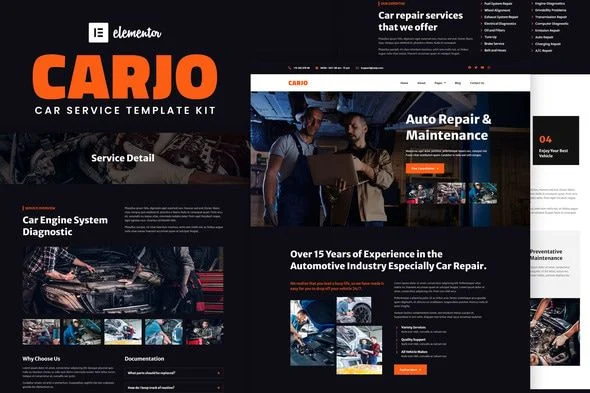
Carjo Car Services & Repair Elementor Template Kit Overview & Layout Delivery Architecture
Carjo is an Elementor Template Kit engineered for auto service workshops, mechanics, and garage businesses that need a production-ready website without designing layouts from a blank canvas. The package addresses the structural bottleneck of assembling service pages, team sections, and contact flows by shipping prebuilt page content that imports directly into the Elementor page builder rather than installing as a WordPress theme. Within an agency delivery pipeline, the kit functions as a reusable layout payload: content is imported through the Envato Elements plugin, stored under Elementor’s Saved Templates, and attached to new pages via the My Templates tab during client staging.
Technical Specifications & Deployment Matrix
| Engineering Metric | Deployment Specification |
|---|---|
| Base Technology / Framework | Envato Template Kit for the Elementor Page Builder (WordPress) |
| Runtime / Compatibility Envelope | Elementor 3.0.x and Elementor 3.1.x; optimized for the free Hello Elementor theme, compatible with most Elementor-supporting themes |
| Deliverable Format | Kit file uploaded as a zip archive (no unzipping) via Elements > Installed Kits |
| Front-End Dependencies | Contact Form 7, Elementor Header & Footer Builder, Image Hover Effects Elementor Addon, PowerPack Lite for Elementor |
| Persistence Footprint | Templates stored inside Elementor’s Saved Templates library; no theme-level database schema is introduced |
Page Composition & Template Import Execution Pipeline
The kit’s core mechanism is staged JSON layout injection into the Elementor editing environment.
Deployment follows a deterministic sequence. First, the Envato Elements plugin is installed and activated from the WordPress Plugins screen, establishing the transport channel between the downloaded kit archive and the site. The kit file is uploaded whole through the Upload Template Kit button, or pulled in automatically by connecting an Elements subscription account. Once imported, the orange requirements banner must be actioned so the four dependent plugins load before any page render occurs. The Global Kit Styles are imported first, which propagates the shared typography and color design tokens across every subsequent page import, keeping visual variables synchronized site-wide rather than managed per-section. Individual templates are then imported one at a time and persist under Templates > Saved Templates in the WordPress dashboard.
New pages are created and opened with Elementor; the gear icon at the lower-left exposes page settings where the canvas is switched to Elementor Full Width and the native page title is hidden, allowing the imported layout to control the entire viewport without theme chrome interference. The gray folder icon opens the My Templates tab, where each stored layout is inserted into the live editing surface for content substitution.
Architectural & Functional Highlights
- Nine-template page inventory: Home, About, Service, Service Detail, Our Team, FAQ, Help & Support, Blog, Single Post, and Contact layouts ship as discrete importable units, letting teams deploy only the routes a client’s sitemap requires.
- Global Kit Styles token layer: Colors and typography are defined at kit level and imported before individual pages, so a single token adjustment cascades across all layouts instead of requiring per-widget edits.
- Header and Footer Builder integration: Global chrome is assembled in the Elementor Header & Footer Builder by creating a new block set to Display on Entire Site, then importing the stored header or footer template into it and publishing.
- Conditional Pro extension path: Where Elementor Pro is active, headers and footers move under Theme Builder, giving the same templates a native placement workflow without re-importing content.
- Contact Form 7 wiring: The Contact page’s inquiry forms run on Contact Form 7, a plugin installed with the kit’s requirements, providing a validated field pipeline for service booking requests.
Production Implementation & Operational Resilience
In agency staging environments, the kit behaves as a self-contained import payload rather than a runtime application. Because template data is serialized layout JSON rather than executable theme code, server-side failure modes are limited to upload and import operations. Administrators should confirm adequate PHP memory headroom (wp_memory_limit) before initiating the kit upload, as large layout archives can exceed conservative default allocations during the import routine. The sequential import discipline matters operationally: skipping the Global Kit Styles import causes later pages to render without the intended design tokens, producing inconsistent typography and color output that must be corrected manually.
Customization boundaries are well defined. Since the deliverable is layout content, modifications occur inside the Elementor editor at the widget, container, and section level; styling is overridden through the Global Kit Styles panel or per-element controls, and imagery is swapped by replacing widget media. The demo photographs are sourced from Envato Elements and require separate licensing before production use, or they can be substituted with a client’s own garage photography, icon sets, and brand assets. For decoupled implementations outside this layout ecosystem, agencies evaluating standalone theme alternatives for general service businesses can assess Rakar as a parallel theme-based path, while transport-sector projects needing a separate luxury vehicle layout can deploy Limoan as an independent Elementor kit on its own site installation.
Frequently Asked Questions
Is Carjo a WordPress theme that installs through the Appearance menu?
No, it is an Envato Template Kit containing page content for the Elementor page builder. It imports through the Envato Elements plugin and is optimized for use with the free Hello Elementor theme, though most Elementor-supporting themes also work.
Can the kit be imported by connecting an Envato Elements subscription instead of manual file upload?
Yes, the workflow supports both paths. Users can click Connect Account to link an Elements subscription and import under Elements > Template Kits, or download the kit file and upload the unopened archive via the Upload Template Kit button.
Does the kit include the demo images used in its preview layouts?
No, the demo images come from Envato Elements and require a separate license for production use. Each photograph can be licensed individually or replaced with substitute imagery and icon assets supplied by the site owner.