Candy Box – Physics-based Puzzle Mobile/Android Game
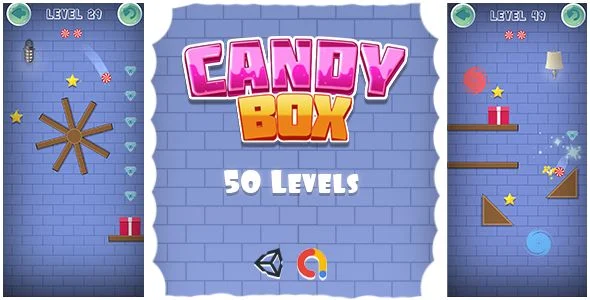
Candy Box Overview & Physics-Driven Puzzle Architecture
Candy Box is a Unity 2020.3.19f1-engineered physics-based puzzle mobile game source package, built for Android developers and casual-game studios to publish a gravity-driven, level-clearing title on Google Play. The codebase removes the dominant engineering bottleneck in one-touch puzzle production: wiring believable rigid-body simulation, level win-state detection, and a monetization layer into one deployable project. Within a studio delivery pipeline, it operates as a ready-to-publish Android artifact with AdMob pre-integrated, layered source art included, and a level-editing workflow that compresses reskin-to-store cycles.
Technical Specifications & Deployment Matrix
| Engineering Metric | Deployment Specification |
|---|---|
| Base Technology / Framework | Unity game engine, build 2020.3.19f1, C# scripting runtime |
| Runtime / Platform Requirements | Android 9.0 through Android 12.0 (verified targets); iOS and HTML5 export supported from the same project |
| Monetization / Ad Layer | Google AdMob SDK implemented inside the build pipeline |
| Deliverable File Formats | Compiled .apk for device testing, layered PSD and layered PNG source graphics |
| Content / Persistence Footprint | 50 playable levels, 6 candy avatars, star and diamond collection; local device storage for progress, no server backend required |
Physics Simulation Core & Level Execution Pipeline
The core mechanism routes a single tap through Unity’s input layer into a rigid-body solver that must deposit the candy inside the box to clear the level. Because every stage is resolved by simulated forces rather than scripted animation, the execution pipeline behaves identically across the 50 shipped levels: input dispatch, physics integration, collision evaluation, and win-state confirmation all run inside the engine’s fixed timestep loop. Once the candy lands in the box, the level controller evaluates collected stars and converts them into the end-of-level rating, while accumulated diamonds feed a currency store that unlocks the five additional candy avatars beyond the default skin.
The presentation layer runs in parallel with the simulation. Particle systems and effect shaders fire on impact and collection events, the audio manager triggers bundled sound effects and music tracks at state transitions, and the clean, responsive UI animates menu, level-select, and victory screens without blocking the physics thread. For studios evaluating an independent Unity puzzle foundation with a different input model, Slide The Ball exists as a separate template project covering the same engine stack.
Core Technical Capabilities of Candy Box
- One-Touch Input Architecture: The entire control scheme is reduced to a single tap event, which the input manager forwards to the physics solver; this eliminates multi-gesture handling code and keeps the interaction model consistent across all 50 levels.
- Physics-Based Win-State Resolution: Level completion is detected through collision and trigger volumes on the box, meaning difficulty tuning happens by adjusting level geometry and physics properties rather than rewriting conditional logic.
- Star and Diamond Progression Economy: Collected stars map directly to per-level ratings, and diamonds function as an unlock currency for the 6 candy avatars, giving the save system two parallel, locally persisted progression tracks.
- AdMob Monetization Layer: Ad requests are dispatched through the implemented AdMob integration at designated points in the game loop, so revenue plumbing is already wired before store submission rather than bolted on afterward.
- Particles, Effects, and Audio Feedback: Impact and collection events drive particle emission plus a library of sound effects and music, synchronizing visual and audio feedback with physics state changes.
Production Implementation & Operational Resilience
Deployment starts from the included .apk, which confirms runtime behavior on a physical Android 9.0–12.0 device before any build work begins. From there, the project opens in Unity 2020.3.19f1, where the AdMob unit identifiers must be replaced with the publisher’s own configuration before a store build is generated. The same Unity project exports to iOS and HTML5, so a single codebase covers three distribution targets without a rewrite of the physics or progression logic.
Reskinning is handled entirely outside the engine where possible: the layered PSD and layered PNG files can be edited in any photo editor software, and modified art drops back into the project without scripting changes. Level content is equally extensible, since the authoring workflow allows new stages to be edited and added in a few minutes inside the editor. Operationally, the title carries no database or backend footprint; progress persistence stays on-device, which removes server maintenance from the release checklist. The known boundary is toolchain versioning: builds should target the documented Unity 2020.3.19f1 release to keep physics behavior and package compatibility deterministic. For teams pursuing a native Android Studio path entirely outside the Unity runtime, Word Linker ships as a decoupled puzzle project with its own AdMob wiring and publish-ready configuration.
Frequently Asked Questions
Does the package include a compiled APK for testing before opening the Unity project?
Yes, the deliverables contain a ready-made .apk file alongside the layered PSD and layered PNG graphics, allowing verification of gameplay, physics behavior, and AdMob behavior on a physical Android device prior to any rebuild or customization work.
Can the graphics be replaced without modifying any code?
Yes, the included layered PSD and layered PNG files are editable in standard photo editor software, so sprites, backgrounds, and UI art can be reskinned directly and reimported into the Unity project without touching the C# scripts.
Is the project limited to Android distribution only?
No, the Unity 2020.3.19f1 project can be exported for iOS and HTML5 in addition to Android, letting one physics codebase serve app stores and web platforms without maintaining separate implementations.
Are sound effects and background music bundled with the source files?
Yes, multiple sound effects and music tracks are integrated into the project and wired to gameplay events, so the shipped build plays complete audio feedback without sourcing or importing external audio assets.