BWD Content Switcher Plus Addon For Elementor
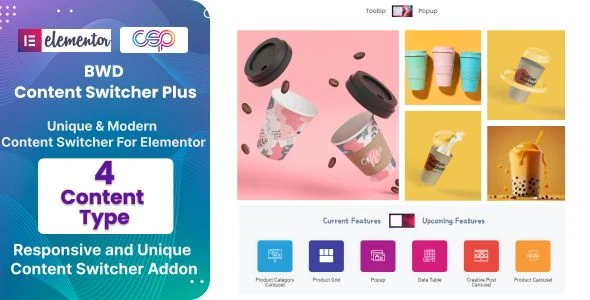
BWD Content Switcher Plus Overview & Interactive Content Toggle Architecture
BWD Content Switcher Plus is a WordPress plugin distributed as JavaScript JS, CSS, and PHP source assets, engineered for agencies and Elementor builders to render interactive tabbed content switcher sections without writing custom front-end code. It addresses a structural gap in Elementor’s native toolkit: the absence of a purpose-built mechanism for toggling between multiple switchable content states — such as monthly versus annual pricing or before-versus-after specifications — inside one layout region. Within agency delivery workflows, the addon operates as a drop-in Elementor widget that collapses these multi-state sections into editable, responsive containers managed directly from the page builder panel.
Technical Specifications & Deployment Matrix
| Engineering Metric | Deployment Specification |
|---|---|
| Base Technology / Framework | WordPress plugin built on PHP, with JavaScript and CSS front-end assets |
| Runtime / Language Requirements | WordPress 4.9.x through 6.9.x hosting environment |
| Data Exchange / Communication Protocols | Client-side content state switching; no external service dependencies |
| Front-End / Engine Dependencies | Elementor page builder; operates with both Elementor and Elementor Pro |
| Database / Persistence Footprint | Widget configuration stored within standard Elementor post metadata; no custom database tables |
Content Toggle Engine & Rendering Pipeline
The widget registers as a native Elementor module and renders a state-driven toggle interface. At the server layer, the PHP component enqueues the widget class into Elementor’s widget manager, exposing dedicated content and style control groups inside the editor sidebar. Editors define two or more content panes — text blocks, images, shortcodes, or nested layouts — and label the switch triggers that map to each state. When a visitor clicks a trigger, the JavaScript layer intercepts the event, applies CSS class changes to hide the inactive pane and reveal the selected one, and updates the switcher’s active indicator so visual state and content state remain synchronized. Because pane transitions are class-based rather than page-reload based, switching occurs without a new document request, keeping navigation flow intact.
Core Technical Capabilities of BWD Content Switcher Plus
- Tabbed Content State Switching: Each widget instance holds multiple content panes bound to discrete triggers, letting one layout region alternate between distinct content sets through click-driven event handlers.
- Dynamic Content Loading: Content assigned to each switch state renders through Elementor’s standard editor pipeline, so switchable sections are composed and revised visually rather than hand-coded in templates.
- Responsive Design Control: Layout properties follow Elementor’s device-based breakpoint system, allowing switcher alignment, spacing, and typography to be adjusted per viewport during the same editing session.
- Cross-Browser Rendering: The front-end stack targets IE9, IE10, IE11, Firefox, Safari, Opera, Chrome, and Edge, using widely supported CSS and JavaScript patterns to keep toggle behavior consistent across engines.
- Design Flexibility Controls: Color, typography, and alignment parameters are exposed through the widget’s style tab, so the switcher chassis matches an existing design system without stylesheet overrides.
For agencies assembling switchable pricing blocks alongside staff presentation modules, deploying Elementor Team Card within the same builder session keeps both section types editable under one Elementor workflow.
Production Implementation & Operational Resilience
Deployment requires only a functioning WordPress installation — version 4.9.x through 6.9.x — with Elementor active, which places the addon within reach of legacy agency staging servers as well as current production stacks. The compatibility matrix also covers WooCommerce 5.x through 8.x, so switchable sections can render inside storefront themes where Elementor templates control product and category layouts. Because the toggle runtime executes entirely in the browser through local event handling and class manipulation, there is no external API handshake involved; the realistic failure surface is limited to stylesheet conflicts or aggressive asset concatenation altering selector specificity during deployment.
Under staging and client handoff conditions, the relevant resilience considerations are front-end rather than server-side. The JavaScript and CSS files ship as readable source, so engineering teams can audit the toggle logic, adjust selector behavior, or deregister styles in favor of a consolidated theme stylesheet. High-resolution display support is confirmed, meaning iconography and rendered assets retain fidelity on retina-class screens. Teams shipping full Elementor site builds for editorial and content service clients can also source complete page structures from Contenta and place switcher widgets into its section layouts as part of the same template workflow.
Frequently Asked Questions
Can the switcher widget be used inside the Gutenberg block editor?
No, the addon is not optimized for Gutenberg. Its widget architecture targets the Elementor page builder runtime, so switchable content sections must be composed and rendered within Elementor-controlled pages and templates.
Is Elementor Pro a mandatory dependency for this addon?
No, Elementor Pro is not required. The compatibility matrix lists both the free Elementor plugin and Elementor Pro, so the switcher widget operates on core Elementor installations while remaining stable inside Pro-powered builds.
Does the package include editable source files for front-end audits?
Yes. The download ships with JavaScript JS, CSS, and PHP files, giving engineering teams direct access to the toggle event logic, the stylesheet layer, and the widget registration code for auditing and modification.
Does the widget output hold up on high-resolution displays?
Yes. The product is flagged as high resolution, so the rendered switcher interface and its visual elements maintain sharpness on retina and other high pixel-density screens.