Bus Jam Escape + Level Editor – HTML5 Game (Construct 3)
Bus Jam Escape Overview & Interactive Runtime Architecture
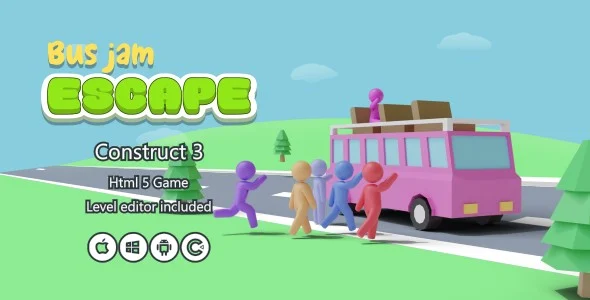
Bus Jam Escape is a Construct 3 HTML5 puzzle engine built for game studios and publishers deploying color-sorting gameplay across web and mobile distribution channels. The codebase solves a concrete production bottleneck: shipping a tap-driven passenger-sorting mechanic with three-dimensional bus rendering, 45 authored levels, and a level editor inside a single editable project file. Within an agency delivery pipeline, it operates as a self-contained source package prepared for HTML5 portal embedding, WebView-based wrapping, or AdMob-monetized Android and iOS builds.
Technical Specifications & Deployment Matrix
| Engineering Metric | Deployment Specification |
|---|---|
| Base Technology / Framework | Construct 3 (release r397.5 LTS), HTML5 runtime export |
| Rendering Dependencies | Mikal’s 3D Object plugin (versions 2-57-2 through 2.58.0) and Better Outline plugin, both bundled in the package |
| Browser Compatibility | IE11, Firefox, Safari, Opera, Chrome, Edge |
| Screen Adaptation | Responsive layout scaling for PC, tablet, and mobile viewports |
| Input Model | Single-tap touch controls with equivalent desktop pointer input |
| Content Volume | 45 designed levels plus an integrated level editor |
| Monetization Layer | AdMob integration covering banner, interstitial, and rewarded ad formats |
| Delivered Files | Construct 3 source (.c3p), HTML5 build files (JS/JSON/HTML), debug APK, PDF documentation |
Passenger-Sorting Logic & Execution Pipeline
Each tap dispatches a queued passenger entity toward the bus whose color identifier matches, while the level definition governs which colors and obstacles enter play. The engine resolves input events against the bus-stop state, and mismatches are prevented at the dispatch layer rather than corrected after animation, which keeps the interaction loop deterministic across frame updates. Difficulty scales by introducing additional color keys and obstacle configurations as levels advance, so the progression curve is data-driven rather than hard-coded per stage.
Architectural & Functional Highlights
- Tap-to-Dispatch Input Handling: Touch and mouse events map to a single interaction primitive, allowing one control scheme to serve mobile handsets, tablets, and desktop browsers without per-platform branching.
- 3D Object Rendering via Plugin Layer: Mikal’s 3D Object plugin supplies the three-dimensional bus presentation inside the Construct 3 event system, while Better Outline handles visual emphasis effects on game entities.
- Level Editor & Data Pipeline: The bundled editor lets designers author additional stages directly, with level definitions serialized as JSON alongside the JavaScript runtime files, extending replay value beyond the shipped 45 levels.
- AdMob Monetization Integration: Banner, interstitial, and rewarded ad placements are already wired into the project, so publishers bind their own ad unit identifiers during build configuration instead of implementing the mediation layer from scratch.
- Asset-Layer Reskinning: Visual identity can be replaced by editing sprites in Illustrator, Photoshop, or Inkscape, leaving the event-sheet logic untouched and reducing the cost of thematic rebrands.
Because the runtime compiles to standard JS, JSON, and HTML output, portal operators can host the build on any static file serving setup. Teams assembling a broader browser catalog on the same engine can deploy Classic Solitaire HTML5 Game Construct 3 through an identical embed-and-export workflow, keeping portfolio maintenance confined to one editor toolchain.
Production Deployment & Implementation Considerations
Staging the project requires Construct 3 release r397.5 LTS or a compatible editor build, since the event sheets depend on Mikal’s 3D Object (2-57-2 through 2.58.0) and Better Outline plugins; both addons ship inside the purchase package, so no separate plugin acquisition is necessary. The verified browser matrix spans IE11, Firefox, Safari, Opera, Chrome, and Edge, which means QA cycles should include pointer-event regression checks on legacy Internet Explorer 11 before portal submission. A debug APK is included to validate Android packaging behavior ahead of store-facing builds, and AdMob placements must be bound to the publisher’s own ad unit identifiers during the build configuration phase. Customization operates at the asset layer: swapping sprite graphics through vector or raster editors changes the presentation without event-sheet surgery, while the level editor handles content expansion. For studios assembling a mixed casual portfolio, Swap Letters occupies a parallel Construct 2/3 slot as an independent word-puzzle deliverable for the same web-embedding channel.
Frequently Asked Questions
Does the download include the editable Construct 3 source project?
Yes. The package contains the native .c3p source file alongside the exported HTML5 build (JavaScript, JSON, and HTML files), a debug APK for Android testing, and PDF documentation covering setup and configuration steps.
Are the required Construct 3 plugins sold separately?
No. Mikal’s 3D Object plugin (versions 2-57-2 through 2.58.0) and the Better Outline plugin are both included in the purchase package, and both are free addons, so no additional licensing or acquisition step is required.
Can new stages be created without editing the event code?
Yes. The integrated level editor allows designers to build additional levels directly within the project, extending the 45 shipped stages without touching the underlying event-sheet logic or re-exporting modified runtime code.
Is AdMob advertising already implemented in the project?
Yes. Banner, interstitial, and rewarded ad formats are preconfigured inside the Construct 3 project, so publishers only need to attach their own AdMob unit identifiers during the Android or iOS build phase.