Bricks – Visual Site Builder for WordPress
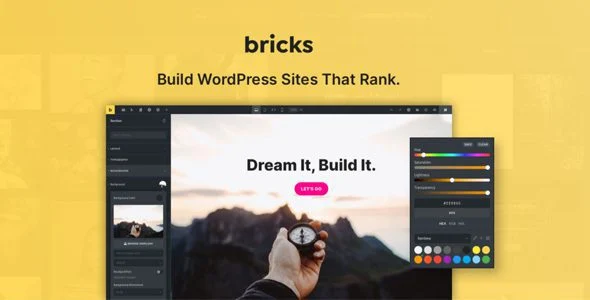
Bricks Visual Site Builder for WordPress Overview & Full-Site Editing Engine
Bricks Visual Site Builder for WordPress is a PHP-rendered visual development engine built for agencies and freelance developers who assemble complete websites—headers, footers, archives, single templates, and storefronts—inside one live editing canvas. The package removes the operational bottleneck of pairing a conventional theme with a separate page-builder plugin, because the builder itself operates as the site’s theme layer and renders every template region visually. In production workflows, it serves as the primary delivery instrument for client builds, letting teams iterate on design, data bindings, and commerce logic from a single interface while the underlying markup is generated server-side.
Technical Specifications & Deployment Matrix
| Engineering Metric | Deployment Specification |
|---|---|
| Base Technology / Framework | WordPress theme-and-builder engine performing visual full site editing across the template hierarchy |
| Runtime / Language Requirements | Standard WordPress LAMP/LEMP environment (PHP + MySQL), self-hosted |
| Ecosystem Compatibility | WooCommerce storefront rendering, custom Gutenberg block authoring, WPML and Polylang localization |
| Front-End / Engine Dependencies | Native SVG asset support for retina-ready, size-optimized icons and graphics |
| Data / Persistence Footprint | Standard WordPress database schema consumed through visual queries, dynamic content bindings, and custom field data |
Visual Rendering Pipeline & Template Architecture
The engine assumes control of the WordPress template hierarchy and renders headers, footers, content regions, and archive views through its visual canvas instead of hand-authored PHP template files. When an element is modified in the editor, the builder records the structural change against its stored layout data, regenerates the affected markup, and previews the result in place—so what the developer sees during editing matches the published output. Style logic is centralized through CSS classes and variables: a token defined once can be bound to any number of elements, and updating the variable propagates the change across every bound component site-wide. Data retrieval follows the same visual model, since query loops and dynamic tags pull records, terms, and field values into templates without requiring manual shortcode assembly.
Architectural & Functional Highlights
- Global CSS classes and variables: Design tokens are declared at the stylesheet level and referenced by elements, keeping large multi-page builds modular, scalable, and consistent when a color, spacing, or typography value changes.
- Dynamic content and custom fields: Elements bind directly to field data and query results, allowing archive cards, detail pages, and listings to populate themselves from structured site data.
- Visual WooCommerce store construction: Product archives, single product layouts, and supporting store templates are composed in the same canvas as the rest of the site, keeping commerce pages inside one design system.
- Reusable global elements: Sections, headers, buttons, and cards are built once and dropped into any page; a single edit to the global element updates every instance across the site.
- Custom Gutenberg blocks: Blocks are authored natively inside the builder, extending block-based content workflows without writing separate block registration code.
For projects that require visitor-submitted content flowing into field data, the builder’s dynamic bindings cover display-side rendering, while ACF Front form with Visual Composer and WPBackery Integration operates as an independent WordPress-side frontend submission layer for decoupled form workflows outside the builder’s own interface.
Production Implementation & Operational Resilience
When deployed for agency client work, the recommended sequence is staging-first: clone the production environment, apply template and style changes, verify WooCommerce checkout and archive rendering, then promote the build. Because the builder resolves icons and graphics through native SVG support, graphic payloads stay resolution-independent and file sizes remain small on high-density displays—though the documentation publishes no fixed Core Web Vitals benchmarks, so teams should profile LCP and CLS figures on their own hosting before go-live rather than relying on vendor claims.
Multilingual rollouts are handled at the localization layer: full integration with WPML and Polylang allows strings, media, and content to be translated across the entire site, including templates composed in the canvas. This means translated variants of a header, footer, or popup do not require duplicated template files, reducing the maintenance surface for clients operating in multiple markets. Teams already standardized on an Elementor runtime should note that Auros Pro exists as a parallel, Elementor-based WooCommerce storefront path—a separate codebase and design system, not an extension of this builder’s architecture.
Customization boundaries are generous within the visual layer: CSS variables, class definitions, and reusable elements act as the sanctioned extension points, so most client revisions stay inside the editor instead of spawning child-theme overrides. Where a project calls for a purpose-built storefront theme rather than a builder-driven design, Stationero serves as an independent WooCommerce theme alternative for decoupled storefront implementations outside the builder’s template runtime.
Frequently Asked Questions
Does the popup module support audience targeting rules rather than sitewide display?
Yes, the popup engine engages audiences through configurable targeting, allowing popups to display for defined visitor segments instead of firing on every page load for every user.
Can custom Gutenberg blocks be produced inside the builder without separate block development?
Yes, Gutenberg blocks can be built directly with the builder, extending block-based content workflows inside the same visual environment used for full site templates.
When translating with WPML or Polylang, are media and strings covered in addition to page content?
Yes, the documented localization integration covers strings, media, and content across the entire site, so translated assets and interface text are handled alongside template output.