Booked – Appointment Booking for WordPress
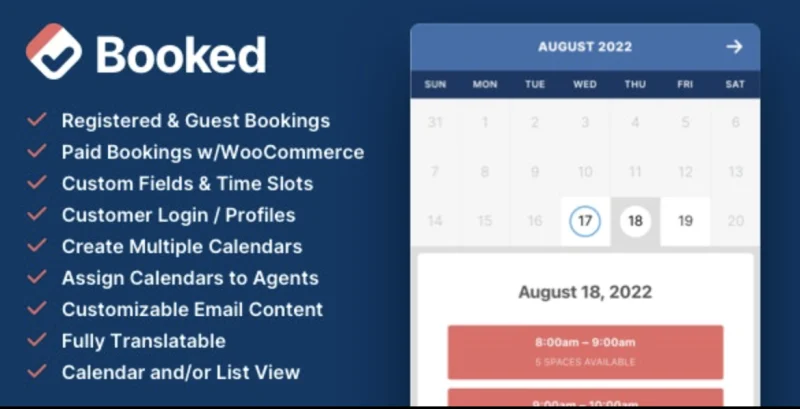
Booked – Appointment Booking for WordPress Overview & Scheduling Engine Role
Booked – Appointment Booking for WordPress is a PHP-based scheduling plugin, engineered for freelancers, service businesses, and agency delivery teams to replace manual appointment coordination with server-side calendar logic. The plugin removes the back-and-forth email cycle by exposing available time slots through a visual calendar that customers reserve directly from the front end, eliminating the transcription errors built into manual scheduling. Within production workflows, it operates as the booking layer of a service-business website, letting administrators define staff calendars, availability rules, and per-service parameters without writing custom code.
Technical Specifications & Deployment Matrix
| Engineering Metric | Deployment Specification |
|---|---|
| Base Technology / Framework | WordPress plugin (server-side PHP) administered through the native WP dashboard |
| Runtime / Language Requirements | A standard WordPress installation running on PHP with a MySQL database |
| Data Exchange / Communication Protocols | Front-end calendar rendering via shortcodes; automated email reminders dispatched to customers and administrators |
| Front-End / Engine Dependencies | Self-contained calendar interface rendered on any page or post through shortcode embeds |
| Database / Persistence Footprint | Appointments, customer profiles, and calendar configurations persisted in the WordPress database |
Shortcode Calendar Engine & Booking Execution Pipeline
The core mechanism is shortcode-driven calendar rendering with server-side availability computation. An administrator first defines one or more calendars in the dashboard, each mapped to a staff member, department, or service. Availability is then encoded as a rule set: recurring working hours, vacation days, holidays, and buffer periods that block adjacent slots from being reserved. Once configured, a shortcode embeds the calendar on any page, and the engine computes which slots remain open against the stored rule set before rendering them to the visitor.
On the customer side, the booking flow branches by authentication state. Registered users authenticate and submit reservations tied to their persistent profile, while guest visitors complete a booking without account creation, which reduces abandonment for first-time traffic. Each accepted reservation writes an appointment record to the database, and automated reminders are dispatched by email as the scheduled time approaches. Customers with accounts can subsequently review and manage their own appointments from a dedicated profile page rather than contacting staff.
Because every calendar is an independent entity with its own availability window and pricing, the architecture scales horizontally with headcount: adding a new team member means adding a calendar, not restructuring the site. Agencies delivering consulting or professional-services builds frequently deploy this plugin alongside Brevon, a business consulting WordPress theme whose page structures accommodate appointment-driven workflows.
Core Technical Capabilities of Booked
- Multiple Calendar Architecture: Each staff member, department, or service receives a dedicated calendar with independent availability rules and pricing, so customers always book against the correct resource.
- Custom Availability Windows: Working hours, vacation days, and holidays are defined per calendar, giving administrators deterministic control over which time slots the engine exposes.
- Guest Booking Pathway: Visitors without accounts can complete reservations directly, removing registration friction from the conversion path while still persisting the appointment record server-side.
- Customer Profile Self-Management: Registered customers manage their appointments and personal details from a profile page, shifting routine changes away from administrative overhead.
- Automated Email Reminders: Scheduled reminder dispatch reduces missed appointments without manual follow-up by staff.
Production Implementation & Operational Resilience
Deployment follows the standard plugin activation path: upload, activate, configure calendars, then embed shortcodes where the booking interface should render. In agency staging environments, the recommended sequence is to validate availability rules on a staging copy before publishing shortcodes to production, since a misconfigured working-hours rule set directly determines which slots customers can reserve. Per-calendar pricing and buffer settings should be audited per service line, because these values govern both the customer-facing offering and scheduling density.
The front-end calendar is responsive across desktop, tablet, and smartphone viewports, so the booking surface renders correctly regardless of how visitors reach the site. Color customization lets administrators align the calendar palette with an existing brand identity, which matters on client deliveries where the booking page must visually match the surrounding theme. Operationally, automated reminders depend on the host’s email deliverability; verifying mail transport during staging prevents silent reminder failures after launch. Since availability computation runs against stored calendar rules rather than external services, the plugin has no third-party API dependency to degrade. For engineering teams evaluating decoupled scheduling dashboards outside the WordPress runtime, Calendify provides a standalone admin template path for custom-coded scheduling systems.
Frequently Asked Questions
Can visitors book an appointment without registering a WordPress account?
Yes, the plugin supports guest booking, allowing new visitors to reserve a time slot directly from the calendar without creating an account first, which shortens the conversion path for first-time traffic.
Can buffer periods be placed between consecutive appointments?
Yes, each calendar can define buffer times in its configuration, blocking the intervals between reserved slots so staff receive transition time and adjacent bookings cannot be placed back to back.
Can the calendar’s visual appearance be adjusted to match site branding?
Yes, color customization controls let administrators modify the calendar’s palette so the booking interface aligns with the website’s existing brand identity without editing stylesheet files.
Does the booking calendar function correctly on smartphones and tablets?
Yes, the front-end display is fully responsive, rendering the calendar and time-slot selection correctly across desktop, tablet, and mobile viewports without requiring a separate mobile implementation.
-
2.4.3 LatestSeptember 25, 2026