Benzo – It Solution & Services Elementor Template Kit
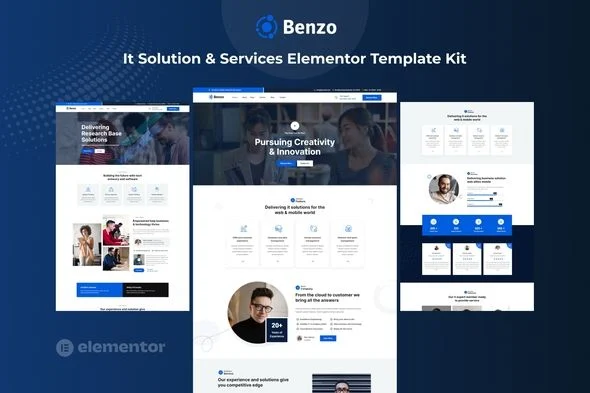
Benzo IT Solution & Services Template Kit Overview & Corporate Site Delivery Engine
Benzo IT Solution & Services Template Kit is an Envato Elements Template Kit built for the Elementor 3.10.x page builder engine, engineered for IT agencies, SaaS vendors, software companies, and startup service providers to launch production websites without custom theme development. The package resolves the recurring agency bottleneck of assembling an entire corporate site from scratch by supplying pre-structured layouts — two homepage variants, service and service-detail pages, project case-study pages, team, FAQ, blog, contact, and a 404 page — as importable JSON design records. Within a delivery workflow, it functions as a layout source that agencies clone, re-brand through global style tokens, and hand over to clients after content and asset substitution.
Technical Specifications & Deployment Matrix
| Engineering Metric | Deployment Specification |
|---|---|
| Base Technology / Framework | Elementor 3.10.x page builder, distributed as an Envato Template Kit |
| Runtime / Environment Requirements | WordPress install with the Envato Elements plugin; adequate wp_memory_limit for JSON layout imports |
| Data Exchange Mechanism | Compressed kit archive uploaded via Elements > Installed Kits; no manual extraction required |
| Front-End / Engine Dependencies | ElementsKit Lite, Elementor Header & Footer Builder, MetForm |
| Layout Grid System | 1170px Bootstrap-based design grid with fluid responsive behavior across devices |
| Persistence Footprint | None beyond standard WordPress and Elementor saved-template storage |
Import-Driven Layout Architecture & Execution Pipeline
The kit’s execution model is import-driven: every page ships as a structured JSON layout record that the Elementor editor parses into a manipulable widget tree. During installation, the Envato Elements plugin reads the compressed archive, registers its plugin requirements through the Install Requirements banner, and stages each template under Templates > Saved Templates.
Operators import the Global Kit Styles record first so that font families, type scales, and the color palette are written as site-wide design tokens; every subsequent page import inherits those tokens, meaning a single palette adjustment propagates across all layouts instead of demanding per-widget edits. Page assembly follows a fixed sequence: create a new page, open it in the Elementor editor, set Elementor Full Width and hide the page title through the gear-icon settings panel, then insert the saved template from the My Templates tab. Global header and footer regions are constructed through the bundled Elementor Header & Footer Builder or ElementsKit Lite, and operators running Elementor Pro can relocate those regions into the Theme Builder instead. For agencies whose client roster also includes security-service providers and who need a parallel visual direction rather than a shared codebase, Xyber – Cybersecurity Agency & IT Security Elementor Template Kit occupies the same import workflow as an independent kit option.
Core Technical Capabilities of Benzo IT Solution & Services Template Kit
- Token-based style propagation: fonts and colors are defined once in the Global Kit Styles record and cascade into every imported page, while individual widgets still accept fine-grained overrides where a specific section demands deviation.
- No-code layout manipulation: each JSON template renders as a drag-and-drop widget tree inside the Elementor 3.10.x editor, so reordering sections, duplicating containers, and swapping content require zero PHP or stylesheet authoring.
- Form payload routing through MetForm: the contact page’s input fields are wired to the bundled MetForm module, giving client sites inquiry capture without a separate form plugin install.
- Theme-agnostic rendering: layout output comes from the builder engine rather than theme template files, so the kit runs on most Elementor-compatible themes.
- Purpose-mapped page inventory: two homepages, service and service-detail layouts, project and project-detail case-study layouts, team, FAQ, blog, blog-detail, contact, and 404 pages, plus global header and footer sections, cover a complete corporate site map.
Production Implementation & Operational Resilience
Reliable deployment depends on import ordering and environment sizing. The Global Kit Styles record must be imported before any page template; skipping this step leaves later imports referencing unstyled tokens and forces manual re-theming. Because the Envato Elements plugin decodes each JSON layout and writes it into Elementor’s saved-template storage, hosting environments with a low wp_memory_limit can abort mid-import on larger page records — raising that limit before upload prevents partial imports. The kit archive itself is uploaded without unzipping, since the plugin handles extraction internally.
Customization boundaries are confined to the visual layer. Agencies re-skin the package through global font and color tokens, per-element style overrides, and image replacement; there are no server-side code paths to extend. One deliverable boundary deserves explicit attention: all demo photography is sourced from Envato Elements and ships unlicensed, so a production launch requires either licensing those assets or substituting original imagery before client handover. For studios running a multi-client pipeline where a darker aesthetic would serve digital-agency briefs as a separate install, Webiso – Dark Digital Agency Elementor Template Kit flows through the same Elements > Installed Kits import path without touching the Benzo deployment.
Frequently Asked Questions
Does the kit import correctly if I unzip the downloaded archive first?
No. The kit file must be uploaded as a compressed archive through the Upload Template Kit button under Elements > Installed Kits; the Envato Elements plugin performs extraction internally, and pre-extracted folders break that ingestion path.
Can global headers and footers be edited without an Elementor Pro subscription?
Yes. The bundled Elementor Header & Footer Builder and ElementsKit Lite modules construct and manage global header and footer regions, while Elementor Pro’s Theme Builder remains an optional alternative for operators who already hold it.
Are the demo images shown in the preview included for live production use?
No. Demo imagery is drawn from Envato Elements and ships unlicensed, so a live launch requires licensing those images from that platform or replacing them with the agency’s own client-approved assets before deployment.