Be admin – Bootstrap Admin Skin
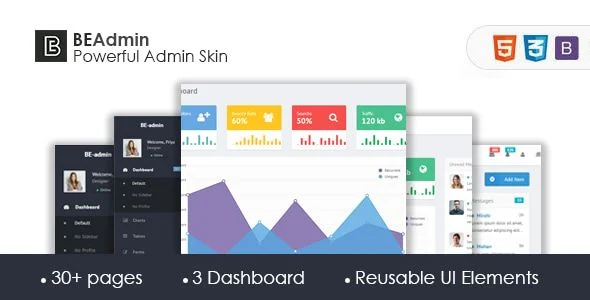
Be Admin Bootstrap Admin Skin Overview & Front-End Dashboard Foundation
Be Admin is a Bootstrap 3 admin skin, engineered for developers and agencies building administrative dashboards and web application back ends. The package resolves the bottleneck of assembling management interfaces from scratch by layering additional JavaScript and CSS components on top of the native Twitter Bootstrap 3 framework. Within production delivery workflows, it functions as an adaptable presentation layer that can be wired into client control panels, internal tools, and SaaS administration screens.
Technical Specifications & Deployment Matrix
| Engineering Metric | Deployment Specification |
|---|---|
| Base Framework | Twitter Bootstrap 3 (skin architecture with LESS sources) |
| Runtime / Language Requirements | HTML, CSS, JavaScript JS, PHP files; standard web server, no database engine required |
| Browser Compatibility | IE8, IE9, IE10, IE11, Firefox, Safari, Opera, Chrome, Edge |
| Icon System | Font Awesome icon font |
| Layout Modes | Responsive mobile-first grid, RTL version, high-resolution rendering |
Bootstrap 3 Override Layer & Component Rendering Pipeline
The skin operates as a Bootstrap 3 override layer that restyles native framework components and injects supplementary JavaScript behavior. Because it is a skin rather than a from-scratch CSS library, every UI element inherits the Bootstrap 3 grid, typographic scale, and component markup conventions. Developers who already know the framework’s class vocabulary can therefore adopt the package without relearning a parallel naming system. The included LESS sources expose the styling variables that drive color, spacing, and typography decisions, so visual identity adjustments happen at the variable layer instead of through scattered selector overrides.
Rendering follows a progressive enhancement strategy: interface components are constructed for mobile viewports first, then additional layout complexity activates as screen resolution increases. This sequencing means dashboard widgets, navigation panels, and data containers retain functional layouts on phones and tablets before desktop-only refinements load. The JavaScript additions extend the framework’s default interaction set with the behaviors an administrative context typically demands, and the widget structure provides drop-in building blocks for common dashboard regions. The version 1.0 release added a mailbox page, and the compose experience in that page is powered by the Summernote rich-text editor, which handles formatted message authoring directly in the browser.
Core Technical Capabilities of Be Admin
- LESS Variable Customization Layer: The skin ships its styling logic as LESS sources, allowing agencies to recompile the entire visual identity by modifying variable definitions rather than rewriting component selectors, which keeps override debt low across client projects.
- Extended Component & Widget Set: Beyond native Bootstrap 3 components, the package adds purpose-built JavaScript and CSS modules and pre-assembled widgets, supplying dashboard-ready UI regions that the stock framework does not include.
- RTL Layout Version: A right-to-left stylesheet version introduced in release 1.0 mirrors the layout for languages written in right-to-left scripts, extending deployment reach into multilingual administrative environments without a separate theme purchase.
- Font Awesome Icon Pipeline: Iconography runs on the Font Awesome font, delivering scalable vector icons that inherit color and size from CSS rules and render consistently across the supported browser matrix.
- Mailbox Page with Summernote Compose Editor: The added mail interface demonstrates a full application-style screen pattern, with the compose flow delegated to the Summernote editor for rich-text input handling.
It is worth grounding scope expectations here: the package targets administrative interfaces exclusively. For storefront work that lives outside the admin layer, Ecomus Ultimate eCommerce React NextJs/ Bootstrap Template exists as an independent React and Next.js front-end path for customer-facing commerce builds.
Production Implementation & Operational Resilience
Deployment is a static asset exercise: the HTML, CSS, JavaScript, and PHP files are transferred to any standard web host, and the skin carries no database schema, migration routine, or server-side persistence footprint. That absence of backend state makes the package well suited to agency staging environments, where a dashboard skin can be previewed on a throwaway subdomain with no provisioning overhead. The included documentation covers the customization workflow, so teams adjusting the LESS variables or restructuring widget markup have an author-written reference rather than reverse-engineering the source tree.
Operational boundaries deserve honest framing. The architecture is pinned to Bootstrap 3, so teams standardizing on Bootstrap 4 or 5 utility systems cannot reuse this skin’s class structure against those frameworks without manual porting. Legacy browser support reaches back to Internet Explorer 8, which constrains some CSS techniques to patterns that legacy engine can parse. Error handling and state management remain the integrating application’s responsibility, since the skin is a presentation layer, not a data controller. Teams evaluating a newer-generation dashboard foundation built on Bootstrap 5 with an accompanying Laravel 8 version can examine Arcone as a separate alternative in that stack. Secondary development within this package should stay confined to style overriding through the LESS layer and asset replacement, both of which the bundled documentation explicitly supports.
Frequently Asked Questions
Does the package include a ready-made mailbox page?
Yes. The version 1.0 update added a mail box page to the template set, giving developers a prebuilt application-style screen pattern they can adapt for message-centric admin workflows without constructing the layout manually.
Is the compose editor in the mailbox page based on Summernote?
Yes. The documentation directs users to the Summernote project for details on the compose editor, confirming that formatted message authoring in the mail page is handled through the Summernote rich-text component.
Does the download include documentation for customizing the skin?
Yes. The author states that a customization document is included with the item, covering how to modify the skin so agencies can adapt the appearance through the documented workflow instead of blind source edits.