Battery Charging Annimation | Full Android App | Admob Ads
Product Overview
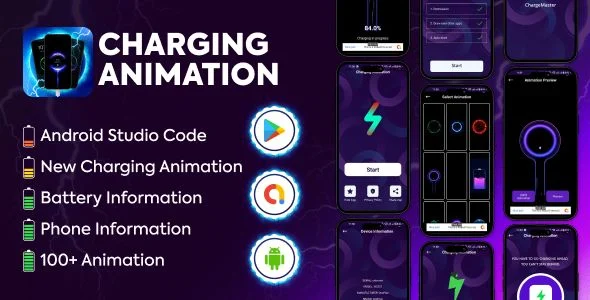
Battery Charging Annimation | Full Android App | Admob Ads is a native mobile utility application designed for Android developers looking to deploy a customization tool to the Google Play Store. When installed, this Battery Charging Annimation | Full Android App | Admob Ads runs a background service that detects when a power cable connects to the device, instantly overriding the default system battery icon with a custom full-screen overlay. The main dashboard layout features a bottom navigation bar with tabs for selecting animation themes, checking battery health statistics, and configuring alarm settings. It targets end-users who want personalized charging screens and developers aiming to generate revenue through integrated mobile advertisement placements.
When a user navigates to the animation gallery tab, a two-column scrolling grid displays thumbnail previews of available charging effects, such as neon circles, liquid waves, and speedometer styles. Tapping a thumbnail opens a full-screen preview activity where a mock battery percentage counts up, allowing the user to test the visual behavior before applying it. A floating action button in the bottom right corner lets the user set the selected effect as the active default. If the user presses the back navigation gesture, the app returns to the grid retaining the previous scroll position, preventing the need to browse through the top of the list again.
Highlights & Value
Deploying the Battery Charging Annimation | Full Android App | Admob Ads modifies the standard charging sequence by introducing interactive UI elements that remain active while the device screen is locked.
• Active Foreground Service: A persistent notification remains in the Android pull-down tray, ensuring the animation listener process is not killed by the operating system’s battery optimization manager.
• Integrated Advertisement Placements: Banner ad views are anchored to the bottom edge of the settings screen, while interstitial ad triggers load when a user transitions from the gallery grid to the individual preview activity.
• Battery Status Dashboard: The home fragment displays a circular progress UI showing the current charge level, alongside raw data fields pulling the real-time battery temperature, voltage, and health status directly from the Android hardware API.
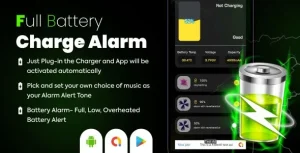
• Custom Alarm Triggers: A toggle menu allows users to set a numerical threshold, triggering an audio alarm loop when the battery reaches maximum capacity to prevent device overcharging.
Real-World Use Cases
Publishers use the Battery Charging Annimation | Full Android App | Admob Ads to build portfolio assets that serve utility functions for mobile consumers.
- App Store Monetization: Developers compile the provided Android Studio source code, replace the default AdMob unit IDs with their own, and publish the utility to generate passive income from daily active users plugging in their phones.
- Device Customization Platforms: Modders extract the animation source files to offer localized themes for specific Android communities, swapping the default neon graphics with custom branded charging loops.
- Hardware Testing Utility: Repair technicians use the raw battery telemetry screen to monitor incoming voltage and device temperature spikes while testing replacement charging ports.
Technical & Compatibility
Battery Charging Annimation | Full Android App | Admob Ads requires Android Studio to compile and relies on Java to handle the core application logic. The layout structures use standard XML files, meaning developers can adjust the grid spacing, button constraints, and text colors directly inside the visual layout editor without needing external design software. The animation assets are stored in the local drawable folders, utilizing lightweight formats to keep the final APK size small and reduce memory consumption during the background charging state.
The project implements the official Google AdMob SDK via Gradle dependencies, handling ad requests asynchronously so the main UI thread does not freeze while banners load. To function correctly, the app prompts users to grant the “Draw over other apps” permission during the initial launch sequence. This permission is mandatory, as it allows the charging overlay to render on top of the native Android lock screen whenever the hardware detects a connected power source. The codebase also includes logic to suppress the animation overlay if the user is currently on an active phone call, preventing the visual elements from interfering with the dialer interface.