Bambini – Pre-School and Kindergarten Theme
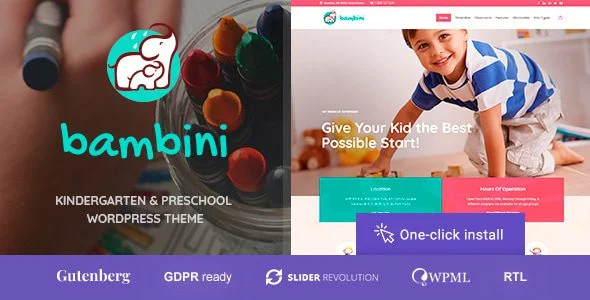
Bambini Pre-School and Kindergarten Theme Overview & Parent-Journey Presentation Layer
Bambini Pre-School and Kindergarten Theme is a WordPress theme built for childcare centers, preschools, and kindergarten operators who need to publish enrollment, program, and parent-communication pages quickly. It resolves a structural bottleneck specific to early-education websites: mixing practical operational data — age ranges, teacher ratios, pickup notes, allergen labels — with warm, plain-language presentation without sacrificing mobile readability. Within an agency delivery pipeline, the package functions as a drop-in presentation layer that handles admissions flows, event calendars, staff profiles, menu documentation, and health-and-safety content out of the box.
Technical Specifications & Deployment Matrix
| Engineering Metric | Deployment Specification |
|---|---|
| Base Technology / Framework | WordPress theme package; PHP template hierarchy with modular front-end content sections |
| Runtime / Language Requirements | Standard WordPress hosting environment running PHP and MySQL per platform minimums |
| Data Exchange / Communication Protocols | Native WordPress request/response rendering; theme content modules configured through the admin layer |
| Front-End / Engine Dependencies | Component set of tabs, accordions, badges, card grids, and galleries; no external server-side engine documented |
| Database / Persistence Footprint | Native WordPress tables (wp_options, post meta); no custom database schema documented |
Modular Content Architecture & Execution Pipeline
Bambini maps early-education operations onto the WordPress template hierarchy through a fixed set of reusable interface components. When a visitor requests a program or admissions URL, WordPress resolves the matching template, and the theme renders page content via tabs, accordions, badges, and card grids rather than free-form layouts. This component discipline is the engine’s central design decision: parents scanning on a phone during a busy morning encounter identical interaction patterns on every page type.
The hero layer exposes exactly one primary call to action — enroll, book a tour, or view the calendar — while quick links surface classrooms, tuition, meals, and safety, backed by a compact search for direct navigation. Program pages follow a conversational structure covering goals, daily rhythm, learning areas, and family participation options. Staff sections foreground qualifications, spoken languages, and passions, with one-tap links to classroom updates. Calendars separate events from reminders — holidays, parent nights, screenings — without visual clutter, and every success state terminates in an explicit next action such as add to calendar, upload documents, or message the office. To extend on-page visibility without editing template files, agencies can deploy Rank Math SEO Pro alongside the theme for schema markup, sitemaps, and redirect control across these content modules.
Core Technical Capabilities of Bambini
- Component consistency layer: Tabs, accordions, and badges repeat across page types, keeping DOM structure predictable and reducing cognitive load on mobile viewports.
- Card-grid data layer: Classroom essentials — age range, teacher ratios, hours, pickup notes — render as scannable card units instead of dense paragraph blocks.
- Accessibility baseline: Readable color contrast, visible focus states, and generous tap targets are treated as foundational rendering requirements rather than optional enhancements.
- Menu and allergen module: Meal sections combine photography with ingredient lists and allergen tags, so dietary restrictions are communicated both visually and textually.
Production Implementation & Operational Resilience
In agency staging environments, deployment follows the standard WordPress theme activation path: upload the package, activate it, then import the bundled structure before mapping real classroom data into the pre-built modules. Because operational details — ratios, hours, pickup notes, allergen labels — live in configurable content fields rather than hard-coded templates, client handover does not require PHP edits for routine content changes.
Style overrides must respect the theme’s accessibility baseline. When a brand palette replaces the default soft color accents, contrast ratios, focus states, and tap-target dimensions need re-verification rather than assumption. Photography replacement across the play, rest, and outdoor galleries is the primary asset-swap workflow, and image weight should stay disciplined so galleries retain their documented no-slowdown behavior. For education teams evaluating a standalone kit path outside a full theme install, Edumaya – Homeschool Elementor Template Kit exists as an independent design alternative, not a mergeable component of this codebase.
Operational resilience centers on expectation management rather than custom server logic. Microcopy covering uniforms, allergies, and rainy-day routines pre-empts inbound support questions, and failure points in the parent journey resolve to explicit next actions instead of dead ends. Since no custom database writes are documented, the persistence footprint stays within native WordPress tables, which simplifies backups, migrations, and multi-client maintenance across an agency portfolio.
Frequently Asked Questions
Does Bambini support multilingual communities with mirrored section layouts?
Yes. The theme mirrors sections for multilingual audiences while keeping the visual hierarchy intact, so translated copy preserves the original reading order, component structure, and placement while tone is adapted carefully per language community.
Are the health and safety pages designed for printing?
Yes. The health and safety pages present policies in plain language, produce printable illness guides, and keep contact details prominently placed, so parents can retain operational documents for offline reference during screening periods.
Do the admissions pages include financial aid guidance?
Yes. Admissions pages sequence application steps, timing expectations, and required forms, while financial aid cues are positioned at the exact points where parent questions typically arise during enrollment windows.
-
v1.3.2 LatestOct 24, 2026