Augmented reality App | Filters | Effects | Masks
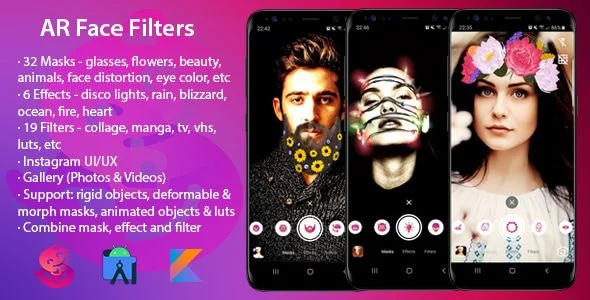
Augmented Reality App Overview & Real-Time Face Tracking Architecture
Augmented Reality App is a Kotlin-based Android source package engineered for mobile developers and agencies to ship real-time face masks, effects, and filters across photo and video capture modes. The codebase resolves the core bottleneck of compositing a deformable mask, a post-processing effect, and a color filter simultaneously inside one camera pipeline—states most camera implementations treat as mutually exclusive. Within agency delivery pipelines it operates as a store-ready camera module whose Instagram-patterned capture surface maps directly onto entertainment and social publishing products.
Technical Specifications & Deployment Matrix
| Engineering Metric | Deployment Specification |
|---|---|
| Base Technology / Framework | Kotlin application layer distributed with .java and .xml source files |
| Runtime / Language Requirements | Kotlin 1.x on a Java 17 toolchain; validated on Android 9.0 through Android 17 (SDK 37 target) |
| Data Exchange / Communication Protocols | On-device camera frame pipeline; AdMob banner and interstitial ad requests configured via strings.xml |
| Front-End / Engine Dependencies | Media3 ExoPlayer for gallery video playback; 16 KB page-size-compatible packaging |
| Database / Persistence Footprint | Device gallery integration for captured photos and recorded videos; no external database layer |
Layered AR Composition & Execution Pipeline
The rendering engine composes mask, effect, and filter layers within one real-time camera pass. Inbound frames from the active sensor—front camera by default—flow through a face-tracking stage that resolves anchor geometry for five supported effect classes: rigid objects, deformable masks, morph masks, animated objects, and post-processing effects. Once landmarks are resolved, the selected mask deforms against the tracked mesh while the chosen effect and filter are applied to the same output frame, so all three layers are captured together in a still photograph or a recorded clip.
The interaction layer mirrors the capture grammar of short-form social platforms: a single tap dispatches a photo capture event, a long press starts and stops recording, and swipes move between the mask, effect, and filter shelves. A reset control clears the active stack, a 3×3 grid overlay can be toggled for composition, flash state and camera facing switch at runtime, and a haptic vibration confirms each applied asset. Volume keys are bound to zoom—the up button zooms in, the down button zooms out.
The shipped asset library spans 32 masks across glasses, flowers, beauty, animals, face distortion, galaxy background, people, eye color, metal face, and beard categories; 6 effects (disco lights, rain, blizzard, ocean, fire, heart); and 19 filters including grid collage, manga, TV, VHS, drunk, and LUT-based grades. Fire and heart bind activation to a mouth-open facial trigger, so the effect state machine listens for landmark-driven interaction events rather than UI input alone. The gallery module reads all device photos and videos, refreshes its lists after each capture or deletion, and exposes per-item details—path, media type, date, resolution, size, and video duration—plus share and delete actions. For studios assembling an Android product line, WOW Photo Editor ships as an independent photo-editing source package covering a complementary vertical outside this AR codebase.
Core Technical Capabilities of Augmented Reality App
- Simultaneous AR layering: Mask, effect, and filter selections run as parallel states in the capture pipeline, so a composed frame carries all three assets into either a photo or a recording without re-initializing the camera session.
- Interaction-triggered effect state machine: Fire and heart effects are gated by mouth-open landmark detection, forming an event-driven bridge between the face-tracking stage and the effect renderer.
- Gesture-driven capture controller: Tap, long-press, and swipe events map to capture, recording, and shelf navigation, with haptic feedback, grid overlay, flash, camera switching, and volume-key zoom handled at controller level.
- Self-reconciling gallery subsystem: Photo and video lists refresh after capture or deletion, and each item exposes metadata, sharing, and deletion through a unified viewer and Media3-based player.
Production Implementation & Operational Resilience
Deployment follows a standard Android Studio Gradle workflow against a Java 17 toolchain, with the current 11.0.2 release compiled in Android Studio Quail 1 (2026.1.1 Patch 2) and the documented earlier baseline at Meerkat 2024.3.1 Patch 1. Monetization is wired through AdMob banner and interstitial placements whose unit identifiers live in strings.xml, making ad-account configuration a resource-level edit that never touches request or lifecycle logic. Version 11.0.0 added 16 KB page-size support, keeping packaged binaries aligned with memory page constraints on recent Android hardware, and the CameraHelper refactor isolates sensor handling into a discrete module for anyone porting the capture surface.
The recorded change history shows scoped defect handling rather than blanket rewrites: a crash fix, a camera bug affecting Android 12 and above, and an earlier gallery-screen failure that blocked media display on some Android 10 devices were each resolved in targeted releases. Secondary development is bounded by the asset pipeline—new masks slot into the existing effect classes, new filters arrive as LUT grades, and interaction triggers follow the landmark-event pattern established by the fire and heart effects. Teams operating multiple monetized Android builds can study the ad-configuration pattern in computer shortcut keys app, a separate AdMob-driven codebase maintained as its own package.
Frequently Asked Questions
Does building the project require a specific Android Studio version and JDK?
Yes, the documented development environment specifies Android Studio with Java 17; the current 11.0.2 build was compiled in Android Studio Quail 1 (2026.1.1 Patch 2), while Meerkat 2024.3.1 Patch 1 is the earlier documented baseline.
Can AdMob banner and interstitial identifiers be replaced without modifying Kotlin logic?
Yes, both ad unit identifiers are exposed in strings.xml, so monetization configuration is a resource-level edit; no changes to the ad request or lifecycle code paths are required to point builds at a specific ad account.
Does gallery video playback rely on the legacy ExoPlayer library?
No, the V 10.0.0 migration replaced legacy ExoPlayer with Media3 ExoPlayer, so gallery video playback and volume handling run on the current Media3 pipeline rather than the deprecated player dependency.
Does the build satisfy 16 KB page-size constraints on newer Android devices?
Yes, V 11.0.0 introduced support for 16 KB page sizes alongside dependency updates and CameraHelper refactoring, aligning the packaged binaries with the memory page enforcement on recent Android hardware.
i Camera Photo – iCamera iOS 13 – Selfie Camera – iOS Camera Photo Editor -iPhone Camera Filters
Pop Art Studio Pro – Poster PopArt – Camera Effects Maker – Art Effect – AI Photo Filters – WPAP

HumanAR Anatomy | Augmented Reality App Unity