AstralVue – Astrology & Horoscope Elementor Template Kit
AstralVue Astrology & Horoscope Elementor Template Kit Overview & Mystical Content Publishing Architecture
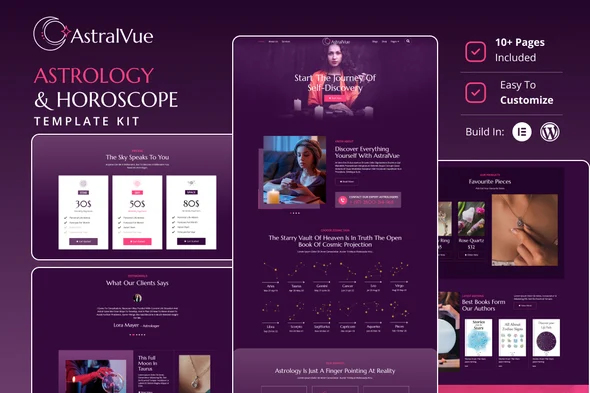
AstralVue Astrology & Horoscope Elementor Template Kit is an Envato Template Kit built for Elementor 3.10.x, engineered for astrologers, spiritual bloggers, and agencies to publish horoscope content, zodiac insights, and consultation services without writing code. The kit removes the design bottleneck of assembling horoscope archives, service pages, and esoteric shop layouts from scratch by shipping twelve prebuilt page templates plus reusable header, footer, and form blocks. Within an agency delivery workflow, it functions as a drop-in layout system that imports through the Envato Elements plugin and renders on any WordPress site already running an Elementor-compatible theme.
Technical Specifications & Deployment Matrix
| Engineering Metric | Deployment Specification |
|---|---|
| Base Technology / Framework | Envato Template Kit targeting Elementor 3.10.x |
| Runtime / Environment Requirements | WordPress installation with the Envato Elements plugin activated; kit archive kept zipped during upload |
| Data Exchange / Import Protocol | Template definitions uploaded through Elements > Installed Kits > Upload Template Kit |
| Front-End / Engine Dependencies | Elementor, Jeg Elementor Kit, and MetForm, resolved via the Install Requirements banner |
| Persistence / Storage Footprint | Imported records stored under Elementor Saved Templates; styling governed by the Global Kit Styles token layer |
Design Token System & Template Import Pipeline
Every layout ships as a structured definition that the Envato Elements plugin parses and converts into Elementor node trees, so no server-side code execution occurs at any import stage. The pipeline begins at the Elements > Installed Kits screen, where an orange banner listing required plugins is resolved through a single Install Requirements action; the Global Kit Styles record is imported first so every subsequent page template inherits identical typography and color tokens. Imported templates then land under Elementor’s Templates > Saved Templates section, and page-level composition happens inside the builder through the grey folder icon’s My Templates tab.
Because fonts and colors bind to the global token layer rather than per-widget values, a single token edit propagates across the Home, Services, Pricing, and Shop layouts simultaneously, which is the mechanism behind the kit’s centralized styling workflow. The drag-and-drop container editor then exposes every layout arrangement for direct manipulation, letting teams reposition horoscope grids, testimonial sections, and pricing tables without touching code.
When a client brief expands beyond a single mystical visual direction, importing Mystik alongside this kit gives the design team a second zodiac-focused layout set running on the identical Elementor, Jeg Elementor Kit, and MetForm stack, allowing both kits to coexist in one staging environment during concept comparison.
Core Technical Capabilities of AstralVue
- Twelve-Template Page Inventory: Home, About Us, Services, Blogs, Shop, Single Post, Pricing, Contact Us, Team, Testimonials, Coming Soon, and 404 arrive as prebuilt layouts, covering the full site architecture from launch pages to error states.
- Reusable Sections and Blocks: Header, Footer, Contact Form, Newsletter Form, and Message Form blocks import independently and attach through the ElementsKit Header Footer module or embed directly into page compositions.
- MetForm Data Capture: Contact and newsletter submissions run through MetForm widgets whose form templates import via the builder’s My Templates tab, keeping inquiry capture functional without external form services.
- Theme-Agnostic Rendering: Layouts render through the Elementor engine, so any theme advertising Elementor compatibility can host the kit; page settings switch to Elementor Full Width with the native page title hidden.
Production Implementation & Operational Resilience
Before importing, verify the WordPress environment satisfies Elementor’s minimum PHP memory allocation, since a wp_memory_limit below the engine’s recommended threshold can interrupt parsing of large template payloads mid-import. The downloaded kit archive must remain zipped; the Envato Elements plugin reads the compressed package directly, and extracting it beforehand breaks the Upload Template Kit handshake at the Installed Kits screen.
MetForm configuration follows a distinct sequence: import the page containing the form, open the Navigator by right-clicking, select the MetForm widget, choose New and Edit Form, then insert the previously imported form template from the My Templates tab and confirm Update & Close. Skipping the insert step leaves an empty widget shell that renders no fields on the front end.
Header and footer deployment uses ElementsKit > Header Footer with the Activation toggle set to On and the display condition left as Entire Site; the menu assignment is selected inside the nav element before updating, and the footer repeats the same cycle. Elementor Pro users can alternatively route these overrides through Theme Builder.
For engagements where the client requires a complete theme layer with native horoscope functionality rather than a template overlay, deploying Astralla supplies a dedicated horoscope and astrology theme, while AstralVue remains the lighter option for sites already standardized on an Elementor-compatible theme.
Frequently Asked Questions
Does AstralVue require Elementor Pro to import and edit its templates?
No, imports and edits run on the free Elementor 3.10.x build with the Envato Elements plugin; only the optional Theme Builder route for header and footer overrides needs Elementor Pro, and the bundled ElementsKit module supplies an alternative path without it.
Are the Envato Elements demo images included for live production use?
No, demo imagery appears for preview purposes only; running the site live with those assets requires a separate Envato Elements license, so teams should source replacement photography or secure proper licensing before client handover to remain compliant.
Can typography and color values be adjusted from a single location?
Yes, the Global Kit Styles step centralizes every font family and color token; importing it first means later template imports inherit the same design tokens, and subsequent edits propagate across all installed pages instead of requiring per-widget changes.
Can the header and footer blocks be applied across every page of the site?
Yes, the ElementsKit Header Footer module assigns each imported block to the Entire Site display condition, so one header and one footer template render uniformly across all pages, with menu assignments selected inside the nav element before the final update.
Is the kit compatible with any WordPress theme?
Yes, the layouts render through the Elementor engine rather than theme-level templates, so most themes built for Elementor compatibility can host the kit; the recommended configuration sets Elementor Full Width layout and hides the native page title.